5
English
EN
3 Prepare
TofullybenetfromthesupportthatPhilips
offers, register your product at www.philips.
com/welcome.
Your InRange device
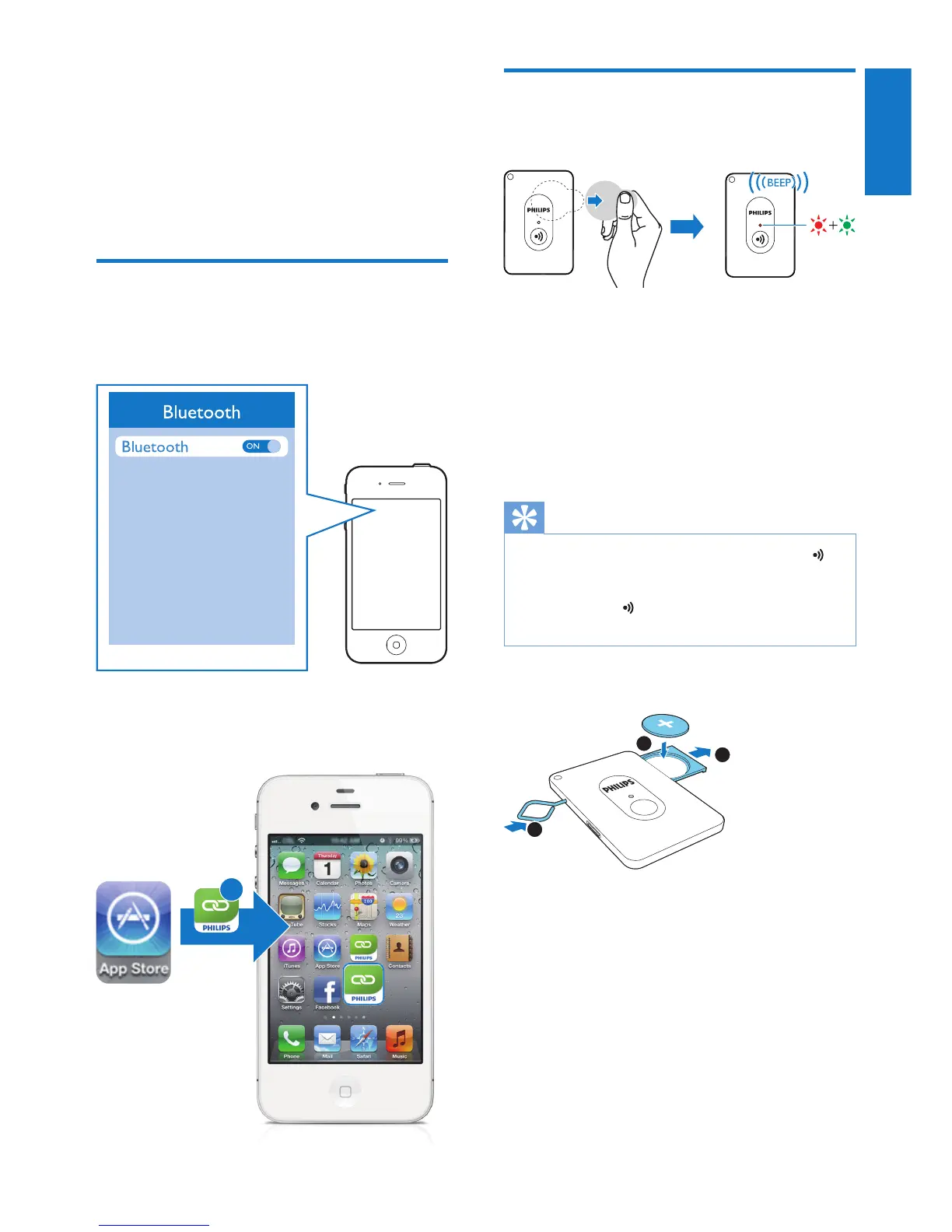
1 Enable Bluetooth on your iPhone 4S/New
iPad.
2 Download and install Philips InRange from
Apple App Store.
InRange
+
Prepare the InRange device
For rst-time use:
• Remove the plastic tab from the battery
compartment.
» The InRange device switches on
automatically.
» Thepowerindicatorashesredand
green alternately, and the InRange
device beeps.
Tip
• To switch off the InRange device, press and hold
for more than 3 seconds until the power indicator turns
off and the InRange device beeps. To switch on it again,
press and hold untilthepowerindicatorashes
red and green and the InRange device beeps.
To replace the battery:
1 Use the supplied metal pin to eject the
battery compartment.
2 Load a CR2016 cell battery with the
correct polarity as indicated.
3 Push to close the battery compartment.
1
2
3












 To Next Page