6EN
Note
• Batteries are not supplied with the accessories.
• bAt shows on the display when the battery level is low.
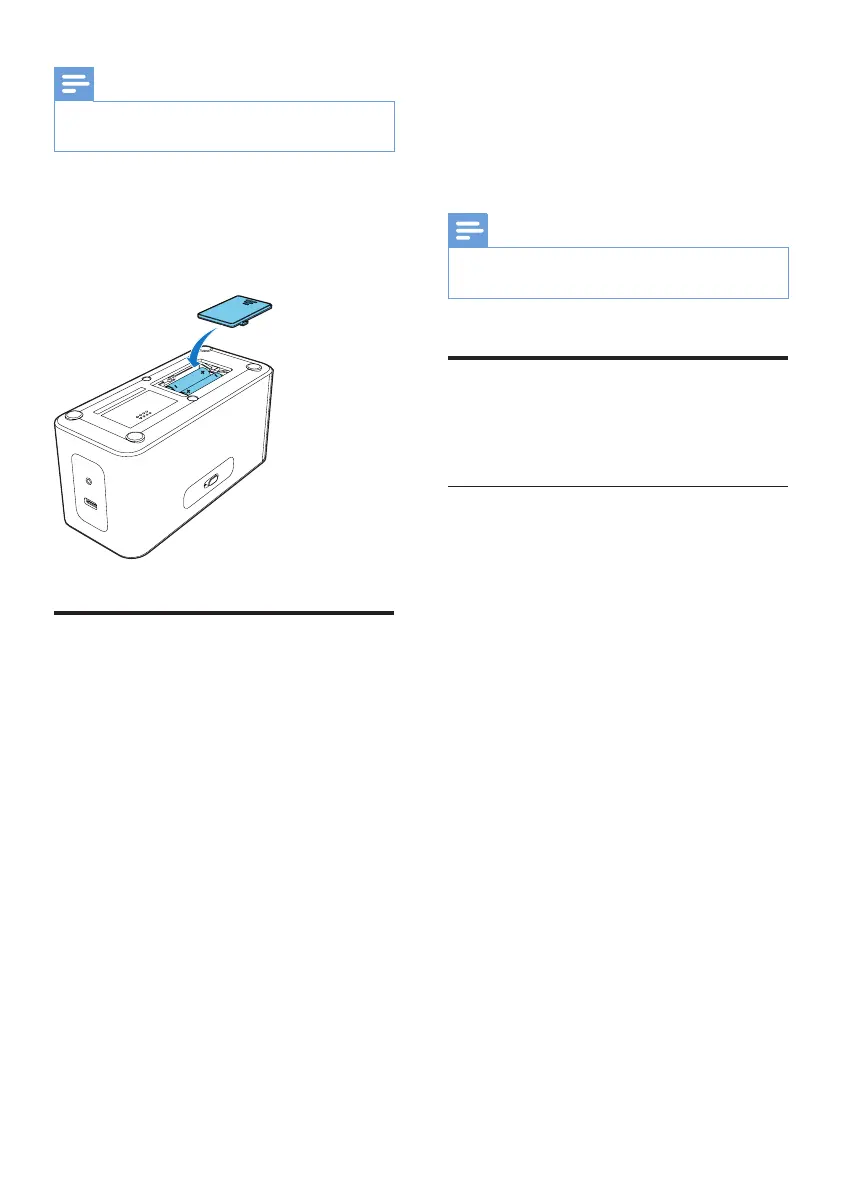
1 Open the battery compartment.
2 Insert 2 batteries (type: 1.5V LR6/AA) with
correct polarity (+/-) as indicated.
3 Close the battery compartment.
Set time
1 Rotate the Third Knob to "SET TIME" to
activate clock setting mode.
» Hour and minute digits blinks.
2 Rotate the First Knob to adjust the hour.
3 Rotate the Second Knob to adjust the
minute.
4 Press OK on the First Knobtoconrm.
» The setting time is displayed.
5 Rotate the Third Knob to CLOCK after
setting.
» The hour and minute digits stops
blinking.
Note
• When an iPod/iPhone is connected, the clock radio
synchronizes time from the iPod/iPhone automatically.
Turn on
The clock radio turns on automatically once
your plugged in.
Switch to standby mode
Press SOURCE for 3 seconds to switch to
standby mode.
» The source indicator on the display panel
turns off.



 To Next Page