22EN
Note
If the micro USB connector is located at the top, and
your are using Android system of version 2.3 or above,
screen auto-rotation is available.
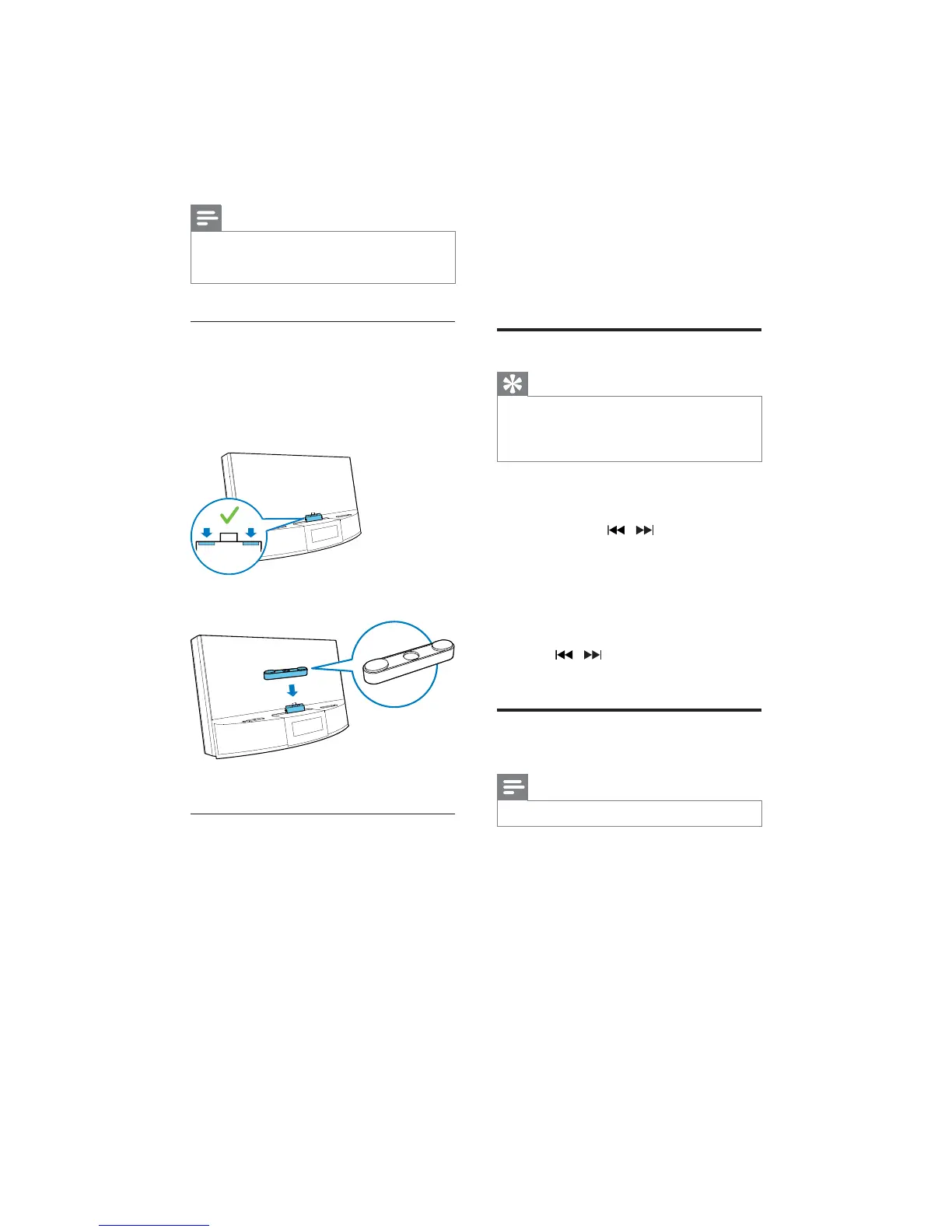
Use dock extension
If the USB connector on your phone is close
to the edge, the supplied dock extension can
balance the docked phone, as illustrated.
1 Adjust the slide knobs to make both
bumpers at the lowest position.
2 Place the dock extension onto the dock.
3 Dock your phone.
Charge Android-powered phone
When the docking system is connected to
power, the docked phone starts charging
automatically even in standby mode.
5 Listen to FM
radio
Tune to FM radio stations
Tip
Position the antenna as far as possible from TV, VCR, or
other radiation source.
For better reception, fully extend and adjust the
position of the antenna.
1 Press SOURCE repeatedly to select FM
tuner source.
2 Press and hold / for two seconds.
» The docking system tunes to a station
with strong reception automatically.
3 Repeat step 2 to tune to more radio
stations.
To tune to a station manually:
1 Press /
optimal reception.
Store FM radio stations
automatically
Note
You can store a maximum of 20 FM radio stations.
In tuner mode, press an hold PROG for two
seconds.
» The docking system stores all the available
available station automatically.



 To Next Page