13EN
» The audio comes out through the
docking speaker.
Dock and charge Android-
powered phone
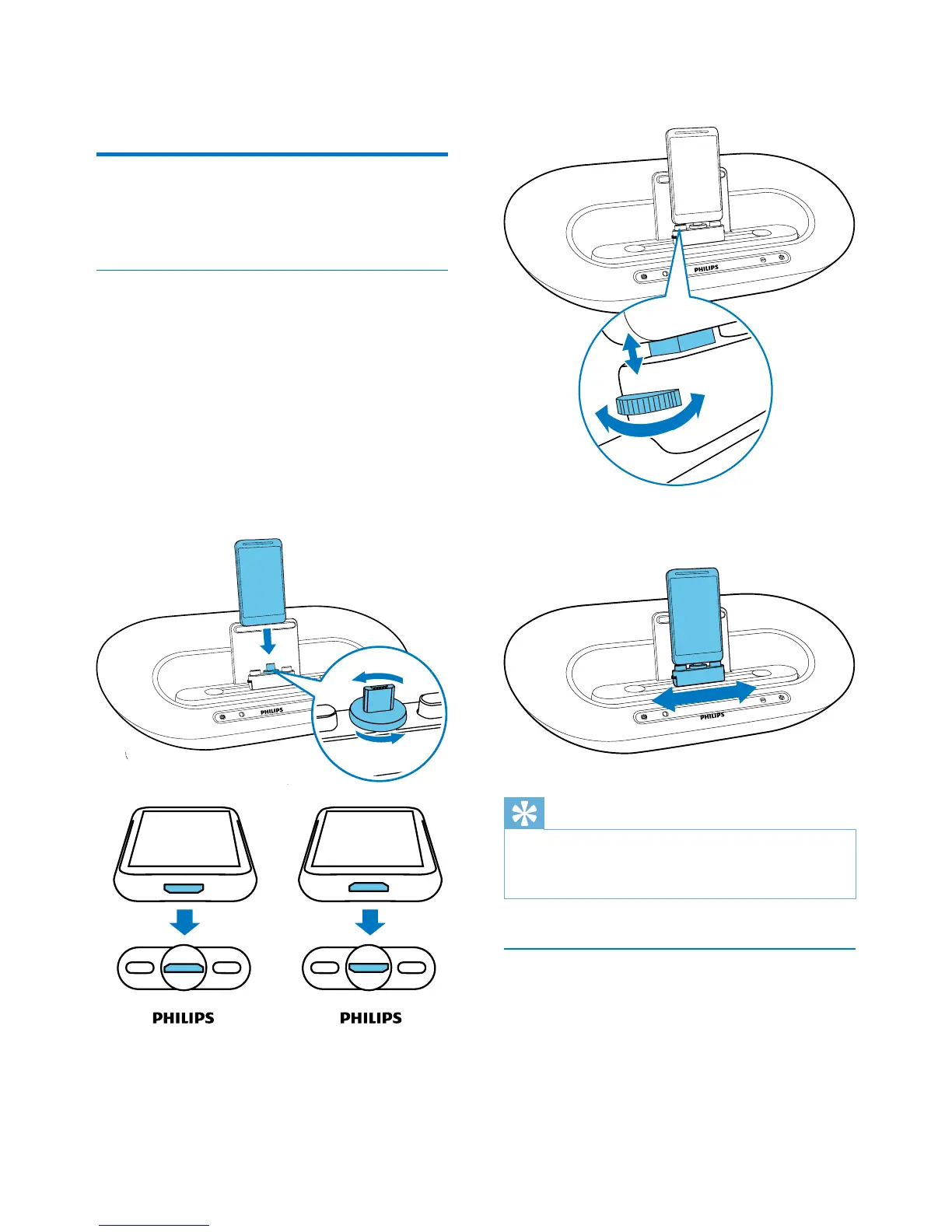
Dock Android-powered device
To charge your Android-powered phone, you
needtodockitinthedockingspeakerrst.
1 Check the orientation of the micro USB
connector on your Android-powered
phone. If your USB connector has a cover,
ipitoutwards.
2 If necessary, rotate the USB connector on
the docking speaker, and then place your
Android-powered phone onto the dock.
3 Adjust the bumpers on both sides of the
connector to stabilize the phone.
4 Slide the connector to place your phone in
the middle of the docking speaker.
Tip
•
If the micro USB connector is located at the top, and
your are using Android system of version 2.3 or above,
screen auto-rotation is available.
Use dock extension
If the USB connector on your phone is close
to the edge, the supplied dock extension can
balance the docked phone, as illustrated.
1 Adjust the slide knobs to make both
bumpers at the lowest position.
2 Place the dock extension onto the dock.



 To Next Page
 Loading...









