EasyManua.ls Logo

Philips AS660C/41 - Page 19

Philips AS660C/41
128 pages
Print Icon
To Next Page IconTo Next Page
To Previous Page IconTo Previous Page
Loading...
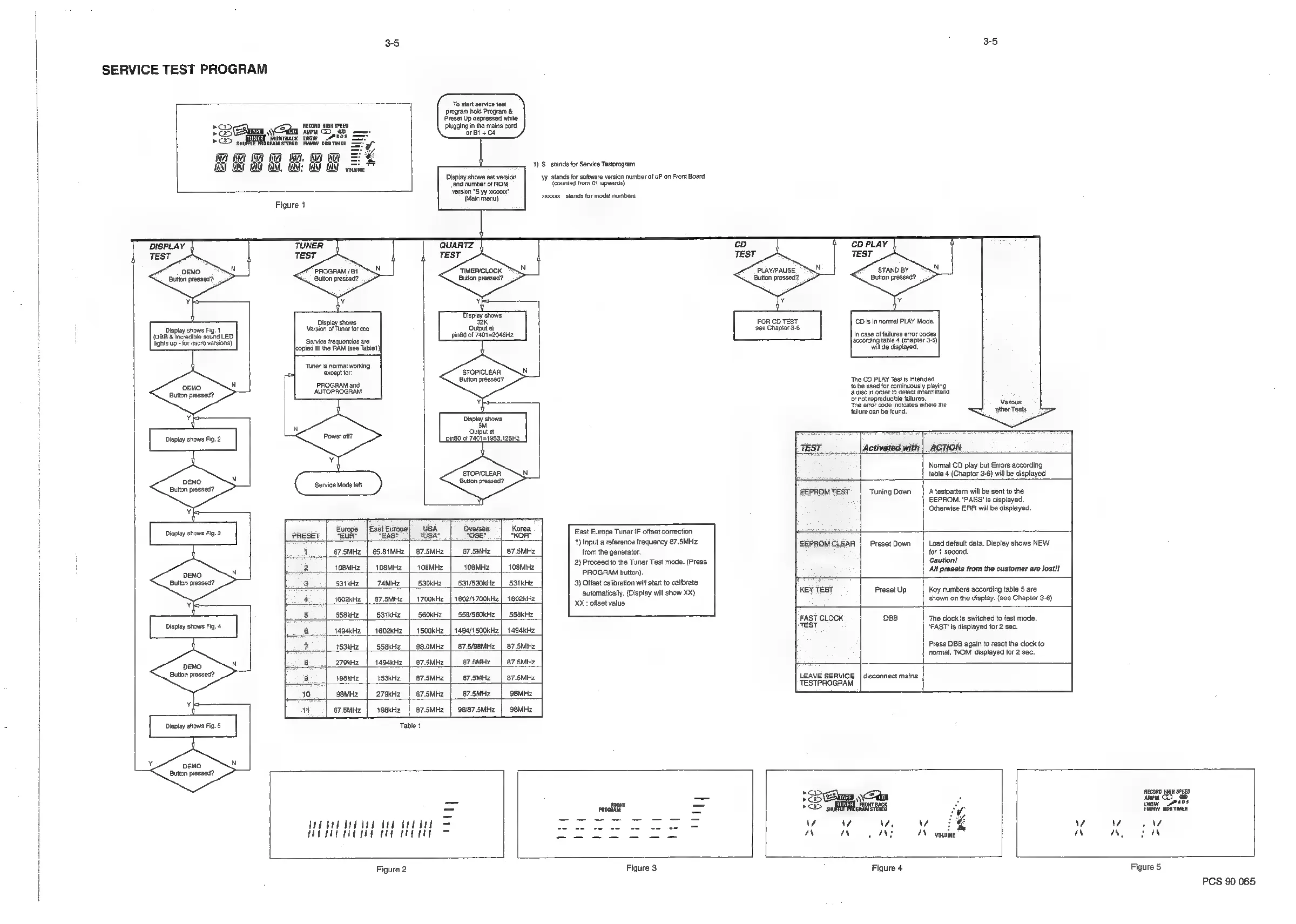
3-5
SERVICE
TEST
PROGRAM
To
sar
sono
ost
program
hold
Program
&
Frost
Up
dapreseed
who
Beis
suzanne
ren
plusggnte
main
cord
[Rehm
do
ws
—-
atin
>>
su
)GRAM
STEREO
FMMW
DBBTIMER
—~
Mi
wi
we
oo
ANT
ENT
TANT
TAN,
MAN!
WAN
voiuine”*
Dispiay
shows
set
version
‘and
number
of
ROM
version
°S
yy
xxG0%x"
(Main
menu)
Figure
1
DISPLAY
TEST
DEMO
Button
pressed?
PROGRAM
/Bt
Button
pressed?
TIMER/CLOCK
Button
pressed?
Display
shows:
VereDiplay
shows
one
at
Display
shows
Fi
sion
of
Tuner
for
eco
uiput
at
(088
&
Incredible
sound
LED
ping
of
7401=2048H2
Service
frequencies
are
lcopied
to
the
RAM
(see
Tablet)
lights
up
-
for
micro
versions)
‘Tuner
is
normal
working
‘except
for
STOPICLEAR
Button
pressed?
PROGRAM
and
Button
pressed?
Display
shows
aM
1)
S
stands
for
Service
Testprograin
Wy
stands
for
software
version
number
of
uP
on
Front
Board
(counted
from
01
upwards)
yoo
stands
for
model
numbers
‘STAND
BY
Button
pressed?
PLAY/PAUSE
Button
pressed?
3-5
FOR
CD
TEST
‘see
Chapter
3-6
will
de
displayed.
‘The
CD
PLAY
Testis
intend
to
be
used
for
continuously
playing
a
disc
in
order
to
detect
intermittend
oF
not
reproducible
failures.
‘The
error
code
indicates
win
failure
can
be
found.
(Dis
in
normal
PLAY
Mode.
In
case
of
failures
error
codes
according
table
4
(chapter
3-6)
fed
Various
other
Tests
yore
the
Output
at
Display
shows
Fig.2
ping0
of
7401=1953,125H2
If
TEST
Activated
with
|
ACTION
Normal
CD
play
but
Errors
according
'STOP/CLEAR
tabie
4
(Chapter
3-6)
willbe
displayed
DEMO
Button
pressed?
Euson
preset?
EEPROMTEST
|
TuningDown
|
Atestpattem
will
be
sent
to
the
EEPROM.
‘PASS
'is
displayed.
Otherwise
ERR
willbe
displayed.
Display
shows
Fig.
3
Beeeee
|.
Guee
jeep
EeOe
Ie
Buse
7’
Korea
East
Europe
Tuner
IF
offset
correction
1)
Input
a
reference
frequency
87.5MHz
EEPROMCLEAR
|
Preset
Down
|
Load
default
data.
Display
shows
NEW
i
87.5MHz_|
65.81MHz
|
87.5MHz
|
_67.5MHz_|
87.5MHz
from
the
generator.
for
1
second.
2)
Proceed
to
the
Tuner
Test
made.
(Press
Caution!
i
2
toeMHz
|
toeMHz
|
1oemHz
|
10aMHz
|
1oaMHz
PADaEAN
Baton
‘All
presets
from
the
customer
are
losti!
Button
pressed?
|
3
saikHz
|
74MHz
|
530kHz
|
531/S30kHz
|
S91kHz
3)
Offset
calibration
will
stat
to
calibrate
automatically.
(Display
will
show
XX
key
TEST
Preset
Up
|
Key
numbers
according
table
5
are
pea
seo2KHz
|
e7.sMiz
|
1700KH2
|
1602/1700KH2
|
1602KHz
PRR
aS
shown
on
the
display.
(see
Chapter
3-6)
XX
:
offset
value
5
Ssektiz
|
Stktz
|
S60kH2z
|
SSaS60KH2
|
SSBKH2
FAST
CLOCK
DBB
The
clock
is
switched
to
fast
mode.
Displéy
shown
Fin
6
1494KHz
|
1602kHz
|
1500kHz
|
1494/1500kKHz|
1494kHz
alt
‘FAST
Is
displayed
for
2
eec.
2
1sakH2
|
ssekHz
|
98.0mHz
|
87.5/9aMHz
|
87.5MHz
Press
DBB
again
to
reset
the
clock
to
normal,
‘NOM"
displayed
for
2
sec.
a
27okriz
|
1494kHz
|
87.5MHz
|
875MHz
|
87.5MHz
DEMO
2
Barton
praoeee)
3
igektz
|
1sokHz
|
e7.sMHz
|
_87.5MHz
|
87.SMHz
LEAVE
SERVICE
|
disconnect
mains
TESTPROGRAM
40
geMHz
|
279kHz
|
87.5MHz
|
87.SMHz
|
98MHz
LL
11
|
e7.smz
|
toakrz
|
e7.sMHz
|
98/67.5MHz
|
s8MHz
Table
1
4
econo
wig
sPeED
=
_
[Sens
Cea
acon
eh
SE
font
=
5S
Eetay
Mowrancx
iwsw
“se
hes
=
oct
=
EA
Fibra
SERED
Hit
06
men
bebe
ddd
ae
aed
aed
oe,
eee
ee
aes
Vv
vA
vv
Vv
Vv
Ws
MP
AC
TE
A
Ao
(as,
ee,
SS
nN
nN
pd
NS
4N-
vowme
nN
IN
IN
Figure
2
Figure
3
Figure
4
Figure
5
PCS
90
065

Related product manuals