EasyManua.ls Logo

Philips AS660C/41 - Page 20

Philips AS660C/41
128 pages
Print Icon
To Next Page IconTo Next Page
To Previous Page IconTo Previous Page
Loading...
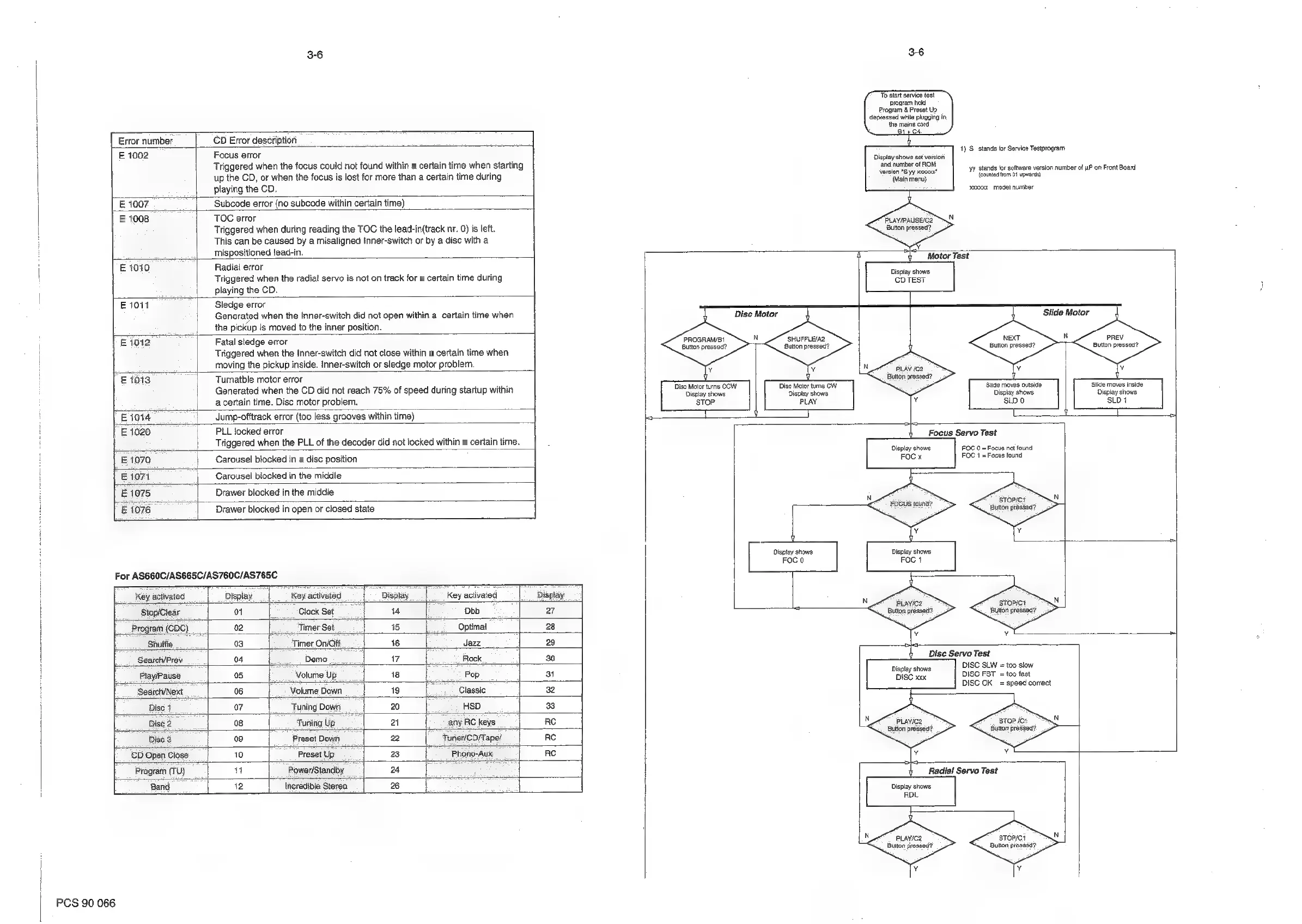
3-6
Error
number
CD
Error
description
E
1002
Focus
error
Triggered
when
the
focus
could
not
found
within
a
certain
time
when
starting
up
the
CD,
or
when
the
focus
is
lost
for
more
than
a
certain
time
during
playing
the
CD.
E
1007
Subcode
error
(no
subcode
within
certain
time)
E
1008
TOC
error
Triggered
when
during
reading
the
TOC
the
lead-in(track
nr.
0)
is
left.
This
can
be
caused
by
a
misaligned
Inner-switch
or
by
a
disc
with
a
mispositioned
lead-in.
E1010
Radial
error
Triggered
when
the
radial
servo
is
not
on
track
for
a
certain
time
during
playing
the
CD.
E1011
Sledge
error
Generated
when
the
Inner-switch
did
not
open
within
a
certain
time
when
the
pickup
is
moved
to
the
inner
position.
£1012
Fatal
sledge
error
Triggered
when
the
Inner-switch
did
not
close
within
a
certain
time
when
moving
the
pickup
inside.
Inner-switch
or
sledge
motor
problem.
E1013
Turnatble
motor
error
Generated
when
the
CD
did
not
reach
75%
of
speed
during
startup
within
acertain
time.
Disc
motor
problem.
E1014
Jump-offtrack
error
(too
less
grooves
within
time)
E
1020
PLL
locked
error
Triggered
when
the
PLL
of
the
decoder
did
not
locked
within
a
certain
time.
£1070
Carousel
blocked
in
a
disc
position
E1071
Carousel
blocked
in
the
middle
E1075
Drawer
blocked
in
the
middle
E
1076
Drawer
blocked
in
open
or
closed
state
For
AS660C/AS665C/AS760C/AS765C
To
start
service
test
program
hold
Program
&
Preset
Up
depressed
while
plugging
in
the
mains
cord
B14
C4.
1)
S
stands
for
Service
Testprogram
Display
shows
set
version
‘and
number
of
ROM
version
"S
yy
1000"
(Main
menu)
yy
stands
for
software
version
number
of
uP
on
Front
Board
(counted
from
04
upwards)
20000
model
number
PLAYIPAUSEIC2
Button
pressed?
PROGRAM/B1
Button
pressed?
‘SHUFFLE/A2
Button
pressed?
Disc
Motor
turns
COW
Display
shows
‘STOP
Disc
Motor
turns
CW
Display
shows:
PLAY
Key
activated
|
_Display
Key
activated
Display
Key
activated
|
__
Display
Stop/Clear
01
Clock
Set
14
Dbb
27
Program
(CDC)
02
Timer
Set
15
Optimal
28
Shuffle
03
Timer
On/Oft
16
Jazz
29
SearchPrev
04
Demo
17
Rock
30
Play/Pause
05
Volume
Up
18
Pop
31
Search/Next
06
Volume
Down
19
Classic
32
Disc
1
07
Tuning
Down
20
HSD
33
Dise
2
08
Tuning
Up
at
any
RC
keys
RC
Disc
3
09
Preset
Down
22
Tuner/CD/Tape/
RC
CD
Open
Close
10
Preset
Up
23
Phono-Aux
RC
Program
(TU)
1
Power/Standby
24
Band
12
incredible
Stereo
26
PCS
90
066
Motor
Test
NEXT
Ie
PREV
Button
pressed?
Button
pressed?
Button
pressed?
Slide
moves
outside
Display
shows
SLD
O
‘Slide
moves
inside
Display
shows
SLD
1
Focus
Servo
Test
FOC
0
=
Focus
not
found
FOC
1
=
Focus
found
sTorici
Button
pressed?
Display
shows
FOC
1
PLAYIC2
sTopict
Button
pressed?
Button
pressed?
Disc
Servo
Test
Diep
shows
DISC
SLW
=
too
slow
DISC
xxx
DISC
FST
=
too
fast
DISC
OK
=
speed
correct
PLAYIC2
Button
pressed?
stop
/c1
Button
pressed?
Radial
Servo
Test
Display
shows
RDL
PLayiC2
Button
pressed?
STOPICI
Button
pressed?

Related product manuals