EasyManua.ls Logo

Philips AX 2200 - User Manual

Philips AX 2200
22 pages
Print Icon
To Next Page IconTo Next Page
Loading...
PRODUCT FAMILY FOCUS – BASIC
Handling chip components ................................................1-1
Technical specification ......................................................2-1
Measuring setup................................................................2-1
Connections and controls..................................................2-2
Instruction for use.......................................................2-3..2-4
Accessories .......................................................................3-1
Service tools......................................................................3-1
Blockdiagram - Set ............................................................4-1
Block diagram - Intergrated Circuits...........................4-2..4-6
Circuit diagrams
Control part ...................................................................5-1
Supply / Servo part........................................................5-2
CD / Audio part..............................................................5-3
Layout diagrams
Componentside view.....................................................5-4
Copperside view............................................................5-5
Keyboard
Circuit diagram..............................................................6-1
Layout diagram .............................................................6-1
Exploded view ...................................................................7-1
Mechanical partslist...........................................................7-1
Electrical partslist...............................................................8-1
© 3140 785 32260
Published by YT 0251 Service Audio Printed in The Netherlands Subject to modification
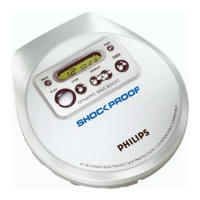
Portable Compact Disc Player
CLASS 1
LASER PRODUCT
AX2201
all versions
TABLE OF CONTENTS
©
Copyright 2001 Philips Consumer Electronics B.V. Eindhoven, The Netherlands
All rights reserved. No part of this publication may be reproduced, stored in a retrieval
system or transmitted, in any form or by any means, electronic, mechanical, photocopying,
or otherwise without the prior permission of Philips.
AX2200
Question and Answer IconNeed help?

Do you have a question about the Philips AX 2200 and is the answer not in the manual?

Overview

This document is a service manual for the Philips Portable Compact Disc Player, models AX2200 and AX2201. It provides comprehensive information for servicing and maintaining these devices.

Function Description

The Philips Portable Compact Disc Player is designed for playing audio compact discs. It supports standard CD-DA (Compact Disc Digital Audio) format discs and CD-R/RW (CD-Recordable/ReWritable) discs. The device features an Electronic Skip Protection (ESP) system to prevent interruptions during playback caused by vibrations or shocks. It offers various playback modes including normal play, program play (up to 30 tracks), shuffle (random play), and repeat (single track, all tracks, or program). The player includes a Dynamic Bass Boost (DBB) function for enhanced bass sound and volume adjustment. It can be powered by internal batteries (normal carbon or rechargeable) or an external 4.5V DC power supply. An audio line-out/headphone jack allows connection to headphones or an external audio system.

Important Technical Specifications

General:

  • Dimensions (WxHxD): 128x31x141 mm
  • Weight without batteries: 205 g

Power Supply Modes:

  • DC-in socket: 2.5 - 6.0V
  • Primary batteries (2xLR6): 1.8 - 3.6V
  • Rechargeable batteries: 1.8 - 3.6V

Battery Lifetime (approximate):

  • Normal Carbon batteries (2 x R6): ≥ 4h (6h typ.)
  • Rechargeable batteries (2 x LR6): ≥ 8h (18h typ.)

Battery Level Detection:

  • Battery empty: 1.9V nom. +100/-100 mV

Current Consumption (CDDA-playback):

  • Operation Mode (DC-in Supply 4.5V): Play-mode: 130mA typ.; Jump-mode: 160mA typ.; Stand-by: n.a.
  • Operation Mode (Batt. Supply 2.28V): Play-mode: 160mA typ.; Jump-mode: 200mA typ.; Stand-by: n.a.

Shock Resistance:

  • +X/-X direction: ≥ 5 g
  • +Y/-Y direction: ≥ 5 g
  • +Z/-Z direction: ≥ 5 to 10 g

Headphone Out (measured with 16Ω load, DBB/ESP off):

  • Output power (THD=10%): 2x4.5mW (+1/-3dB)
  • Frequency response (1mW): 100Hz-20kHz (within 6dB)
  • S/N ratio (A-wght): ≥ 80dB (84dB typ.)
  • S/N ratio (A-wght): ≥ 82dB (84dB typ.)
  • THD (1kHz, 1mW): ≤ 0.1% (0.05% typ.)
  • Channel crosstalk (1kHz, no load): ≤ 33dB (33dB typ.)
  • Channel unbalance (-40dB): ≤ 4dB
  • Volume attenuation (1kHz): ≥ 50dB

Dynamic Bass Boost DBB:

  • DBB Stage (63Hz): +5dB ±2dB
  • DBB Stage (1kHz): 0dB ±2dB
  • DBB Stage (10kHz): 0dB ±2dB

Laser:

  • Output power: <5mW (3mW typ.)
  • Wavelength: 780nm

Usage Features

Powering the Device: The player can be powered by two AA/UM3 alkaline or Philips rechargeable batteries, or via a 4.5V DC power adapter (Philips AY 3170/00 or AY 3170/05). When using the AC/DC adapter, ensure the correct voltage and polarity. Always remove batteries if they are empty or if the player is not going to be used for an extended period.

Inserting Batteries:

  1. Push the OPEN button to open the CD lid.
  2. Open the battery compartment and insert two AA/UM3 batteries, ensuring correct polarity.
  3. Close the battery compartment and the CD lid.

Battery Indication: The approximate power level of your batteries is shown by icons on the display:

  • Full battery: Battery one-third full
  • Half battery: Battery two-thirds full
  • Low battery: Battery one-third full
  • Empty battery: Battery dead or empty. When the batteries are dead or empty, the symbol flashes, and the beep tone sounds repeatedly.

Loading a CD:

  1. Push the OPEN button to open the CD lid.
  2. Insert an audio CD, printed side up, by pressing the CD onto the hub.
  3. Close the CD lid.

Basic Playback Controls:

  • PLAY/PAUSE (►II): Press to start or pause playback.
  • STOP (■): Press to stop playback.
  • NEXT (►►I): Press to skip to the next track. Press and hold to fast forward.
  • PREVIOUS (I◄◄): Press to skip to the beginning of the current track. Press again to skip to the previous track. Press and hold to fast reverse.
  • DBB: Press to switch the bass enhancement on or off.
  • VOLUME (VOL): Adjust the volume using the rotary control.

Playback Modes:

  • PROGRAM (PROG): Allows programming up to 30 tracks in a specific order.
  • MODE: Selects different playback possibilities: SHUFFLE (random play), SHUFFLE REPEAT ALL, REPEAT (repeats current track), REPEAT ALL (repeats all tracks), and S.C.R.T (Smart Control Repeat).
  • ESP (Electronic Skip Protection): The ESP system is automatically activated to prevent interruptions during playback. It is recommended to keep ESP on for optimal performance.

Hold Function: The HOLD switch (located on the side of the player) locks all buttons to prevent accidental activation. To activate, slide the switch to HOLD. To deactivate, slide it to OFF.

Headphone Use: Connect headphones to the LINE OUT/? jack. The player is compatible with headphones with a 3.5mm stereo jack.

Safety Precautions:

  • Do not expose the device to rain or moisture.
  • Avoid direct exposure to the laser beam.
  • Do not use the device in extremely hot, cold, dusty, or humid environments.
  • Do not use cleaning agents containing alcohol, benzene, or thinners.
  • Do not leave the device in a car parked in direct sunlight as high temperatures can damage the CD.

Maintenance Features

Cleaning the Device:

  • CDs: Use a soft, lint-free cloth to clean CDs. Wipe from the center outwards. Do not use cleaning agents that can damage the disc.
  • Device Exterior: Use a soft, slightly damp cloth to clean the exterior. Do not use abrasive cleaners or solvents.
  • CD Lens: If the CD lens is dirty, use a Philips CD lens cleaner or a blower brush to remove dust. Do not touch the lens with your fingers.

Troubleshooting: The manual provides a troubleshooting section for common issues:

  • CD player has no power, or playback does not start: Check batteries, power adapter connection, and ensure the CD is inserted correctly and clean.
  • The indication 'no dISC' is displayed: Ensure a CD is inserted.
  • The indication 'nF dISC' is displayed: The CD is not finalized (CD-R/RW).
  • The indication 'Hdd' is on and/or there is no reaction to controls: The HOLD function is activated. Deactivate it.
  • CD skips tracks: The CD is damaged or dirty. Replace or clean the CD. If ESP is active, switch it off and on again.
  • No sound or bad sound quality: Check headphone connection, volume level, and ensure the player's position is stable.

ESD Protection Equipment: The manual lists specific Philips part numbers for ESD protection equipment, including:

  • Anti-static table mat (large and small)
  • Anti-static wristband
  • Connection box
  • Extendible cable
  • Earth cable
  • KIT ESD3 (combining all 6 prior products)
  • Wristband tester

Service Tools: The manual also lists specific Philips part numbers for service tools such as:

  • Audio signal disc SBC 429
  • Playability test disc SBC 444
  • Test disc 5 (disc without errors)
  • Test disc 5A (disc with dropout errors, black spots and fingerprints)
  • Burn in test disc (55 min. 1kHz signal at -30 dB level without "pause")
  • Universal test cassette Fe SBC 420

Environmental Information: Philips emphasizes environmental responsibility. The device's packaging materials are recyclable, and the product itself contains materials that can be recycled if disassembled by a specialized company. Users are encouraged to dispose of packaging materials, exhausted batteries, and old equipment according to local regulations.

Philips AX 2200 Specifications

General IconGeneral
BrandPhilips
ModelAX 2200
CategoryPortable cd player
LanguageEnglish