6
English
AZ 1030 /17 page 6
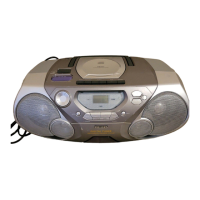
CONTROLS
BASIC FUNCTIONS
1 POWER:
CD, TAPE, BAND
....selects the sound source
2 DBB.......................enhances the bass
3 VOLUME ...............adjusts the volume level
4 p...........................3.5 mm headphone socket
(back of the set)
Note: Connecting the headphones will switch
off the speakers.
5 CASSETTE RECORDER
PAUSE ; ...............pauses recording or
playback
OPEN·STOP /9..stops the tape and opens
the cassette compartment
SEARCH 6 ..........rewinds the tape
SEARCH 5 ..........fast forwards the tape
PLAY 1 .................starts playback
RECORD 0............starts recording
RADIO
6 TUNING ................tunes to radio stations
1 BAND: FM, AM ....selects the wave band
7 CD PLAYER
/ OPEN ................opens the CD
compartment
9...........................stops CD play and erases
the program
2; .........................starts and pauses CD play
§ .........................skips and searches
forward
∞ .........................skips and searches
backward
CD MODE..............selects the different CD
playing modes and
programs tracks
8 Display
AM/FM
53
63
FM
1
03
105
107
B
A
S
S
R
E
F
L
E
X
B
A
S
S
R
E
F
L
E
X
BASS REFLEX SPEAKER SYSTEM
-
V
O
L
U
M
E
+
PLAY
RECORD
SEARCH
PAU S E
STOP
OPEN•CLOSE
CD RADIO CLASSETTE RECORDING
AZ1030
SHUFFLE
PROGRAM
PLAY
RECORD
SEARCH
PAU S E
OPEN•STOP
STOP
PLAY •
PAUSE
•
•
•
S
E
A
R
C
H
CD MODE
S
E
A
R
C
H
•
•
•
4
7
8
5
6
1
3 2
AZ1030/17 eng usa 8/11/00 8:44 AM Page 6



 To Next Page