Need help?
Do you have a question about the Philips AZ1880 and is the answer not in the manual?
Instructions for removing the rear cabinet cover and screws to access internal components.
Steps for removing screws to detach the Display Board, Control Plate, and Main Board.
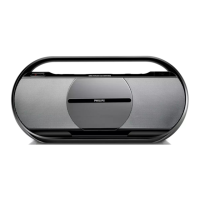
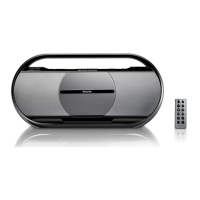
The Philips AZ1880 is a compact USB CD Soundmachine designed for portable audio playback, offering a blend of traditional CD functionality with modern digital media compatibility. Its primary function is to provide versatile audio entertainment, allowing users to enjoy music from various sources in a convenient and portable format.
The core function of the AZ1880 is to play audio. It supports traditional audio CDs, allowing users to listen to their favorite albums and tracks in the classic disc format. Beyond standard CDs, it boasts MP3-CD playback capability, significantly expanding the amount of music that can be stored on a single disc. This feature is particularly useful for users who have extensive digital music libraries and prefer to burn them onto CDs for playback.
A key modern feature is its USB connectivity. This allows users to connect USB flash drives or other compatible USB storage devices directly to the soundmachine and play MP3 or WMA audio files stored on them. This provides a convenient way to access digital music without needing to burn CDs, making it highly adaptable to contemporary music consumption habits. The device is explicitly stated to play Windows™ Media™ files, indicating compatibility with WMA audio formats, which are common for digitally purchased or ripped music.
The AZ1880 also includes a built-in FM/AM radio tuner, enabling users to listen to their preferred radio stations. This adds another layer of versatility, providing access to live broadcasts, news, and a wide range of music genres available on the airwaves. The presence of an antenna suggests a focus on clear radio reception.
For private listening, the soundmachine is equipped with a headphone jack, allowing users to connect headphones and enjoy their music without disturbing others. This is a standard but essential feature for personal audio devices.
The device is powered by an AC adapter, ensuring continuous playback when connected to a power outlet. Additionally, it supports battery operation, making it truly portable and suitable for use in various locations, both indoors and outdoors, where a power source might not be readily available. This dual power option enhances its flexibility and user convenience.
The AZ1880 is designed for straightforward and intuitive use. The front panel features a clear LCD display that provides information such as track number, elapsed time, radio frequency, and playback mode. This display is crucial for navigating through tracks, tuning radio stations, and understanding the device's current status.
Control buttons are logically arranged on the device for easy access to common functions. These include standard playback controls like Play/Pause, Stop, Fast Forward, and Rewind, essential for managing CD and USB playback. Dedicated buttons for program and repeat functions allow users to customize their listening experience, creating playlists or repeating favorite tracks or albums.
The radio tuner includes controls for tuning to different stations, likely with options for manual tuning and possibly preset stations for quick access to frequently listened-to broadcasts. The presence of an FM/AM antenna suggests that users can adjust its position for optimal signal reception, enhancing the quality of radio playback.
Volume control is typically managed via dedicated buttons or a rotary knob, allowing users to adjust the audio output to their desired level. The inclusion of a DBB (Dynamic Bass Boost) feature suggests an option to enhance bass frequencies, providing a richer and more impactful sound experience, especially for music genres that benefit from strong bass.
The USB input is clearly marked, indicating easy access for connecting USB storage devices. The device's ability to play MP3 and WMA files from USB simplifies the process of enjoying digital music collections.
The overall design emphasizes portability, with a compact form factor and a handle for easy carrying. This makes it an ideal companion for various activities, from relaxing at home to outdoor gatherings or travel.
Maintaining the AZ1880 involves several simple steps to ensure its longevity and optimal performance.
For the CD player, regular cleaning of the disc tray and the laser lens is important to prevent dust and debris from affecting playback quality. Users should handle CDs carefully, avoiding scratches and smudges, and store them in their cases when not in use. The device's internal CD mechanism, including the spindle and motor, is designed for reliable operation, but gentle handling of the CD door is always recommended.
The USB port should be kept free of dust and foreign objects to ensure proper connectivity with USB devices. Users should insert and remove USB drives carefully to avoid damaging the port.
The exterior of the soundmachine can be cleaned with a soft, dry cloth to remove dust and fingerprints. Avoid using abrasive cleaners or solvents, as these can damage the plastic casing and display.
For battery operation, users should ensure that the correct type and number of batteries are installed according to the manufacturer's recommendations. If the device is not going to be used for an extended period, removing the batteries can prevent leakage and potential damage. When using the AC adapter, ensure it is properly connected to a power outlet and the device, and avoid placing heavy objects on the power cord.
The display, being a key interface, should be protected from scratches and impacts. If the display becomes dirty, it can be gently wiped with a soft, lint-free cloth.
In case of any operational issues, the manual provides a disassembly diagram, which, while primarily for service technicians, indicates the modular nature of the internal components. This suggests that specific parts, such as the main board, display board, or jack board, can be accessed and potentially replaced by qualified personnel if necessary. The service parts list further supports this, detailing components like the CD mechanism, speakers, and remote control, which are available for replacement. This modularity is a maintenance feature that allows for targeted repairs rather than requiring a full device replacement for certain failures.
Overall, the Philips AZ1880 is a user-friendly and versatile soundmachine designed for enjoyable audio experiences with minimal maintenance requirements, focusing on ease of use and portability.
 General
| Display type | LCD |
|---|---|
| Display digits | 6 digits |
| Backlight display | Yes |
| Battery type | LR14 |
| Battery voltage | 1.5 V |
| Power requirements | 220 - 240 V |
| Number of batteries supported | 6 |
| Supported radio bands | FM |
| RMS rated power | 5 W |
| Media types supported | CD, CD-R, CD-RW, MP3-CD, WMA-CD |
| Package depth | 159 mm |
| Package width | 561 mm |
| Package height | 275 mm |
| Package weight | 3500 g |
| Device type | Portable CD player |
| Product color | Black, Grey |
| Preset stations quantity | 40 |
| Headphone outputs | 1 |
| Headphone connectivity | 3.5 mm |
| USB 2.0 ports quantity | USB 2.0 ports have a data transmission speed of 480 Mbps, and are backwards compatible with USB 1.1 ports. You can connect all kinds of peripheral devices to them. |
| Audio system | stereo |
| Audio formats supported | MP3, WMA |
| Dimensions (WxDxH) | 451 x 132 x 214 mm |
 Weight and Dimensions
| Weight | 2850 g |
|---|

 To Next Page