8EN
4 Play
Play a CD
Note
• You cannot play CDs encoded with copyright
protection technologies.
• When an audio-in cable is plugged, CD/USB playback
stops, and the unit switches to audio in mode
automatically.
You can play commercially available audio CDs:
• CD-Recordables(CD-R)
• CD-Rewritables(CD-RW)
• MP3-CDs
1 Switch the source selector to CD.
2 Open the CD compartment.
3 Insert a CD with the printed side facing up
and close the CD lid gently.
» The total number of tracks displays.
» Your CD sound machine starts to play
automatically.
• To select a track,press / .
• To pause CD play, press .
» [ ]ashes.
• To resume CD play, press again.
• To stop CD play, press .
CD
USB/SD
FM
TAPE/OFF
AUDIO IN
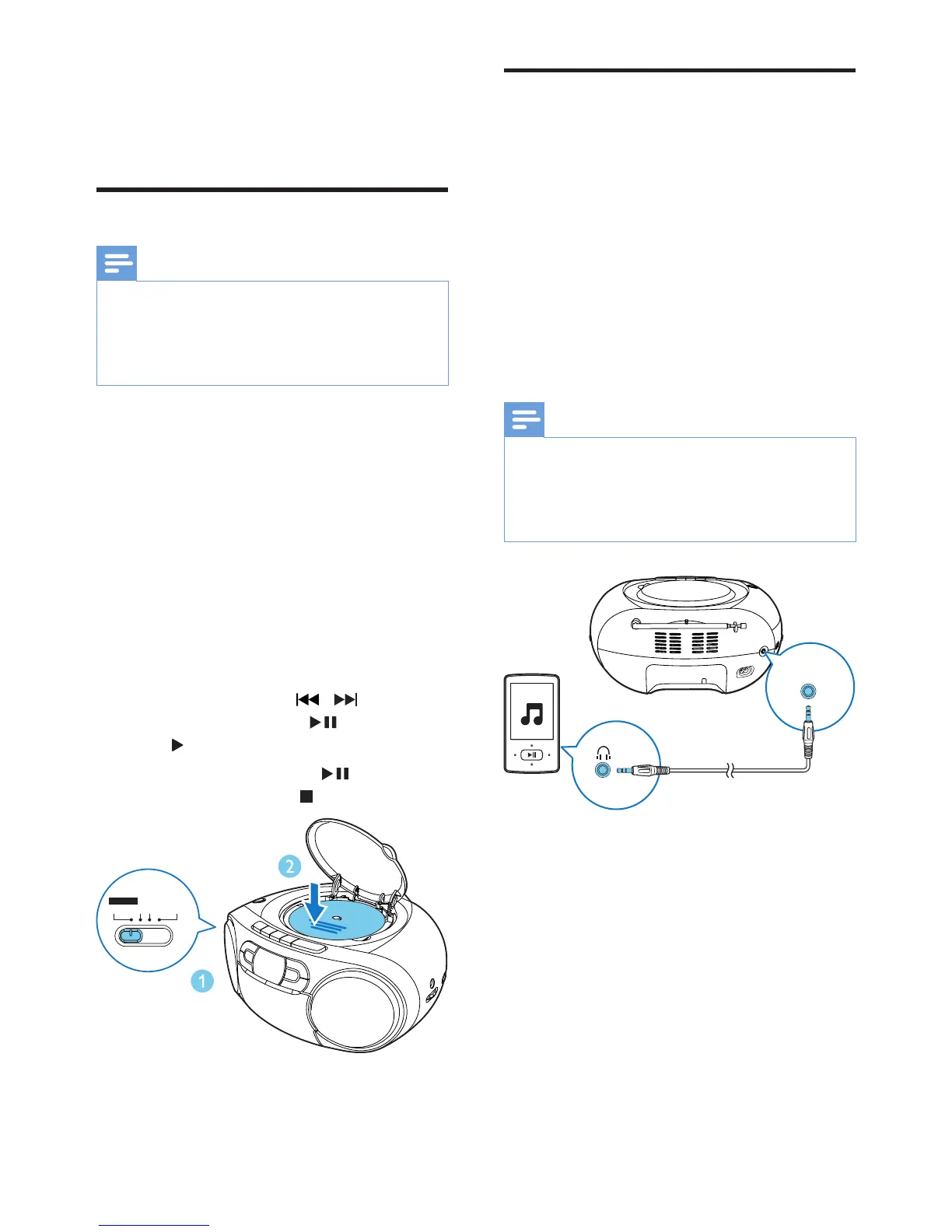
Play from an external device
You can also listen to an external audio device
through this unit.
1 Connect an audio cable (3.5mm, not
supplied)to:
• the AUDIO-IN socket on the unit.
• the headphone socket on an external
device.
» "Au" shows on the display.
2 Play the external device (see the device's
usermanual).
Note
• The AUDIO-IN socket is not for headphones.
• The display panel lights off when the unit plays from the
external device.
• The unit switches to Audio in mode automatically when
it plays under CD or SD/USB mode.
AUDIO-IN


 To Next Page