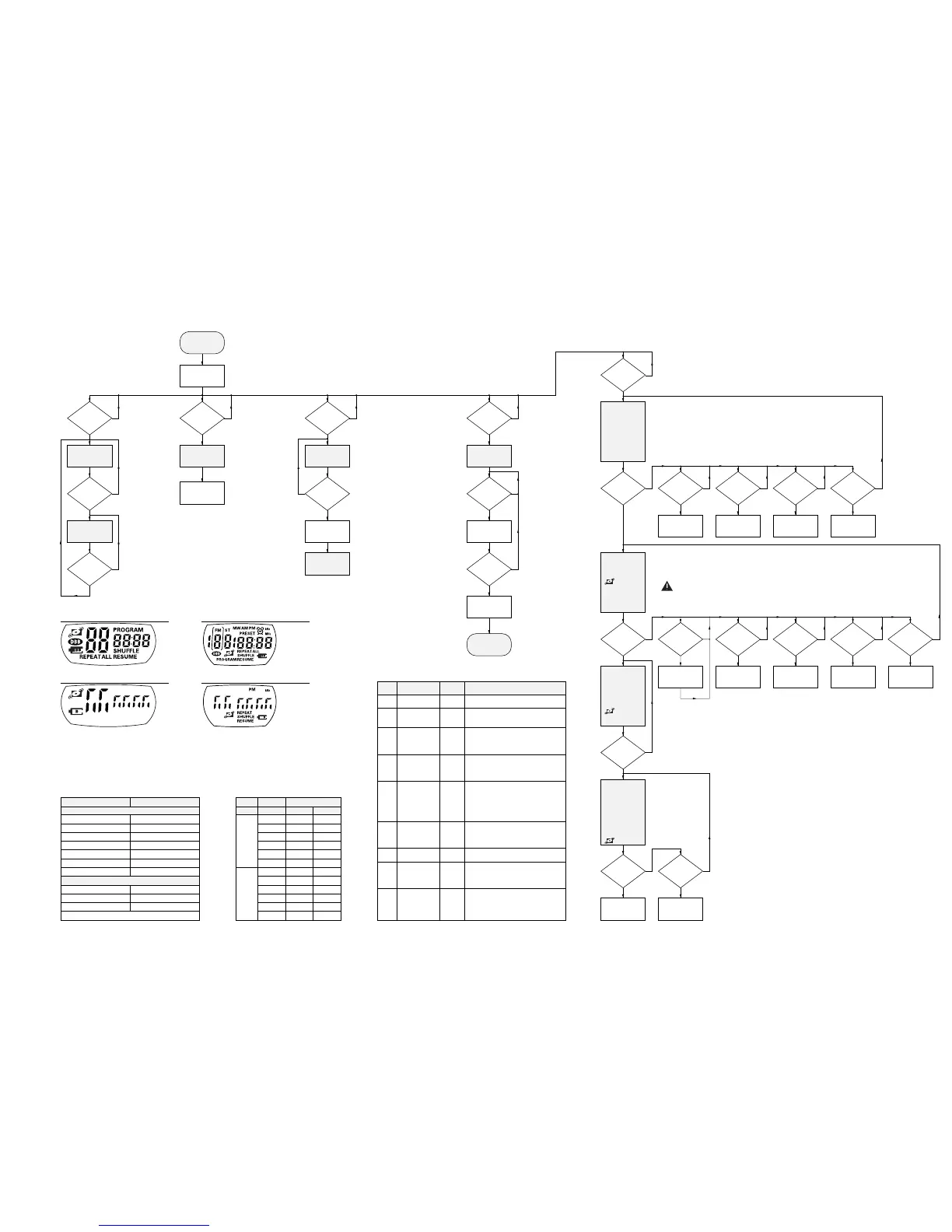
table1 – key test
DISPLAY SET
1
2
3
5
6
7
8
4 rc
5 rc
6 rc
KEYS OF SET
DBB
PROGRAM
MODE
PLAY
NEXT
PREVIOUS
ESP (not for AZ7902)
KEYS OF CORD REMOTE CONTROL
STOP
PLAY
NEXT
Press “STOP” on the CD-player to exit the key test.
table2 – Tuner service frequencies
PRESET
1
2
3
4
5
6
1
2
3
4
5
6
EUROPE
87.5MHz
108MHz
98MHz
–
–
–
531kHz
1602kHz
558kHz
1494kHz
–
–
USA
87.5MHz
108MHz
98MHz
–
–
–
530kHz
1700kHz
560kHz
1500kHz
–
–
FREQUENCYBAND
FM 1
AM
PRELIMINARY
SETUP
Display shows
software-version
(e.g. “S-
13”)
DISPLAY TEST 1
display shows
test pattern 1
DISPLAY TEST 2
display shows
test pattern 2
KEY TEST
Display shows
“--”
To enter service test program open the CD-door and
hold “PREVIOUS” & “STOP” buttons depressed while
turning POWER ON (i.e. connecting the AC/DC adaptor)
Playback test can only
be entered if CD-door
is closed!
Tuner version can be toggled
by pressing buttons other than
“RADIO” and “STOP”.
CUE-MODE
Track servo jumps
16 tracks forwards
“NEXT”
pressed?
“MODE”
pressed?
“RADIO”
pressed?
“PLAY”
pressed?
“PLAY”
pressed?
“RADIO”
pressed ?
“PLAY”
pressed and
focus OK?
“PLAY”
and focus OK
and speed
OK?
“NEXT”
depressed?
REVIEW-MODE
Track servo jumps
16 tracks backw.
Load Service
preset frequ.
(see table2)
Slide moves
outside
Slide moves
inside until inner
switch is activated
“NEXT”
depressed?
“NEXT”
pressed?
“NEXT”
pressed?
“PREV”
depressed?
“MODE”
depressed?
“PROG”
depressed?
Hold key depressed
and check display
according to table1
MAIN MENU
N
Y
N
Y
N
Y
N
Y
N
Y
N
Y
N
Y
N
Y
N
Y
N
Y
N
Y
N
Y
N
Y
N
Y
N
Y
N
Y
Toggle play mode
betw. “
normal
” and
“
CD-RW compatible
”
“DBB”
pressed?
N
Y
EXIT
SERVICE TEST
PROGRAM
“DBB”
pressed?
Error during
playback?
Fatal error?
Display shows
error-code
(see table3)
PLAYBACK
TEST
Tuner in normal
play-mode
Stop playback
N
Y
N
Y
N
Y
CODE
E 1000
E 1001
E 1002
E 1003
E 1004
E 1005
E 1006
E 1008
E 1020
ERROR
focus error
radial error
sledge in error
sledge out error
DRAM filling
error
jump error
subcode error
turntable motor
error
focus search
error
TYPE
non fatal
non fatal
non fatal
non fatal
non fatal
non fatal
non fatal
fatal
fatal
CAUSE
Focus point lost for at least 3ms.
The radial servo was offtrack for a
certain amount of time.
The slide did not reach it´s inner pos.
(inner switch of CD-drive doesn´t close)
within approx. 6 seconds.
The slide did not come out of it´s inner
pos. (inner switch of CD-drive is open)
within approx. 250ms.
The DRAM controller was not able to
connect two consecutive audio frames.
The microcontroller had to perform a
direct audio connection that produces
audible clicks.
The offtrack values don´t decrease
properly when jumping tracks, the jump
destination could not be found.
No valid subcode for approx. 230ms.
During start-up, the disc speed did not
reach 75% of the nom. speed within
approx. 6 seconds.
The focus point could not be found
within approx.
10 seconds (no valid TOC info), resp.
30 seconds (valid TOC info).
table3 – playback error analysis
Disc motor turns
clockwise
(accelerate)
Disc motor turns
counter-clockwise
(brake)
Slide moves
outside
Slide moves
inside
“NEXT”
depressed?
“PREV”
depressed?
“MODE”
depressed?
“PROG”
depressed?
N
Y
N
Y
N
Y
N
Y
Disc motor turns
clockwise
(accelerate)
Disc motor turns
counter-clockwise
(brake)
ATTENTION: FROM THIS TEST ONWARDS THE
LASER IS SWITCHED ON !!
→ AVOID DIRECT EXPOSURE TO BEAM !!
test pattern 1 (all segments activated)
“PREV”
depressed?
RADIAL TEST
• On track status
“ r” = on track
“-r” = not on track
• Disc speed status
“ d” = speed OK
“-d” = speed error
• Focus status
“ F” = focus OK
“-F” = focus error
=
CD-RW
mode
DISC MOT. TEST
• Disc speed status
“ d” = speed OK
“-d” = speed error
• Focus status
“ F” = focus OK
“-F” = focus error
=
CD-RW
mode
FOCUS TEST
• Focus status
“ F” = focus OK
“-F” = focus error
=
CD-RW
mode
Note: If focus has
been lost, focus
start-up procedure
is entered (ramping).
SERVO TEST
Display shows:
“S
xy”
• State of switches
x = door switch
y = inner switch
“0” = closed
“1” = open
test pattern 2 (alternate segments activated)
test pattern 1 (all segments activated)
TUNER TEST
Display shows
Tuner version
test pattern 2 (alternate segments activated)



 To Next Page