18 EN
Stream media from an
Android device
With Philips SimplyShare, through this player
you can stream media les from an Android
based device on your TV. For details, visit
www.philips.com/support.
3 Change settings
This section helps you change the settings of
this player.
Note
• You cannot change a menu option that is grayed out.
• To return to the previous menu, press . To exit the
menu, press .
Picture
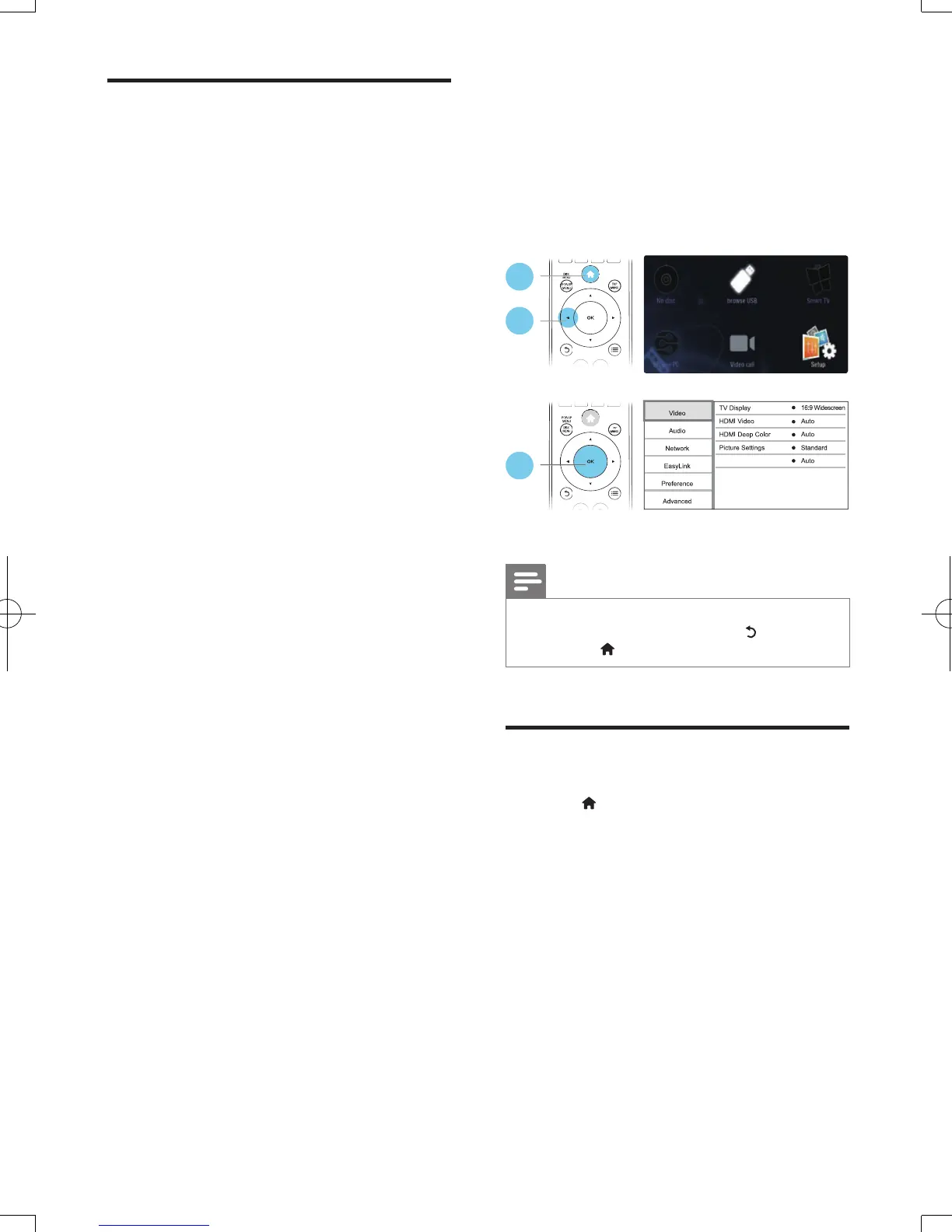
1 Press .
2 Select [Setup] > [Video] to access the
video setup options.
• [TV display]: Select a picture display
format to t the TV screen.
• [HDMI video]: Select an HDMI video
resolution.
• [HDMI Deep Color]: Display colors
with more shades and hues when the
video content is recorded in Deep
Color and the TV supports this feature.
• [Picture settings]: Select a predened
color setting.
1
2
3
Watch 3D video
BDP5500_98_UM_V2.0.indb 18 2012/6/14 14:14:44



 To Next Page