4 EN
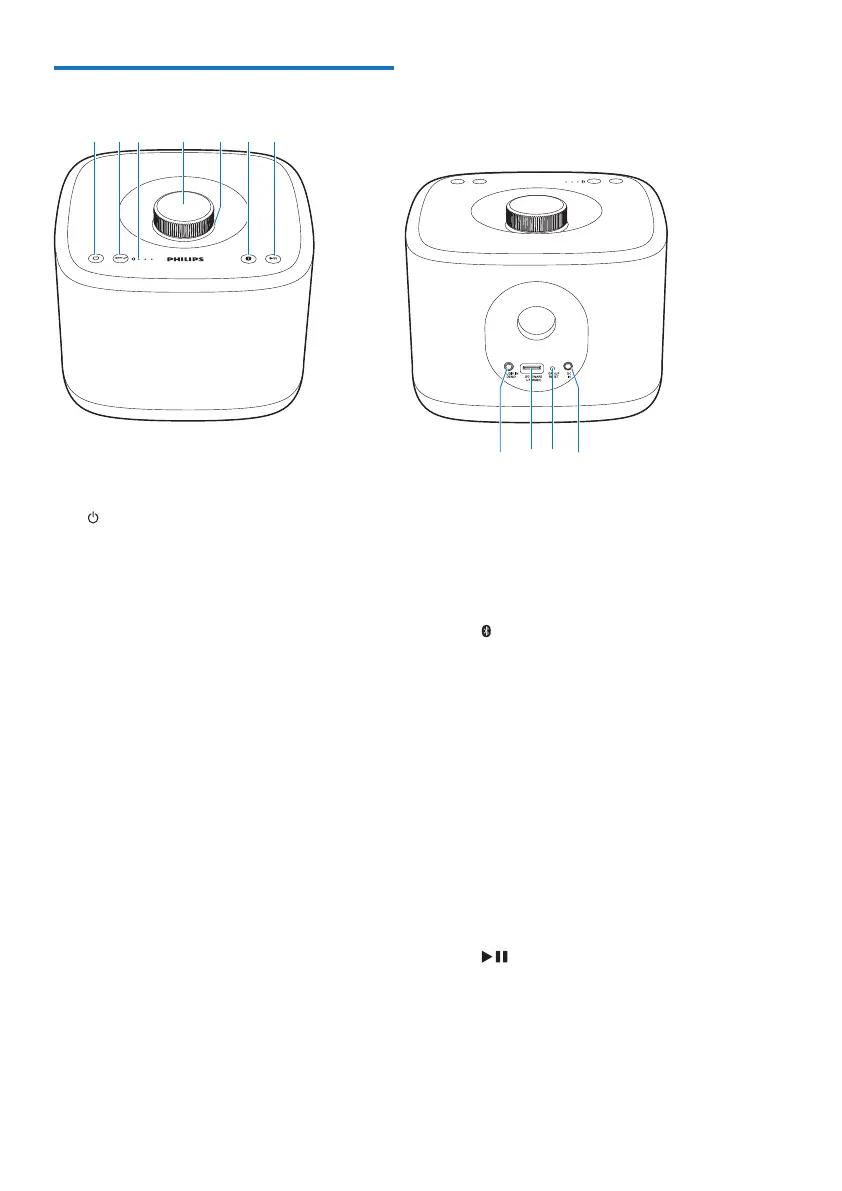
Overview of the main unit
a
• Turn the speaker on or off.
b GROUP button/indicator
• Press and hold to group with another
multiroom speaker.
• Press to exit or return to a group.
• Flashes green during grouping.
• Turns solid green after
successful grouping.
• Flashes green when the
speaker acts as a slave and is
disconnected from its master.
c Signal strength indicator
• Indicates the signal strength of group
connection.
d Volume knob
• Turn clockwise/anticlockwise to
increase/decrease volume.
• Press to mute/unmute the speaker.
e Volume indicator
• Lights up after power-on.
• Dims in standby mode.
• Flashes when the speaker is muted.
• Turns green when the speaker acts
as a slave in a group of speakers.
f
button/indicator
• Flashes blue in pairing mode.
• Turns solid blue after
successful connection with a
Bluetooth-enabled device.
• Turns off in standby mode or
when the speaker acts as a
slave in a group of speakers.
• Press and hold for three seconds
to disconnect the current
Bluetooth connection.
• Press and hold for ten seconds to
clear the pairing information.
g
• Start, pause, or resume play.
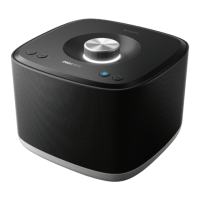
h AUDIO IN


 To Next Page