Need help?
Do you have a question about the Philips BT3500 and is the answer not in the manual?
Details critical safety guidelines for using the speaker, including warnings and precautions.
Provides a brief introduction to the Philips Bluetooth speaker's capabilities and registration.
Lists the items included in the product package for user verification.
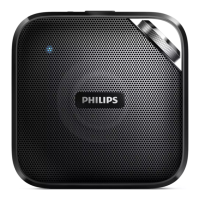
Identifies and describes the various parts and controls of the Philips Bluetooth speaker.
Instructions on how to position the speaker correctly for optimal use and initial setup.
Guidance on how to charge the built-in battery and turn the speaker on/off.
Steps to pair and connect your Bluetooth-enabled device to the speaker.
Detailed procedure for manually connecting a Bluetooth device via manual pairing.
Instructions on connecting devices using Near Field Communication (NFC) technology.
How to play audio and manage phone calls through the speaker via Bluetooth.
Connect and play audio from external devices using the AUDIO IN socket.
Instructions on how to adjust the speaker's volume using the volume knob.
Details on amplifier, Bluetooth, power, battery, dimensions, and weight.
Solutions for common problems like no power, no sound, or poor audio quality.
Addresses issues related to Bluetooth connection, pairing, and device disconnections.
Information regarding compliance with FCC rules and Industry Canada standards.
Instructions for the proper disposal of the product and its batteries.
Details on packaging materials and environmental information related to the product.
 General
| Brand | Philips |
|---|---|
| Model | BT3500 |
| Speaker Type | Portable Bluetooth Speaker |
| Audio in (3.5mm) | Yes |
| Built-in microphone | Yes |
| Waterproof | No |
| Connectivity | Bluetooth |
| Bluetooth Range | 10 meters |
| Bluetooth profiles | A2DP, AVRCP |
| Battery type | Lithium |


 To Next Page