MultiView in OSD menu
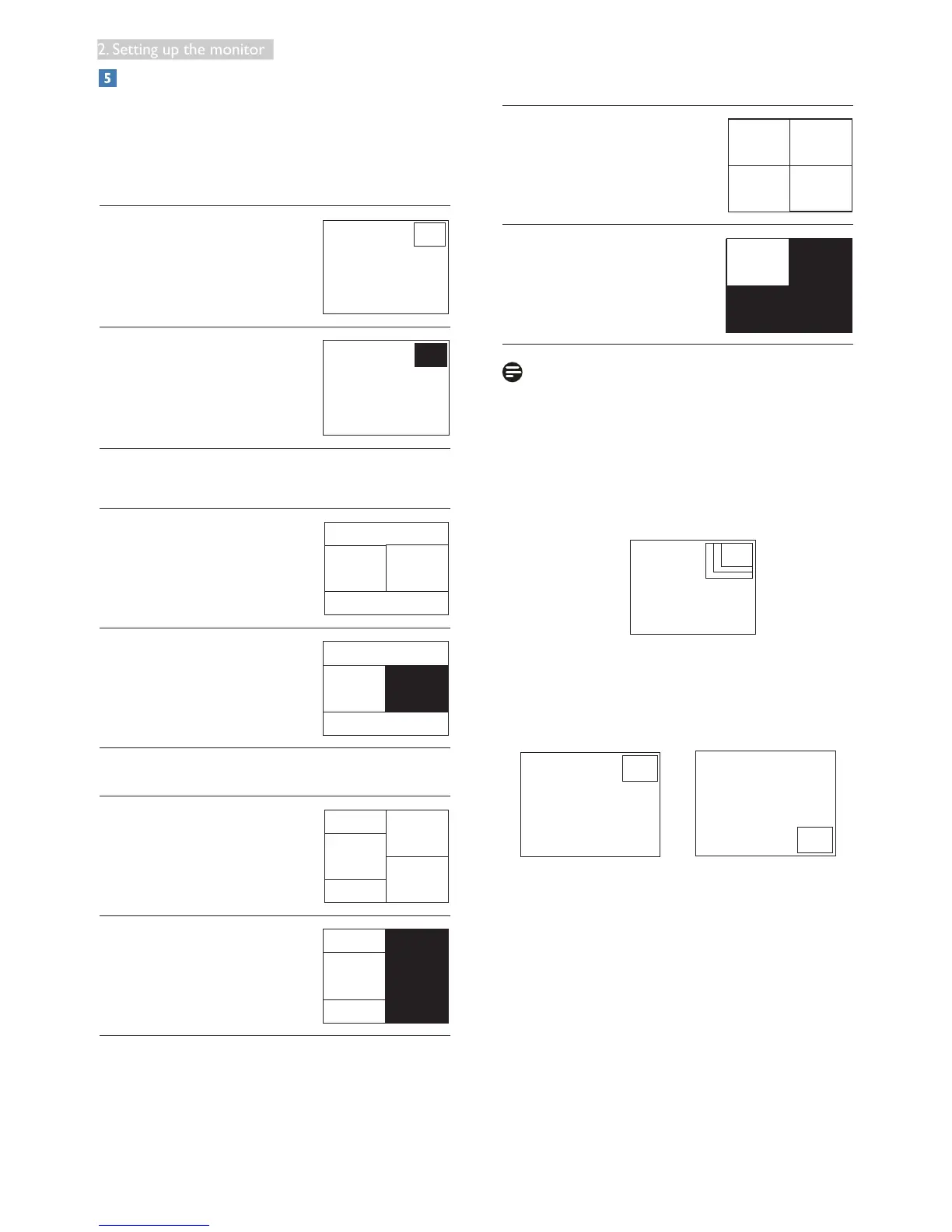
• PIP / PBP Mode: There are five modes for
MultiView: [Off], [PIP], [PBP 2Win], [PBP
3Win] and [PBP 4Win].
[PIP]: Picture in Picture
Open up a sub-window side-
by-side of other signal source.
A (main)
[PBP 2Win]: Picture by Picture
Open up a sub-window
side-by-side of other signal
sources.
BA (main)
When the sub source is not
detected.
A (main)
[PBP 3Win]: Picture by Picture
Open up two sub-windows
of other sources.
B
C
A
(main)
When the sub sources are
not detected.
A (main)
[PBP 4Win]: Picture by Picture
Open up three sub-windows
of other signal sources.
B
DC
A (main)
When the sub sources are
not detected.
A (main)
Note
The black strip shows on the top and the
bottom of the screen for the correct aspect
ratio when in the PBP mode.
• PIP Size: When PIP is activated, there are
three sub-window sizes to choose: [Small],
[Middle], [Large].
A (main)
Small
Middle
Large
• PIP Position: When PIP is activated, there
are four sub-window positions to choose.
Top-Right Bottom-Right











 To Next Page