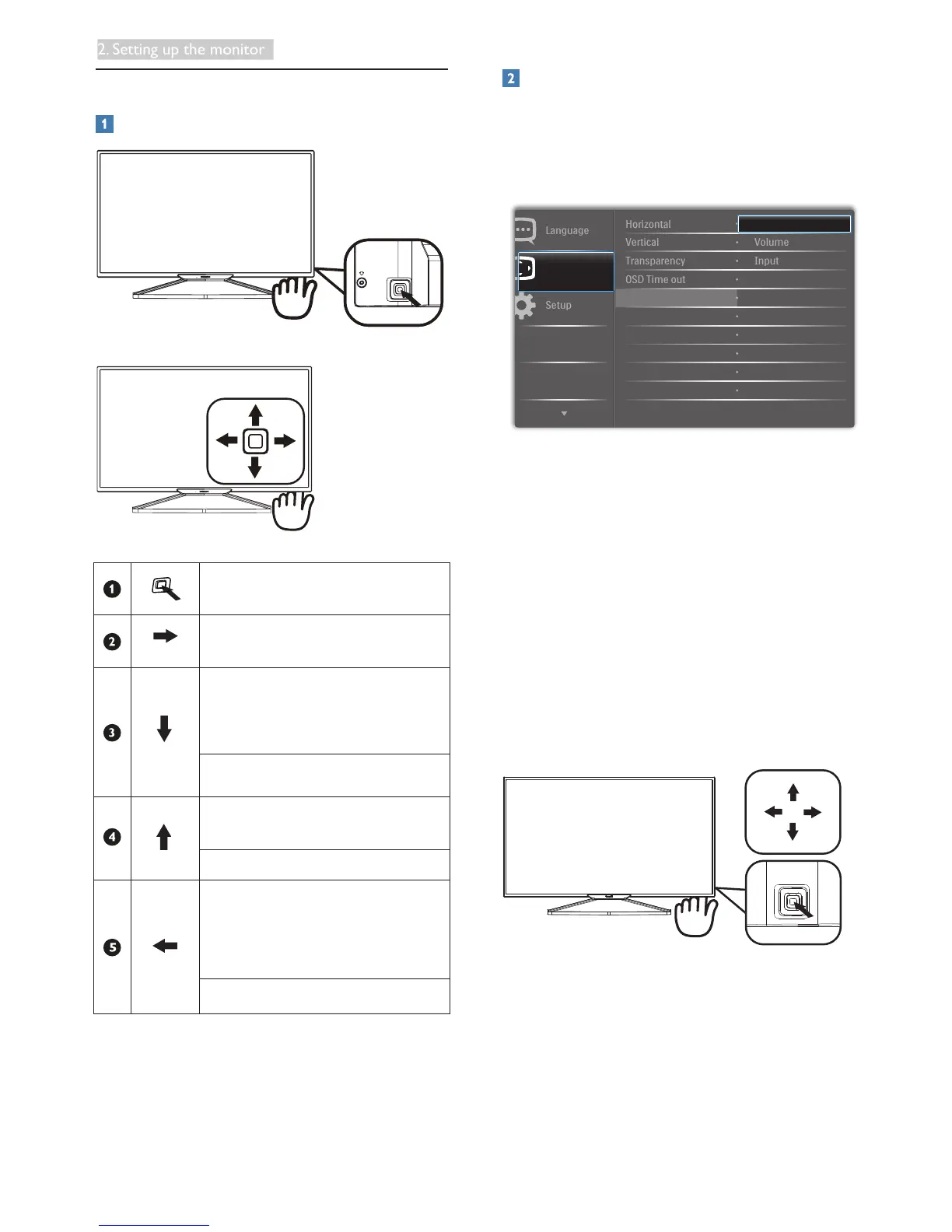
2.2 Operating the Display
Description of the control buttons
Press more than 3 seconds to
switch display power ON or OFF.
Access the OSD menu
.
ConrmtheOSDadjustment.
User preference key. Customize
your own preference function
from OSD to become the “user
key”.
Adjust the OSD menu.
PIP/PBP 2Win/PBP 3Win/PBP
4Win/Swap/Off
Adjust the OSD menu.
SmartImage hot key. There
are7modestoselect:Ofce,
Photo, Movie, Game, Economy,
SmartUniformity, Off.
Return to previous OSD level.
Customize your own “USER” key
“USER” allows you to setup your favorite function
buttons.
1. Toggle to the right to enter OSD menu
screen.
2. Toggle to the up or down to select main
menu [OSD Settings], then toggle to the
righttoconrm.
3. Toggle to the up or down to select [User],
thentoggletotherighttoconrm.
4. Toggle to the up or down to select your
preferred function : [Audio Source],
[Volume], [Input].
5. Toggletotherighttoconrmyourselection.
Now you can toggle the button to the down
[User] directly on the rear cover. Only your pre-
selected function will appear for quick access.











 To Next Page