5
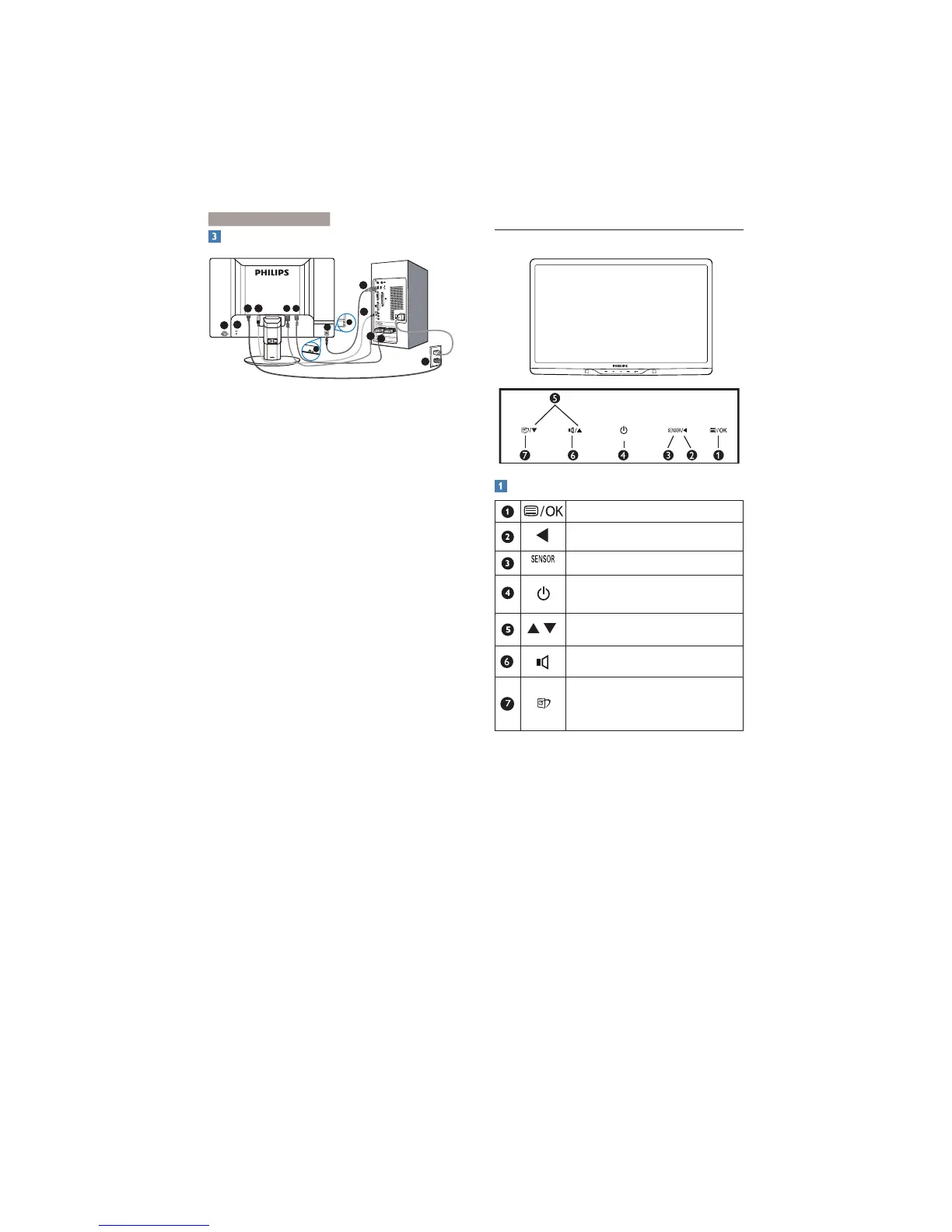
Connecting to your PC
7
65
3 4
4
7
3
2
1
6
5
8
9
&
Kensington anti-thief lock
é
Power switch
"
AC power input
'
Audio input
(
DVI-D input
§
D-sub input
è
USB upstream
!
Earphone
ç
USB downstream
Connect to PC
1. Turn off your computer and unplug its
power cord.
2. Connect the VGA or DVI signal cable for
video connection.
3. Connect the Audio cable for audio
connection.
4. Plug the power cord into a nearby AC
power outlet.
5. Connect the USB upstream port on
the monitor and the USB port on your
computer with a USB cable. The USB
downstream port is now ready for any USB
device to plug in.
6. Turn on your computer and monitor. If the
monitor displays images, the installation is
done.
2.2 Operating the monitor
Front view product description
To access the OSD menu
.
Return to previous OSD level.
Power sensor
.
To switch monitor’s power ON
and OFF
.
To adjust the OSD menu.
To adjust volume of the display.
SmartImage. There are 6 modes
to be selected: Office, Photo,
Movie, Game, Economy, Off.
2. Setting up the monito


 To Next Page