EasyManua.ls Logo

Philips Brilliance 231B4 - 2 Setting up the Monitor; Installation

Philips Brilliance 231B4
48 pages
Print Icon
To Next Page IconTo Next Page
To Previous Page IconTo Previous Page
Loading...
4
2. Setting up the monitor
2.1 Installation
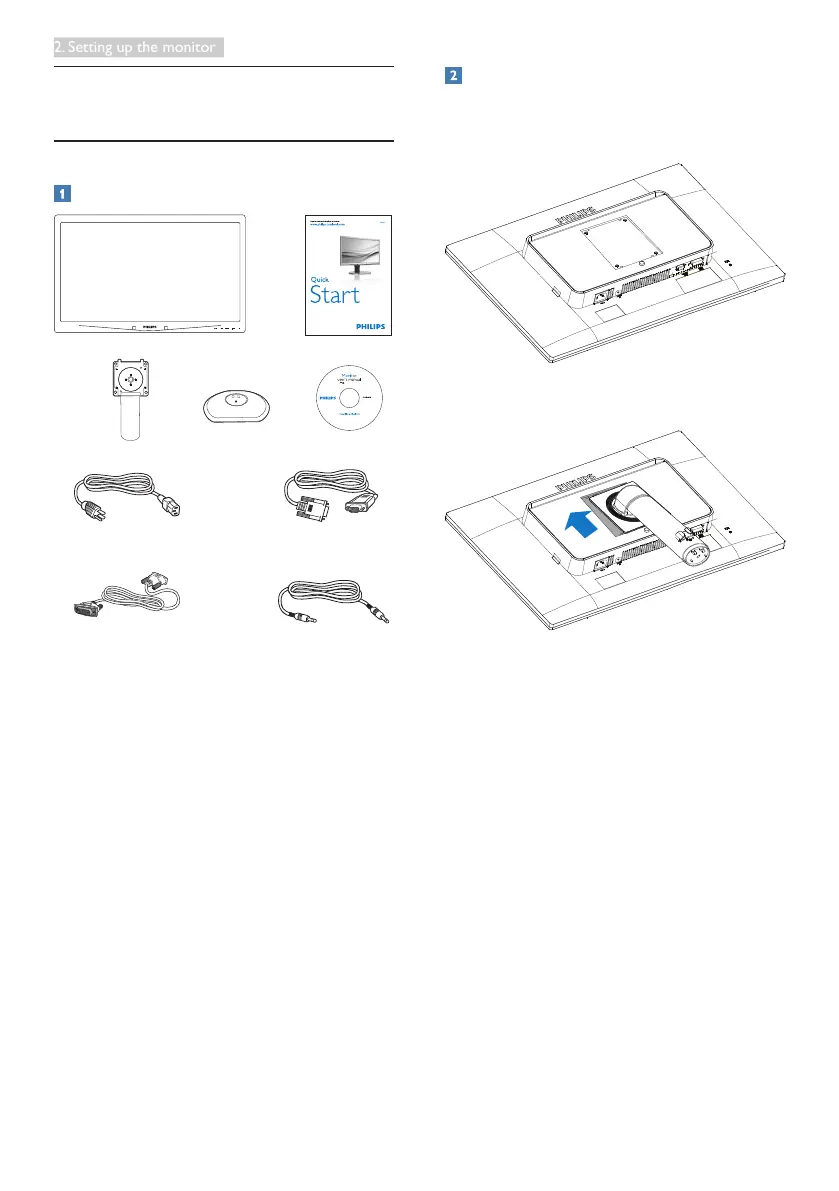
Package contents
*VGA
*DVI
Audio
©
2
0
1
4
K
o
n
i
n
k
l
i
j
k
e
P
h
i
l
i
p
s
N
.
V
.
A
l
l
r
i
g
h
t
s
r
e
s
e
r
v
e
d
.
U
n
a
u
t
h
o
r
i
z
e
d
d
u
p
l
i
c
a
t
i
o
n
i
s
a
v
i
o
l
a
t
i
o
n
o
f
a
p
p
l
i
c
a
b
l
e
l
a
w
s
.
M
a
d
e
a
n
d
p
r
i
n
t
e
d
i
n
C
h
i
n
a
.
V
e
r
s
i
o
n
Philips and the Philips’ Shield Emblem are registered trademarks of
Koninklijke Philips N.V. and are used under license from Koninklijke
Philips N.V.
Monitor drivers
SmartControl software
User’s Manual
使用
前请阅读使用说明
保留备用
Power cable
*Depends on the country
Install the base
1. Place the monitor face down on a smooth
surface. Pay attention not to scratch or
damage the screen.
2. Snap in the base in the VESA mount area.