6 EN
3 Get started
Always follow the instructions in this chapter in
sequence.
Power supply
The Bluetooth speaker can be powered by
either AC mains or batteries.
Option 1: Battery power
Caution
• Risk of explosion! Keep batteries away from heat,
sunshine,orre.Neverdiscardbatteriesinre.
• Batteries contain chemical substances, so they should
be disposed of properly.
Note
• WhenLEDindicatorashesred,replacethebatteries.
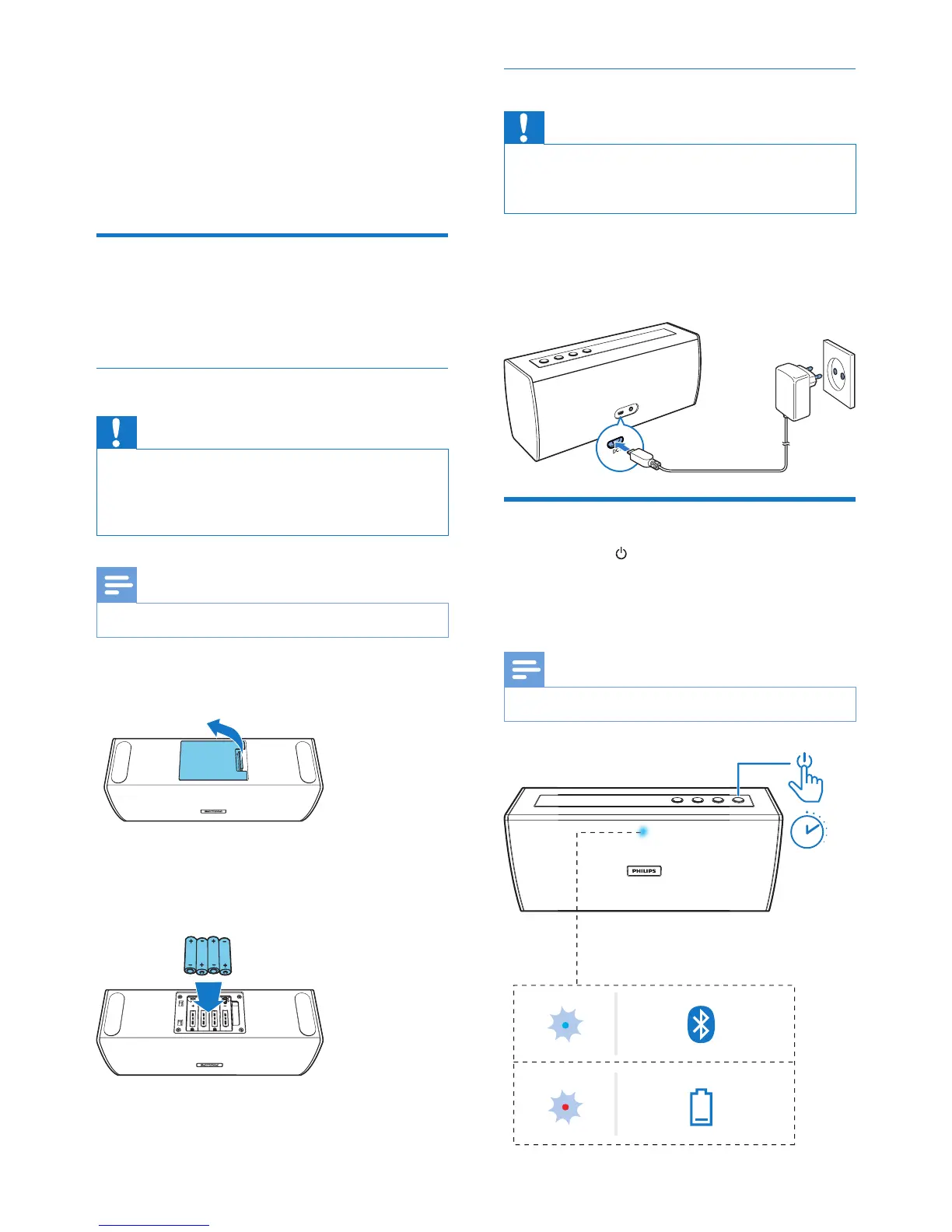
1 Open the battery compartment.
2 Insert 4 AA batteries with correct polarity
(+/-) as indicated.
3 Close the battery compartment.
Option 2: AC power
Caution
• Risk of product damage! Make sure that the power
voltage corresponds to the voltage printed on the back
or underside of the speaker.
Connect the power adaptor to:
• the DC IN socket on the speaker.
• the wall outlet.
Turn on
Press and hold for 2 seconds.
» The speaker switches to Bluetooth
mode automatically.
» TheLEDindicatorashesblue.
Note
• Ifbatteryislow,theLEDindicatorashesred.



 To Next Page