EasyManua.ls Logo

Philips CD721 - Page 6

Philips CD721
33 pages
Print Icon
To Next Page IconTo Next Page
To Previous Page IconTo Previous Page
Loading...
499
09
SOd
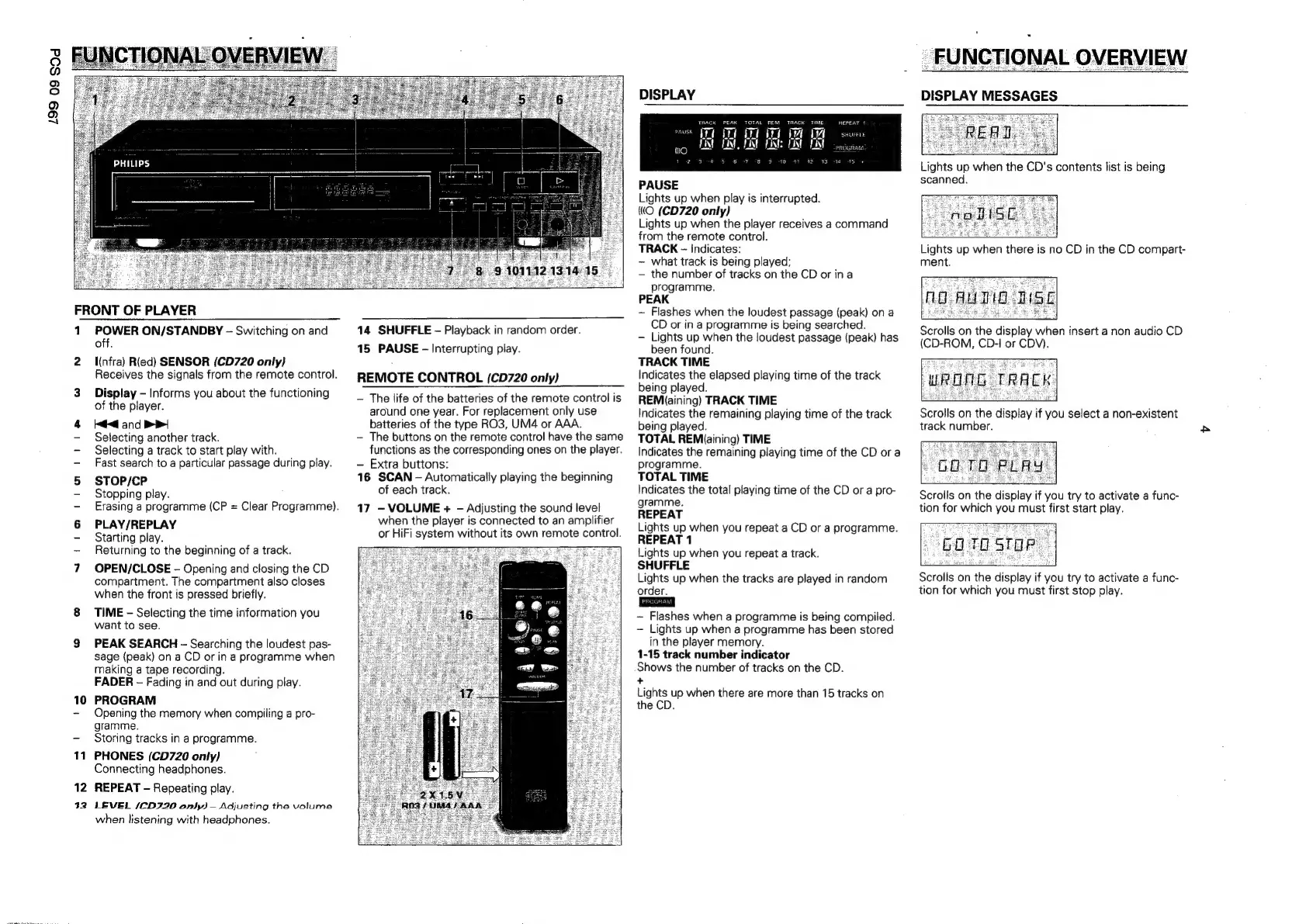
FRONT
OF
PLAYER
1
POWER
ON/STANDBY
-
Switching
on
and
off.
2
infra)
Ried)
SENSOR
(CD720
only}
Receives
the
signals
from
the
remote
control.
3.
Display
-
Informs
you
about
the
functioning
of
the
player.
4
Ke
and
>>|
-
Selecting
another
track.
-
Selecting
a
track
to
start
play
with.
-
Fast
search
to
a
particular
passage
during
play.
5
STOP/CP
-
Stopping
play.
-
Erasing
a
programme
(CP
=
Clear
Programme).
6
PLAY/REPLAY
-
Starting
play.
~-
Returning
to
the
beginning
of
a
track.
7
OPEN/CLOSE
-
Opening
and
closing
the
CD
compartment.
The
compartment
also
closes
when
the
front
is
pressed
briefly.
8
TIME
-
Selecting
the
time
information
you
want
to
see.
9
PEAK
SEARCH
-
Searching
the
loudest
pas-
sage
(peak)
on
a
CD
or
in
a
programme
when
making
a
tape
recording.
FADER
-
Fading
in
and
out
during
play.
10
PROGRAM
-
Opening
the
memory
when
compiling
a
pro-
gramme.
-
Storing
tracks
in
a
programme.
11
PHONES
(CD720
only)
Connecting
headphones.
12
REPEAT
-
Repeating
play.
92
LEVEL
/CD220
only)
Adjusting
tha
volume
when
listening
with
headphones.
14
SHUFFLE
-
Playback
in
random
order.
15
PAUSE
-
Interrupting
play.
REMOTE
CONTROL
(CD720
only)
The
life
of
the
batteries
of
the
remote
control
is
around
one
year.
For
replacement
only
use
batteries
of
the
type
RO3,
UM4
or
AAA.
-
The
buttons
on
the
remote
control
have
the
same
functions
as
the
corresponding
ones
on
the
player.
Extra
buttons:
16
SCAN
-
Automatically
playing
the
beginning
of
each
track.
17
-
VOLUME
+
-
Adjusting
the
sound
level
when
the
player
is
connected
to
an
amplifier
or
HiFi
system
without
its
own
remote
control.
DISPLAY
TRACK
PEAK
TOTAL
REM
TRACK
TIME
vest
VET
TR Tt
itt
A
LAL
REPEAT
1
SHUFFLE
PROGRAM
FX!
ENE
CM
EAN:
EX
itt
3044
95
¢
PAUSE
Lights
up
when
play
is
interrupted.
((O
(CD720
only)
Lights
up
when
the
player
receives
a
command
from
the
remote
control.
TRACK
-~
Indicates:
~—
what
track
is
being
played;
the
number
of
tracks
on
the
CD
or
ina
programme.
PEAK
~—
Flashes
when
the
loudest
passage
(peak)
on
a
CD
or
in
a
programme
is
being
searched.
Lights
up
when
the
loudest
passage
(peak)
has
been
found.
TRACK
TIME
Indicates
the
elapsed
playing
time
of
the
track
being
played.
REM(aining)
TRACK
TIME
Indicates
the
remaining
playing
time
of
the
track
being
played.
TOTAL
REM(aining)
TIME
Indicates
the
remaining
playing
time
of
the
CD
or
a
programme.
TOTAL
TIME
Indicates
the
total
playing
time
of
the
CD
or
a
pro-
gramme.
REPEAT
Lights
up
when
you
repeat
a
CD
or
a
programme.
REPEAT
1
Lights
up
when
you
repeat
a
track.
SHUFFLE
Lights
up
when
the
tracks
are
played
in
random
~—
Flashes
when
a
programme
is
being
compiled.
-
Lights
up
when
a
programme
has
been
stored
in
the
player
memory.
1-15
track
number
indicator
Shows
the
number
of
tracks
on
the
CD.
+
Lights
up
when
there
are
more
than
15
tracks
on
the
CD.
DISPLAY
MESSAGES
Lights
up
when
the
CD's
contents
list
is
being
scanned.
Lights
up
when
there
is
no
CD
in
the
CD
compart-
ment.
Scrolls
on the
display
when
insert
a
non
audio
CD
(CD-ROM,
CD-I
or
CDV).
Scrolls
on
the
display
if
you
select
a
non-existent
track
number.
Scrolls
on
the
display
if
you
try
to
activate
a
func-
tion
for
which
you
must
first
start
play.
Ba
TO
STOR
Scrolls
on
the
display
if
you
try
to
activate
a
func-
tion
for
which
you
must
first
stop
play.

Related product manuals