EasyManua.ls Logo

Philips CD721 - Page 7

Philips CD721
33 pages
Print Icon
To Next Page IconTo Next Page
To Previous Page IconTo Previous Page
Loading...
'g99
09
SOd
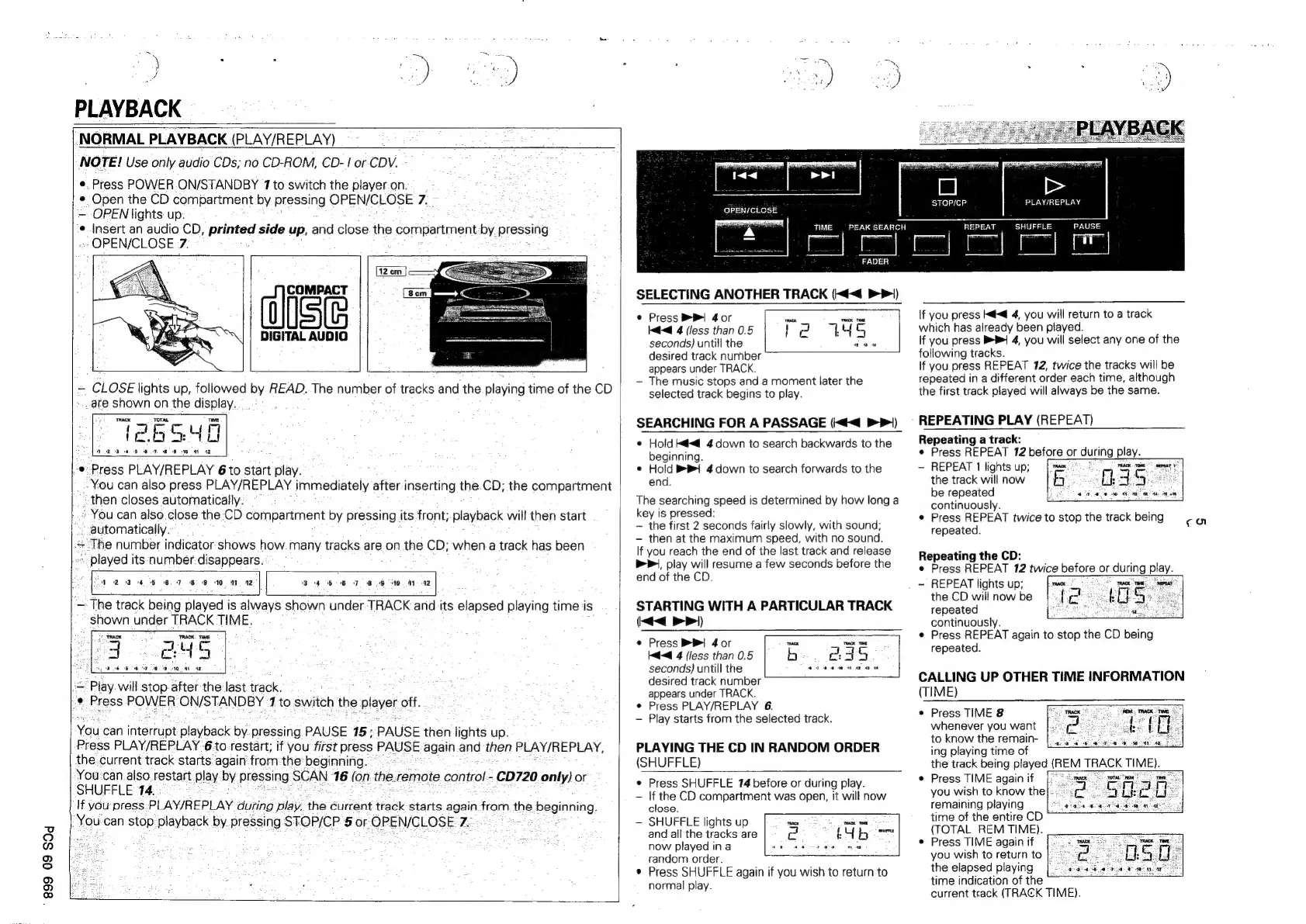
PLAYBACK
NORMAL
PLAYBACK
(PLAY/REPLAY)
NOTE!
Use
only
audio
CDs;
no
CD-ROM,
CD-
1
or
CDV.
e.
Press
POWER
ON/STANDBY
1
to
switch
the
player.on.
¢
Open
the
CD
compartment
by
pressing
OPEN/CLOSE
7.
:
—.
OPEN
lights
up:
:
¢
Insert
an
audio
CD,
printed
side
up,
and
close
the
compartment
by
pressing
“OPEN/CLOSE
7:
DIGITAL
AUDIO
-
CLOSE
lights
up,
followed
by
READ..The
number
of
tracks
and
the
playing
time
of
the
CD
ate
shown
on
the
display.
TOTAL
26SYE
eee
ae
©
Press
PLAY/REPLAY
6
to
start
play.
_-
You
can
also
press
PLAY/REPLAY
immediately
after
inserting
the.CD;
the
compartment
“then
closes
automatically.
*
You
can
also.close
the
-CD
compartment
by
pressing
its
front;.
playback
will
then
start
automatically.
=
The
number
indicator
shows
how.
many
tracks
are
on
the
CD;
whena
track
has
been
played
its
number
disappears.
$23
4
5
6.7
89
10
44
12
34
55-6
7
BG
0.
44-42
“+
The
track
being
played
is
always
shown
under
TRACK
and
its
elapsed
playing
time
is
shown
under
TRACK
TIME.
Ce
a
A
=
~
Play
will:stop-after
the
last
track.
}.®
Press
POWER:
ON/STANDBY
1
to
switch
the
ee
off.
You
can
tfterrupt
playback
by.pressing.
PAUSE
15:
PAUSE
then-lights
up.
Press
PLAY/REPLAY
-6.to
restart;
if
you
first
press
pavee
egal
ane
then
PLAY/REPLAY,
the.current
track
starts
again’
fromthe
beginnifig.
You.can
also.
restart
play
by
pregsing
SCAN
16
(on
the.
remote
contol:
-€D720
only)
or
SHUFFLE
14.
:
If
you
press
PLAY/REPLAY.
duting
play,
the
Current
track
starts
again
fromm
the
beginning.
You
can
ae
playback
by
pressing
STOP/CP.
5
or
OPEIVGLOSE
2
:
OPEN/CLOSE
TIME
SELECTING
ANOTHER
TRACK
(<<
>)
PEAK
SEARCH
Eyre
|
|
STOP/CP
PLAY/REPLAY
PEAT
SHUFFLE
PAUSE
e
Press
P|
40r
a
te
Kd
4
(less
than
0.5
Pe
LYS
seconds)
untill
the
Sars
desired
track
number
appears
under
TRACK.
The
music
stops
and
a
moment
later
the
selected
track
begins
to
play.
SEARCHING
FOR
A
PASSAGE
(<<
>>)
©
Hold
K@<d@
4
down
to
search
backwards
to
the
beginning.
©
Hold
i
4
down
to
search
forwards
to
the
end.
The
searching
speed
is
determined
by
how
long
a
key
is
pressed:
the
first
2
seconds
fairly
slowly,
with
sound;
then
at
the
maximum
speed,
with
no
sound.
If
you
reach
the
end
of
the
last
track
and
release
bP,
play
will
resume
a
few
seconds
before
the
end
of
the
CD.
STARTING
WITH
A
PARTICULAR
TRACK
(<<
>>|)
«
Press
Bi
4or
sex
oe
Kd<@
4
(fess
than
0.5
b
2.4
3
4224
wn
at
seconds)
untill
the
desired
track
number
appears
under
TRACK.
e
Press
PLAY/REPLAY
6.
Play
starts
from
the
selected
track.
PLAYING
THE
CD
IN
RANDOM
ORDER
(SHUFFLE)
¢
Press
SHUFFLE
174
before
or
during
play.
If
the
CD
compartment
was
open,
it
will
now
close.
SHUFFLE
lights
up
and
all
the
tracks
are
now
played
in
a
random
order.
®
Press
SHUFFLE
again
if
you
wish
to
return
to
normal
play.
If
you
press
K@<@
4,
you
will
return
to a
track
which
has
already
been
played.
If
you
press
BP
4,
you
will
select
any
one
of
the
following
tracks.
If
you
press
REPEAT
12,
twice
the
tracks
will
be
repeated
in
a
different
order
each
time,
although
the
first
track
played
will
always
be
the
same.
REPEATING
PLAY
(REPEAT)
Repeating
a
track:
e
Press
REPEAT
12
before
or
during
io
REPEAT
1
lights
up;
the
track
will
now
be
repeated
continuously.
Press
REPEAT
twice
to
stop
the
track
being
repeated.
go
Repeating
the
CD:
Press
REPEAT
12
twice
Beire
or
r
during
play.
REPEAT
lights
up;
mace
;
the
CD
willnow
be}
{c
oc
lS
repeated
a
continuously.
Press
REPEAT
again
to
stop
the
CD
being
repeated.
CALLING
UP
OTHER
TIME
INFORMATION
(TIME)
Press
TIME
&
whenever
you
want
to
know
the
remain-
ing
playing
time
of
the
track
being
played
(REM
TRACK
TIME).
Press
TIME
again
if
(2)
crust
Sota
ne
me
you
wish
to
know
thel::.
remaining
playing
time
of
the
entire
CD
(TOTAL
REM
TIME).
Press
TIME
again
if
you
wish
to
return
to
fe
the
elapsed
playing
time
indication
of
the
current
track
(TRACK
TIME).
Sale
de
ee
OT
4h

Related product manuals