EasyManua.ls Logo

Philips CD721 - Page 8

Philips CD721
33 pages
Print Icon
To Next Page IconTo Next Page
To Previous Page IconTo Previous Page
Loading...
699
09
SOd
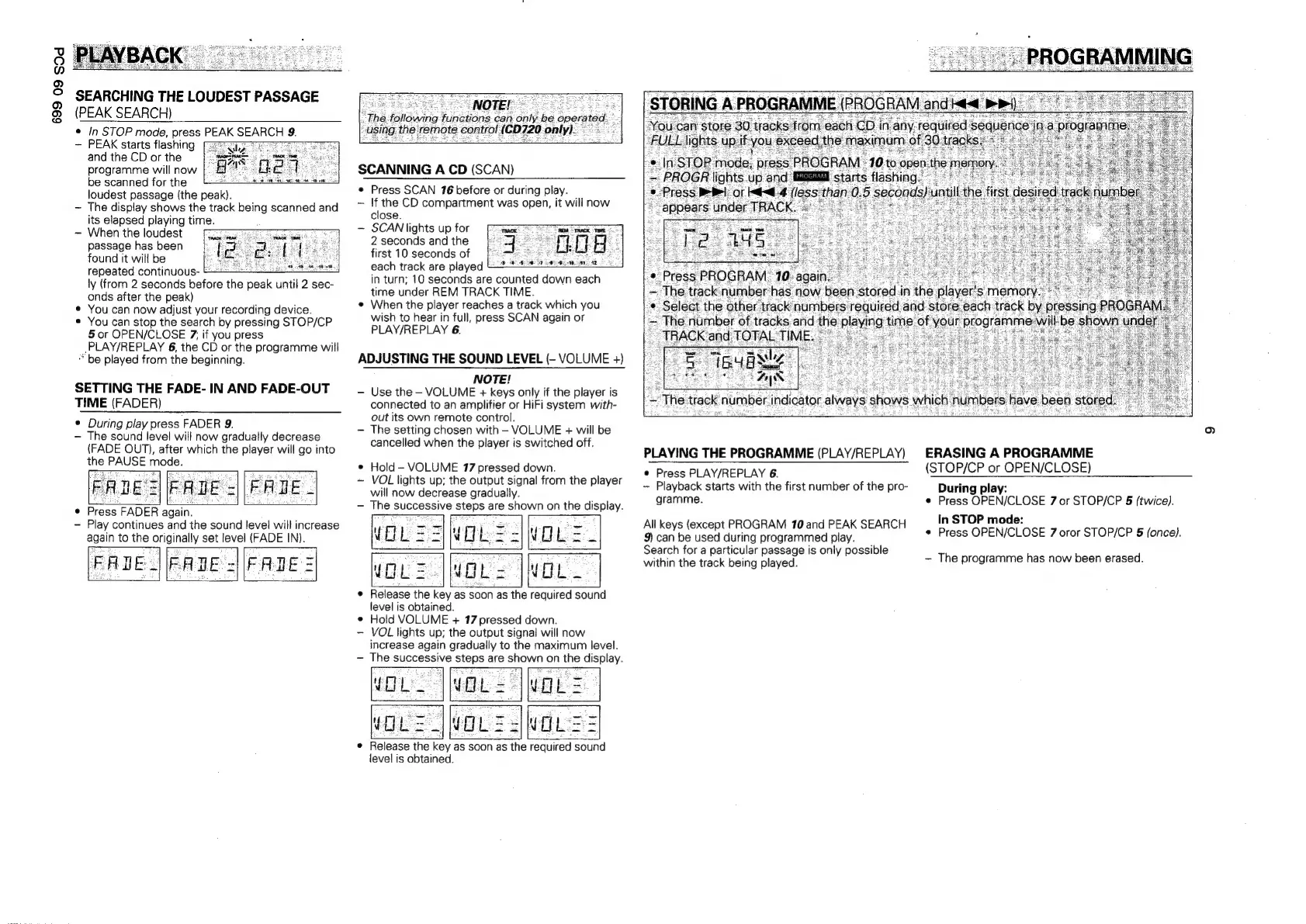
SEARCHING
THE
LOUDEST
PASSAGE
(PEAK
SEARCH)
©
In
STOP
mode,
press
PEAK
SEARCH
9
~
PEAK
starts
flashing
and
the
CD
or
the
programme
will
now
|.
H
be
scanned
for
the
loudest
passage
(the
peak).
-
The
display
shows
the
track
being
scanned
and
its
elapsed
playing
time.
When
the
loudest
passage
has
been
found
it
will
be
repeated
continuous-
§
4
ly
(from
2
seconds
before
the
peak
until
2
sec-
onds
after
the
peak)
¢
You
can
now
adjust
your
recording
device.
You
can
stop
the
search
by
pressing
STOP/CP
5
or
OPEN/CLOSE
7,
if
you
press
-PLAY/REPLAY
6,
the
CD
or
the
programme
will
be
played
from
the
beginning.
SETTING
THE
FADE-
IN
AND
FADE-OUT
TIME
(FADER)
¢
During
play
press
FADER
9.
-
The
sound
level
will
now
gradually
decrease
(FADE
OUT),
after
which
the
player
will
go
into
the
PAUSE
mode.
¢
Press
FADER
again.
Play
continues
and
the
sound
level
will
increase
again
to
the
originally
set
level
(FADE
IN).
FADE.
FADE
=
FADE
=
SCANNING
A
CD
(SCAN)
®
Press
SCAN
76
before
or
during
play.
~
If
the
CD
compartment
was
open,
it
will
now
close.
-
SCAN
lights
up
for
[
j
2
seconds
and
the
first
10
seconds
of
each
track
are
played
in
turn;
10
seconds
are
counted
seen
each
time
under
REM
TRACK
TIME.
¢
When
the
player
reaches
a
track
which
you
wish
to
hear
in
full,
press
SCAN
again
or
PLAY/REPLAY
6.
=
The
number
of
rates:
atid
_
TRACK
and
TOTAL
TIM
ADJUSTING
THE
SOUND
LEVEL
(-
VOLUME
+)
NOTE!
—-
Use
the
-
VOLUME
+
keys
only
if
the
player
is
connected
to
an
amplifier
or
HiFi
system
with-
out
its
own
remote
control.
-
The
setting
chosen
with
-
VOLUME
+
will
be
cancelled
when
the
player
is
switched
off.
e
Hold
-
VOLUME
17
pressed
down.
~
VOL
lights
up;
the
output
signal
from
the
player
will
now
decrease
gradually.
-
The
successive
steps
are
shown
on
the
display.
GL;
wou
z|you:
|
¢
Release
the
key
as
soon
as
the
required
sound
level
is
obtained.
¢
Hold
VOLUME
+
17
pressed
down.
-
VOL
lights
Up;
the
output
signal
will
now
increase
again
gradually
to
the
maximum
level.
The
successive
sete
are
collate
on
the
display.
©
Press
PLAY/REPLAY
6.
~
Playback
starts
with
the
first
number
of
the
pro-
gramme.
All
keys
(except
PROGRAM
10
and
PEAK
SEARCH
9)
can
be
used
during
programmed
play.
Search
for
a
particular
passage
is
only
possible
within
the
track
being
played.
°
Release
the
key
z
as
soon
as
the
required
sound
level
is
obtained.
PLAYING
THE
PROGRAMME
(PLAY/REPLAY)
ERASING
A
PROGRAMME
(STOP/CP
or
OPEN/CLOSE)
During
play:
e
Press
OPEN/CLOSE
7
or
STOP/CP
§
(twice).
In
STOP
mode:
e
Press
OPEN/CLOSE
7
oror
STOP/CP
5
(once).
The
programme
has
now
been
erased.

Related product manuals