5.
Generate KillME and DMAEN (toggle)
Generate a toggle function for the KILLME and DMAEN
signals
in
their complete address range.
Range : base address - (base address+$7FFF)
ITEM 9 : X-BUS
test
This tests the X-bus between DSP and servo processor.
It
assumes that the SPI communication channel between
slave processor and servois working correctly. First it writes
a X-bus test command into the CIDIC command register
(transparent mode). The DSP will send this command via
the X-bus to the servo processor. The servo processor
recognizes this X-bus test command and sends it back via
the SPI bus to the slave processor.
lf
the X-bus test
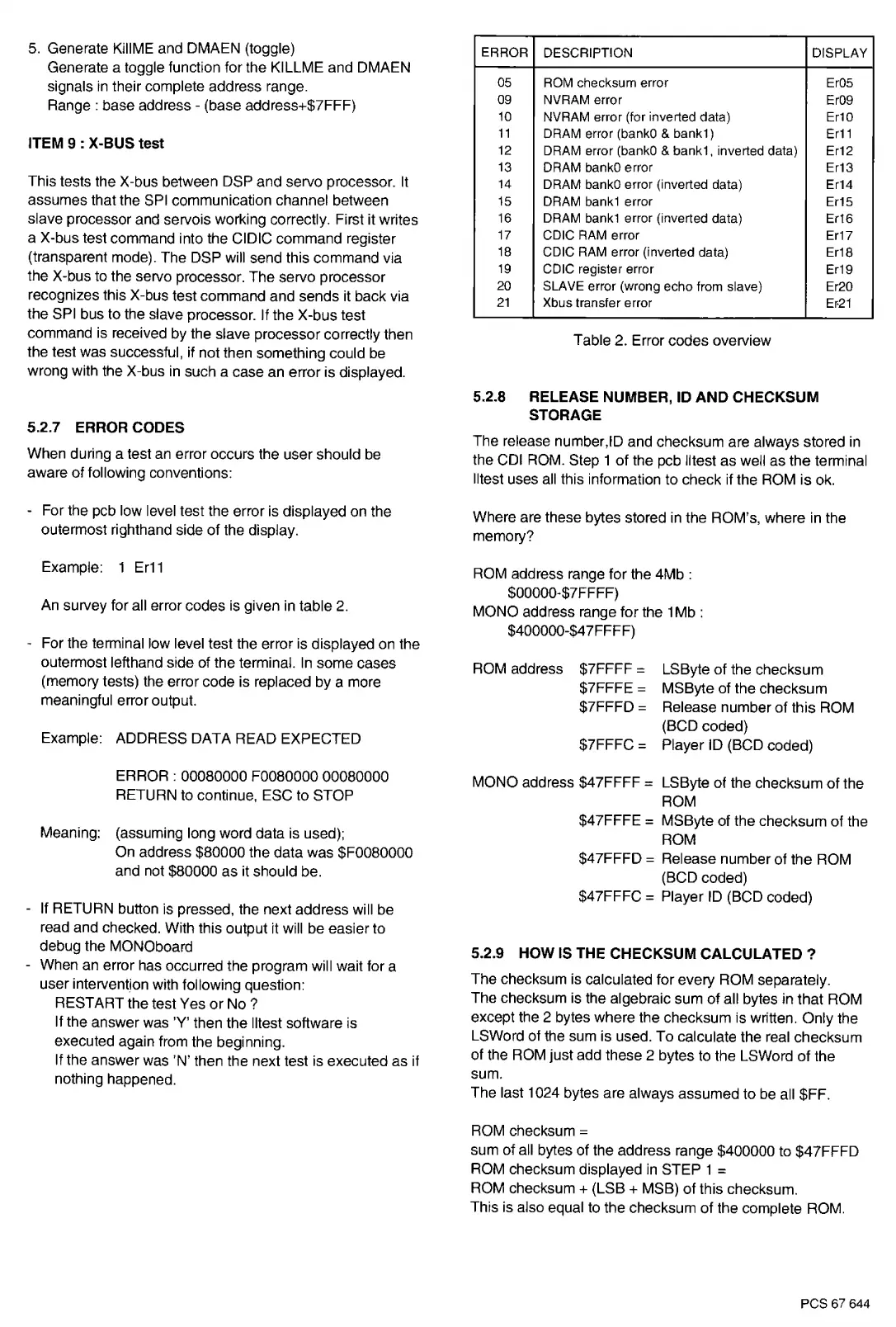
ERROR
05
09
10
11
12
13
14
15
16
17
18
19
20
21
DESCRIPTION
DISPLAY
ROM checksum error
Er05
NVRAM error Er09
NVRAM error (for inverted data) Er10
DRAM error (bank0
&
bank1)
Er11
DRAM error (bank0
&
bank
1,
inverted data) Er12
DRAM bankO error
Er13
DRAM bankO error (inverted data) Er14
DRAM bank1 error
Er15
DRAM bank1 error (inverted data) Er16
CDIC RAM error
Er17
CDIC
RAM
error (inverted data) Er18
CDIC register error
Er19
SLAVE error (wrong echo from slave) Er20
Xbus transfer error
Er-21
command
is
received by the slave processor correctly then Table 2. Error codes overview
the test was successful, if not then something could be
wrong with the X-bus
in
such a case an error is displayed.
5.2.7 ERROR CODES
When during a test
an
error occurs the user should be
aware of following conventions:
- For the pcb low level test the error is displayed on the
outermost righthand side of the display.
Example: 1
Er11
An
survey for all error codes
is
given
in
table
2.
- For the terminal low level test the error is displayed on the
outermost lefthand side of the terminal.
In
some cases
(memory tests) the error code is replaced by a more
meaningful error output.
Example: ADDRESS DATA READ EXPECTED
ERROR: 00080000 F0080000 00080000
RETURN to continue, ESC to STOP
Meaning: (assuming long word data is used);
On address $80000 the data was $F0080000
and not $80000 as it should be.
- If RETURN button is pressed, the next address will be
read and checked. With this output
it
will be easier to
debug the MONOboard
- When an error has occurred the program will wait for a
user intervent.ion with following question:
RESTART the test Yes
or
No?
If the answer was
'Y'
then the lltest software is
executed again from the beginning.
If the answer was 'N' then the next test is executed as if
nothing happened.
5.2.8 RELEASE NUMBER,
ID
AND CHECKSUM
STORAGE
The release number,ID and checksum are always stored
in
the COi ROM. Step 1 of the pcb lltest as well as the terminal
lltest uses all this information to check if the ROM is
ok.
Where are these bytes stored
in
the ROM's, where
in
the
memory?
ROM address range for the 4Mb :
$00000-$7FFFF)
MONO address range for the 1 Mb :
$400000-$4 7FFFF)
ROM address $7FFFF
=
LSByte
of
the checksum
$7FFFE
=
MSByte of the checksum
$7FFFD
=
Release number of this ROM
(BCD coded)
$7FFFC
=
Player ID (BCD coded)
MONO address $47FFFF
=
LSByte of the checksum of the
ROM
$47FFFE
=
MSByte of the checksum of the
ROM
$47FFFD
=
Release number of the ROM
(BCD coded)
$47FFFC
=
Player
ID
(BCD coded)
5.2.9
HOW
IS
THE CHECKSUM CALCULATED
?
The checksum is calculated for every ROM separately.
The checksum is the algebraic sum
of
all bytes
in
that ROM
except the 2 bytes where the checksum is written. Only the
LSWord of the sum is used. To calculate the real checksum
of the ROM just add these 2 bytes
to
the LSWord of the
sum.
The last 1024 bytes are always assumed to
be
all $FF.
ROM checksum
=
sum of all bytes of the address range $400000 to $47FFFD
ROM checksum displayed
in
STEP 1
=
ROM checksum + {LSB + MSB)
of
this checksum.
This is also equal to the checksum of the complete
ROM.
PCS
67
644


 To Next Page
 Loading...