Configuring the Wireless ADSL Modem Router
10
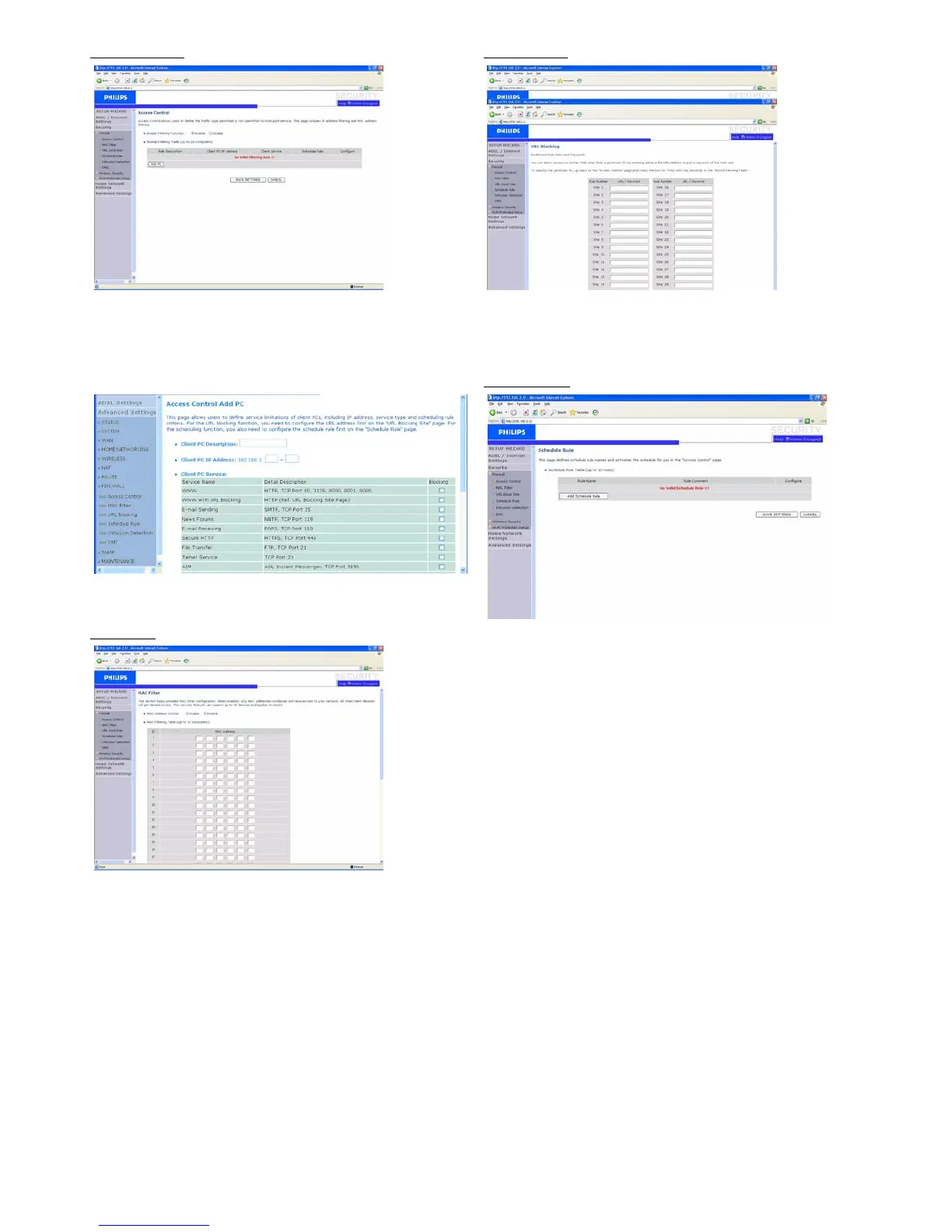
Access Control
Access Control allows users to define the outgoing traffic permitted or
not-permitted through the WAN interface. The default is to permit all
outgoing traffic.
To add the PC to the filtering table :
1- Click "Add PC" on the Access Control screen
2- Define the appropriate settings for client PC services
3- Click "OK" and then click "SAVE SETTINGS" to save your settings
MAC filter
The ADSL Wireless Base Station can also limit the network access
based on the MAC address. The MAC Filtering Table allows the ADSL
Wireless Base Station to enter up to 32 MAC addresses that are
allowed to access to the WAN port.
1- Click "Yes" to enable, or "No" to disable this function
2- Enter the MAC address in the space provided and click "SAVE
SETTINGS" to confirm
URL Blocking
The ADSL Wireless Base Station allows the user to block access to web
sites by entering either a full URL address or just a keyword. This
feature can be used to protect children from accessing violent or
pornographic web sites.
Schedule Rule
You may filter Internet access for local clients based on rules. Each
access control rule may be activated at a scheduled time. Define the
time schedule on this page, and apply the rule on the Access Control
page.


 To Next Page