9
k /
Select a preset radio station.•
l TIMER/VOL
Turn timer on/off.•
Adjust volume.•
m PRESET 1/6 2/7 3/8 4/9 5/10
Select preset radio stations. •
n DSC
Select a preset sound setting.•
o DBB
Turn on/off dynamic bass •
enhancement.
p
Start or pause iPod/iPhone play.•
q
/
Skip to previous/next audio file.•
Tune for radio station.•
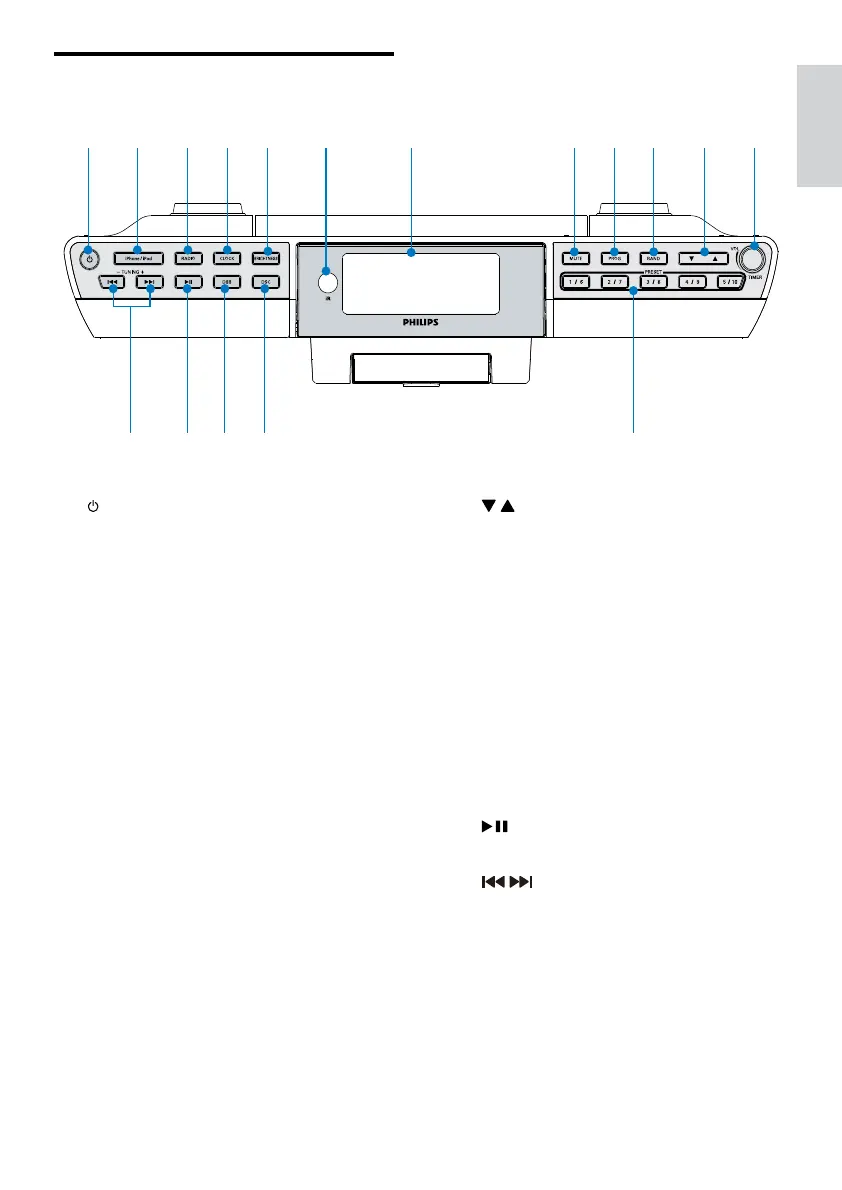
Overview of the main unit
a
Turn on the unit or switch to •
standby mode.
b iPhone/iPod
Switch to Phone/iPod.•
c RADIO
Turn on radio.•
d CLOCK
Set date/time.•
e BRIGHTNESS
Adjust display brightness.•
f iR
Remote control sensor.•
g Display panel
Show current status.•
h MUTE
Mute sound or to resume.•
i PROG
Program radio stations automatically.•
j BAND
Select FM or AM band.•
a b c d e gf h i j k l
nop mq
English
EN



 To Next Page