EasyManua.ls Logo

Philips DCC 380 - Page 4

Philips DCC 380
17 pages
Print Icon
To Next Page IconTo Next Page
To Previous Page IconTo Previous Page
Loading...
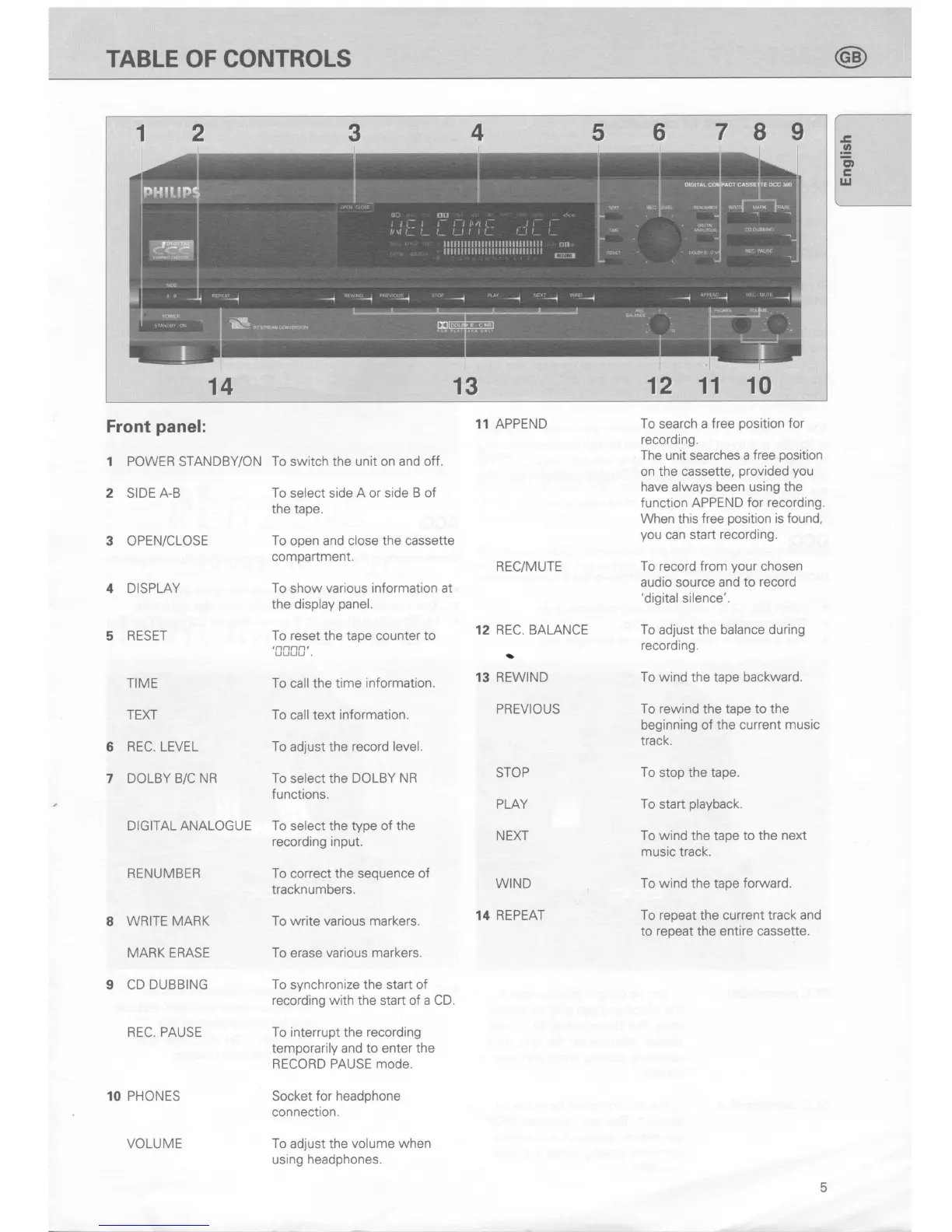
TABLE OF CONTROLS
7
I 9
12 11 10
Front
panel:
1 POWER STANDBY/ON
2
SIDE
A-B
3 OPEN/CLOSE
4 DISPLAY
5 RESET
TIME
TEXT
6
REC. LEVEL
7 DOLBY
B/C NR
DIGITAL ANALOGUE
RENUMBEB
8 WRITE
MARK
MARK ERASE
9
CD DUBBING
REC. PAUSE
10 PHONES
VOLUME
To
switch the unit on and
off.
To
select side
A or side B of
the tape.
To open and close the cassette
compartment.
To
show
various information at
the display
panel.
To reset
the
tape counter to
'[000'.
To
call the time
information.
To
call text
information.
To adjust the
record level.
To
select
the DOLBY NR
functions.
To select the type of the
recording input.
To
correct the
sequence of
tracknumbers.
To write various markers.
To
erase
various markers.
To
synchronize the
start of
recording with
the start of
a CD.
To interrupt the recording
temporarily and to enter
the
RECORD
PAUSE mode
Socket
for headphone
connection.
To adjust the
volume when
using
headphones.
11 APPEND
REC/MUTE
REC. BALANCE
a
REWIND
PREVIOUS
STOP
PLAY
NEXT
WIND
14 REPEAT
To
search a
free
position
for
recording.
The
unit searches
a free
position
on the cassette,
provided you
have always been using the
function
APPEND for recording.
When this
free
position
is found,
you
can start
recording.
To record from
your
chosen
audio source
and to
record
'digital
silence'.
To
adlust the
balance during
recording.
To wind
the
tape backward.
To rewind
the
tape to the
beginning of the current
music
track.
To stop the tape.
To
start
playback.
To wind the tape to the
next
music track.
To wind the tape
forward.
To repeat the current track and
to
repeat
the
entire cassette.
12
13
4 5
II
6
EHM
14
13
5

Related product manuals