EasyManua.ls Logo

Philips DCC 380 - Page 7

Philips DCC 380
17 pages
Print Icon
To Next Page IconTo Next Page
To Previous Page IconTo Previous Page
Loading...
I
o
o
o
o
o
O
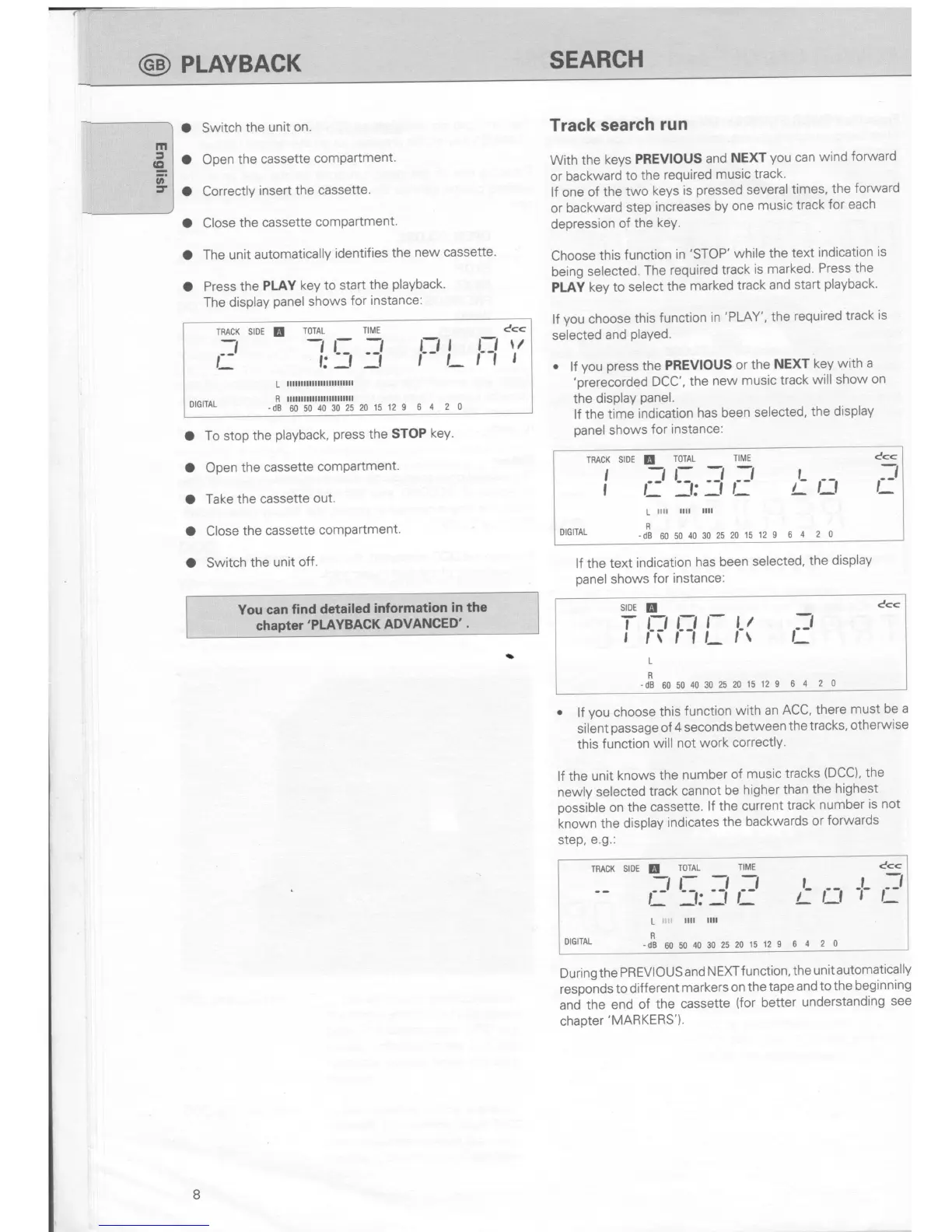
Switch
the
unit on.
Open
the
cassette
compartment.
Correctly
insert
the
cassette.
Close
the
cassette
comPartment.
The unit
automatically
identifies
the
new cassette.
Press
the
PLAY
key
to start
the
playback.
The
display
panel
shows
for
instance:
To stop
the
playback,
press
the
STOP
key.
Open
the
cassette
comPartment.
Take the cassette
out.
Close
the
cassette
comPartment.
Switch
the
unit
off.
Track
search
run
With
the
keys
PREVIOUS
and
NEXT
you
can
wind
forward
or
backward
to
the
required
music
track.
lf one
of the
two
keys
is
pressed
several
times,
the
forward
or
backward
step
increases
by
one
music
track
for each
depression
of
the
keY.
Choose
this
function
in
'STOP'
while the
text
indication
is
being
selected.
The
required
track
is
marked.
Press the
PLAY
key to
select
the
marked
track
and
start
playback'
lf
you
choose
this
function
in
'PLAY',
the
required
track
is
selected
and
played.
.
lf
you
press
the
PREVIOUS
or
the
NEXT
key
with
a
'prerecorded
DCC',
the
new
music track
will
show
on
the
display
panel.
lf the
time
indication
has
been
selected,
the
display
panel
shows
for instance:
lf the text
indication
has
been
selected,
the
display
panel
shows
for
instance:
SIDE
T
I
c<<
t-l l-l
l-
r(r1L
l-t
It
7l
t_
64
20
L
R
-dB
60 50
40 30
25
20 15
12 9
.
lf
you
choose
this
function
with an
ACC,
there
must
be a
silent
passage
of
4 seconds
between
the
tracks,
otherwise
this
function
will
not
work
correctly'
lf
the unit
knows
the
number
of
music tracks
(DCC),
the
newly
selected
track
cannot
be
higher
than
the
highest
possible
on the
cassette.
lf the
current
track
number
is
not
known
the display
indicates
the
backwards
or
forwards
step,
e.g.:
TRACK
SIDE
E
ToTAL
TIME
-_,
L: _-t .-t
L
f J:f
t-
t-
i:l
L
llll
llll
DIGITAL
-S
uo uo
40 30
2s 20
1s 12 I
6
4 2
0
c<<
-L
7-t
tt_
During
the
PREVIOUS
and
NEXT
f
unction,
the
unit
automatically
responds
to different
markers
on
the
tape
and
to the
beginning
and
the end
of
the
cassette
(for
better
understanding
see
chapter
'MARKERS').
o
o
a
o
o
Cc<
t fl\/
i_r1
|
I:J
I
TRACK
SIDE
E
TOTAL
TIME
7]
-,
L:
--!
L
f;-l
-f
L
lllttlnnllllllllnllll
R lllllllllllllllllllttlll
ulullAL
-dB
60 s0
10
30
2s
20 15
12 9
6
4 2 0
TRACK SIDE
E
TOTAL
TIME
Ccc
i
;!
5,:l
,:'
/-
n
;:
L
r[ llll
llll
DTGTTAL
-*
*u0,o30252015129
6
4 2 o
GD
PLAYBACK
SEARCH
You can find
detailed
information
in the
chapter'PLAYBAGK
ADVANCED'
.
8

Related product manuals