EasyManua.ls Logo

Philips DCC 380 - Page 8

Philips DCC 380
17 pages
Print Icon
To Next Page IconTo Next Page
To Previous Page IconTo Previous Page
Loading...
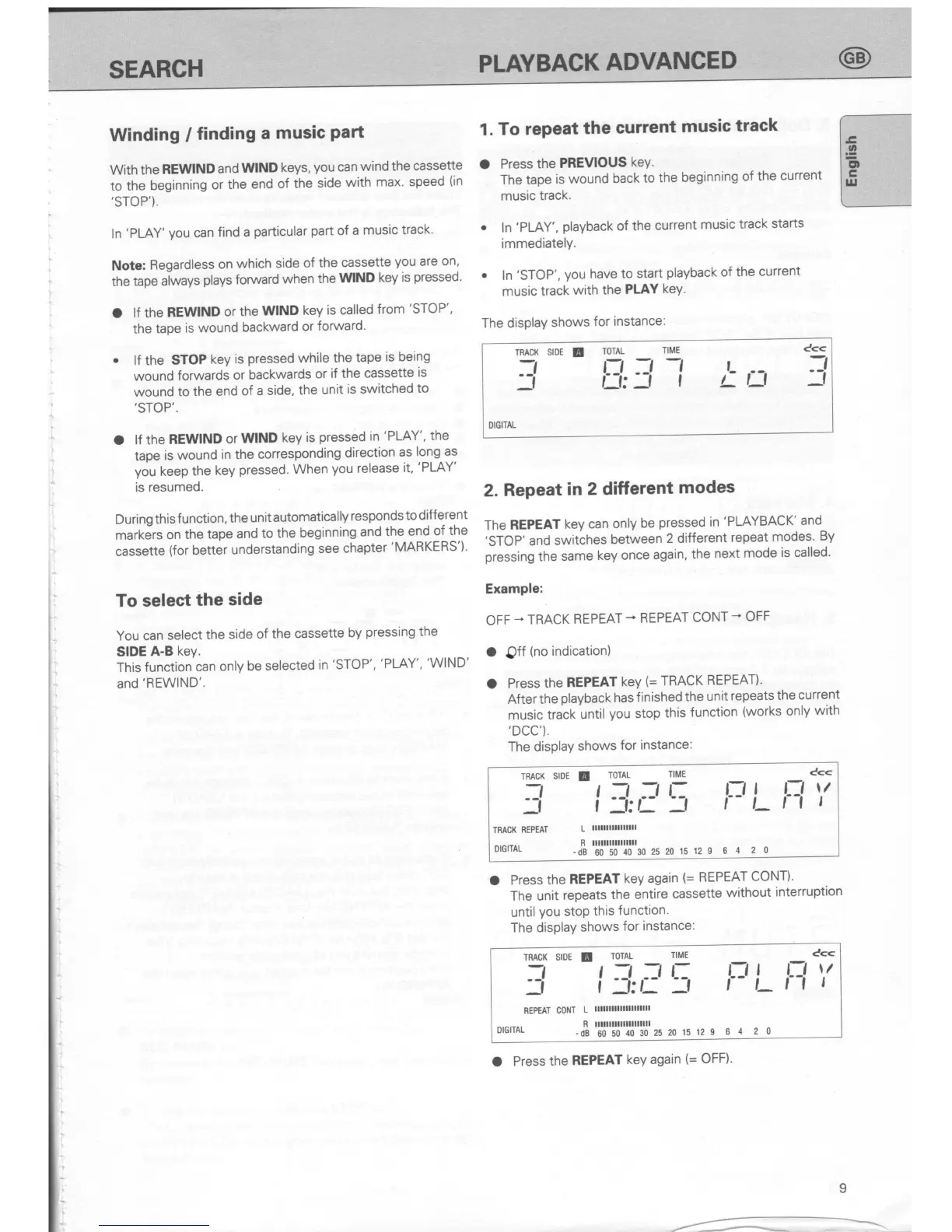
Winding
/
finding
a
music
Part
With
the
REWIND
and
wlND
keys,
you
can
wind
the
cassette
to the
beginning
or
the
end
of the
side
with
max' speed
(in
,STOP').
ln
'PLAY'you
can
find a
particular
part
of
a
music
track'
Note:
Regardless
on
which
side
of
the
cassette
you
are
on,
the
tape
at*ays
plays
foruuard
when
the
W|ND
key
is
pressed'
a
lf the
REWIND
or the
WIND
key
is
called
from
'STOP',
the
tape
is
wound
backward
or
forward.
.
lf the
STOP
key
is
pressed while
the
tape
is being
wound
forwards
or
backwards
or
if the
cassette
is
wound
to
the
end
of a
side,
the
unit
is switched
to
,STOP"
O
lf the
REWIND
or
wlND
key
is
pressed in
'PLAY',
the
tape
is
wound
in the
corresponding
direction
as
long
as
you
keep
the
key
pressed. When
you
release
it,
'PLAY'
is
resumed.
During
this
f unction,
the
unit
automatically
responds
to different
markJrs
on
the
tape
and
to
the
beginning
and
the
end
of
the
cassette
(for
better
understanding
see
chapter'MARKERS')'
To
select
the
side
You can
select
the
side
of
the
cassette
by
pressing
the
SIDE
A-B
key.
This
function
can
only
be
selected
in
'STOP',
'PLAY',
'WIND'
and'REWIND'.
1. To
repeat
the
current
music
track
O
Press
the
PREVIOUS
keY.
The
tape
is wound
back
to
the
beginning
of
the current
music
track.
o
ln
'PLAY',
playback
of
the
current
music
track
starts
immediately.
.
ln
'STOP', you
have
to start
playback
of
the
current
music
track
with
the
PI-AY
keY.
The display
shows
for
instance:
2.
Repeat
in
2 different
modes
The
REPEAT
key
can
only
be
pressed in
'PLAYBACK'
and
'STOP'
and
switches
between
2 different
repeat
modes'
By
pressing
the
same
key once
again,
the
next
mode
is called'
Example:
OFF
*
TRACK
REPEAT
-
REPEAT
CONT
-
OFF
a
Off
(no
indication)
O
Press
the
REPEAT
kev
(=
TRACK
REPEAT)'
After
the
playback has
f inished
the
unit
repeats
the
current
music
track
until
you
stop
this
functlon
(works
only
with
,DCC').
The disPlaY
shows
for
instance:
TRACK
SIDE
E
7
ToTAL
TIME
C<<
I
:l!
;:
\
l.r
i-
l=l
"'
TMCK
REPEAT
L
llllllllllllllll
orGrrAL
-fi'l'lttl'i"ltlttr,
2s
20
i5 12 e
6
4
2 0
O
Press
the
REPEAT
key again
(=
REPEAT
CONT)'
The unit
repeats
the
entire
cassette
without
interruption
until
you
stop
this
function'
The
displaY
shows
for
instance:
TMCK
SIDE
f
ToTAL
rlME
_=l
I
:l!
,!
\
Cc<
rrLr-l
"'
REPEAT CoNT
L
lllllllllltlllllllll
R llllllllllllllllllll
orGilAL
_dB
60 50
40
30
25
20
15 12 9
6
4 2 0
O
Press
the
REPEAT
key again
(=
OFF)'
c<<
-t
r
TIME
-l -l
rf
TRACK SIDE
!
TOTAL
rJ
LI:
7l
_f
La
I)IGITAL
SEARCH
PLAYBACK
ADVANCED
I
-
.-

Related product manuals