7
English
EN
4 Get started
Always follow the instructions in this chapter in
sequence.
If you contact Philips, you will be asked for the
model and serial number of this apparatus. The
model number and serial number are on the
rear of the apparatus. Write the numbers here:
Model No. __________________________
Serial No. ___________________________
Prepare the remote control
Caution
•
Risk of explosion! Keep batteries away from heat,
sunshineorre.Neverdiscardbatteriesinre.
• Risk of product damage! When the remote control is
not used for long periods, remove the batteries.
• Danger of explosion if battery is incorrectly replaced.
Replaceonlywiththesameorequivalenttype.
For rst-time use:
Remove the protective tab to activate the
remote control battery.
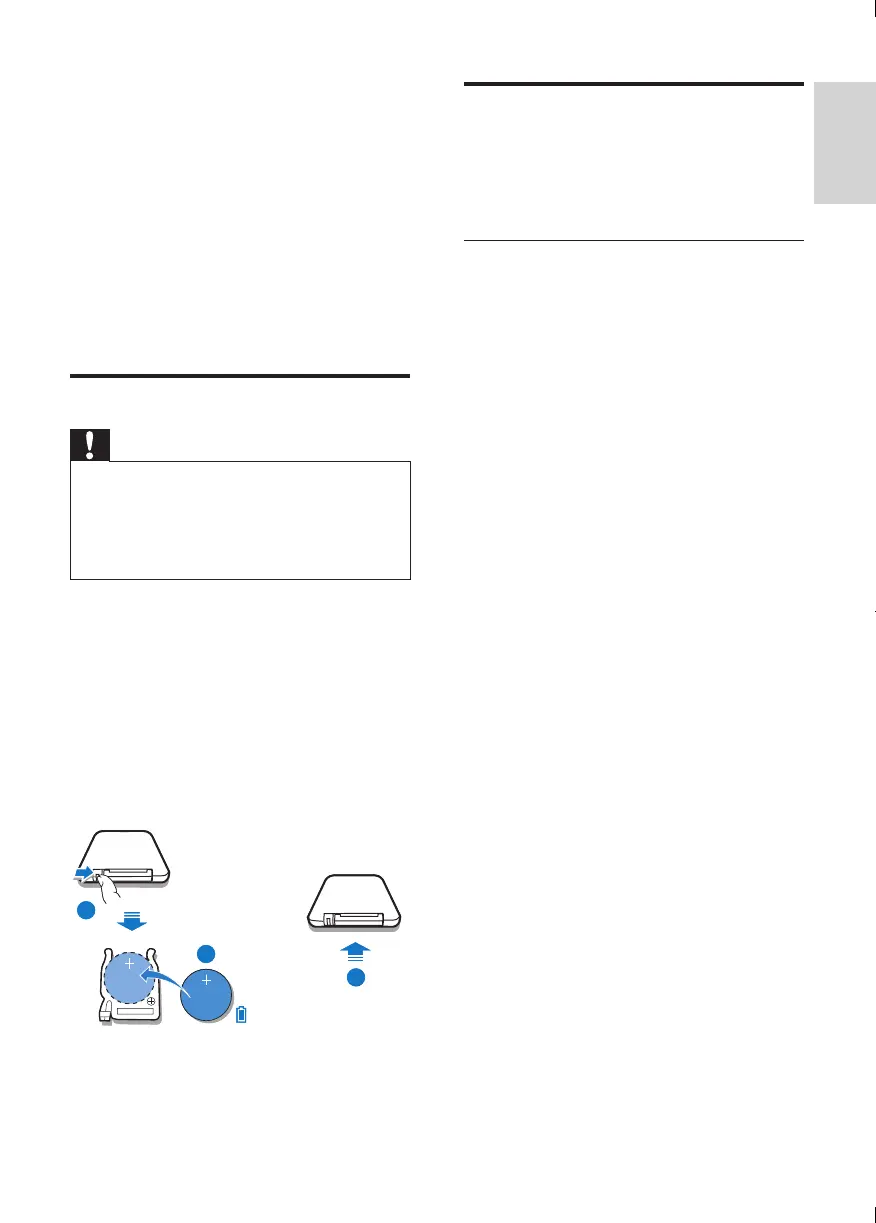
To replace the remote control battery:
1 Open the battery compartment.
2 Insert one CR2025 battery with correct
polarity (+/-) as indicated.
3 Close the battery compartment.
1
2
3
1
2
3
Turn on
Press POWER.
» The unit switches to the last selected
source.
Switch to standby
Press POWER again to switch the unit to
standby mode.
» The red standby indicator turns on.



 To Next Page