10 EN
l Dock for iPod/iPhone
m STANDBY-ON
Turn on the apparatus, switch
to standby mode, or Eco Power
standby mode.
n EJECT
Eject the disc.
o VOLUME +/-
Adjust volume.
p Display panel
Show current status.
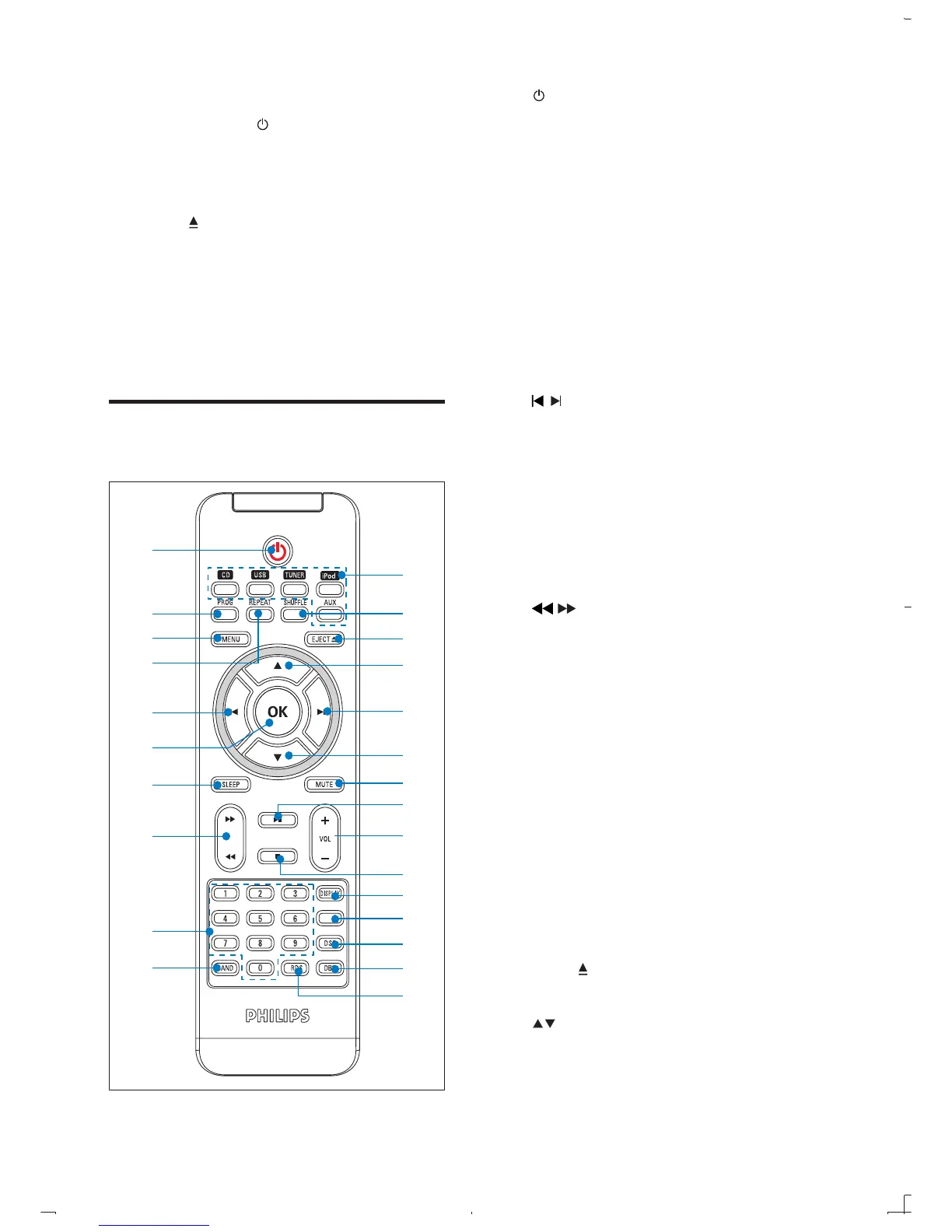
Overview of the remote
control
TIMER
a
b
c
d
e
f
g
h
i
j
k
l
m
n
e
n
o
p
q
r
s
t
u
v
w
a
Turn on the apparatus, switch
to standby mode, or Eco Power
standby mode.
b PROG
Program tracks.
Program radio stations.
Set the clock.
c MENU
Access the iPod/iPhone menu.
d REPEAT
Select a repeat play mode.
e
/
Skip to the previous/next track.
Navigate through the iPod/iPhone
menu.
f OK
g SLEEP
Set the sleep timer.
h
/
Search within a track/disc/USB/iPod/
iPhone.
Tune to a radio station.
i Numeric keypad
Select a track from a disc directly.
j BAND
Select a waveband: FM or AM.
k Source selection keys (CD, USB,
Select a source: CD, USB, TUNER,
iPod/iPhone or AUX (MP3 LINK).
l SHUFFLE
Play tracks randomly.
m EJECT
Eject the disc.
n
Skip to the previous/next album.
Navigate through the iPod/iPhone
menu.



 To Next Page