5-1 5-1
DISASSEMBLY DIAGRAM
Dismantling of the Rear Cabinet
Dismantling of the PCB Board
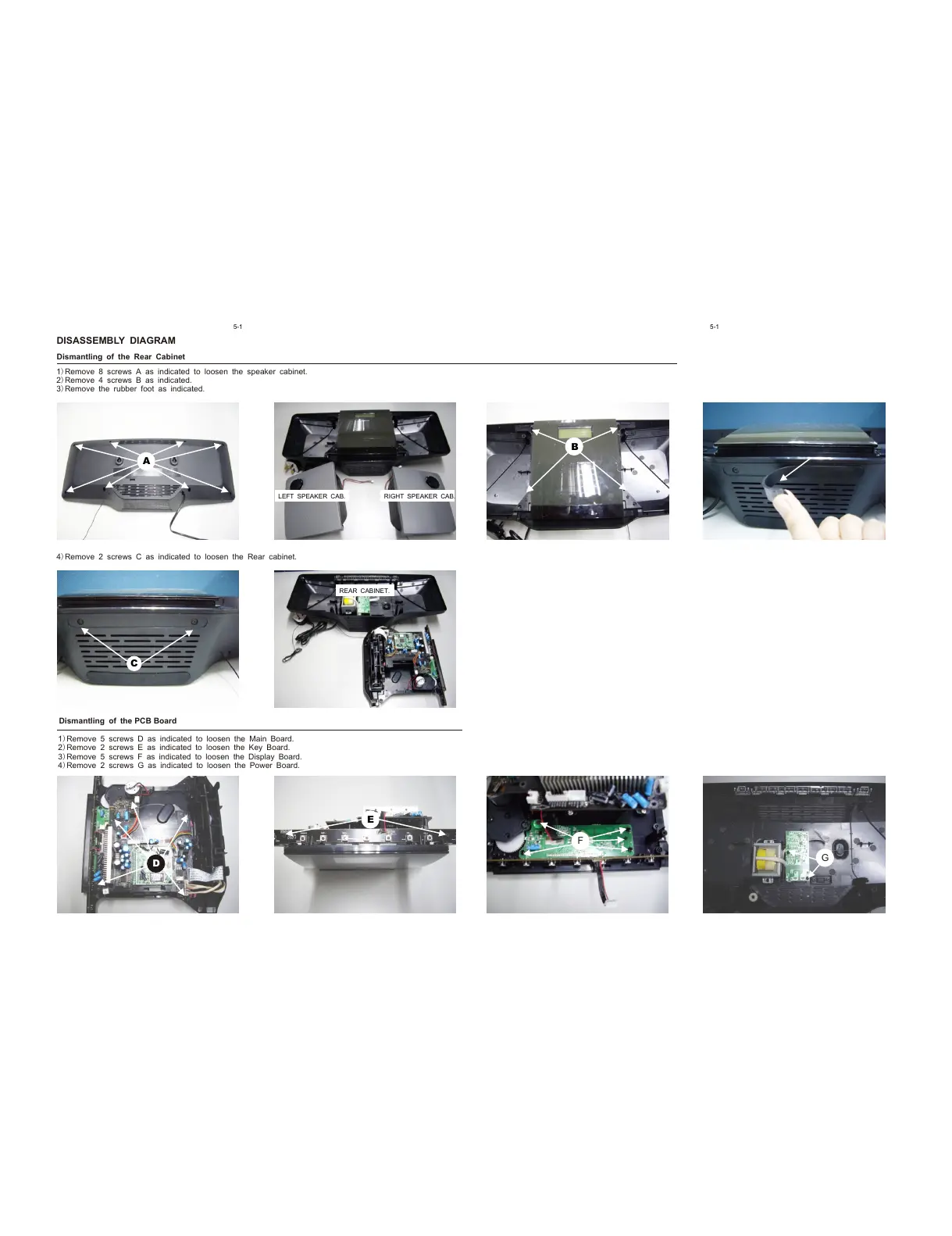
B
C
RIGHT SPEAKER CAB.
LEFT SPEAKER CAB.
REAR CABINET.
D
E
F
G
1)Remove 5 screws D as indicated to loosen the Main Board.
2)Remove 2 screws E as indicated to loosen the Key Board.
3)Remove 5 screws F as indicated to loosen the Display Board.
4)Remove 2 screws G as indicated to loosen the Power Board.
1)Remove 8 screws A as indicated to loosen the speaker cabinet.
2)Remove 4 screws B as indicated.
3)Remove the rubber foot as indicated.
4)Remove 2 screws C as indicated to loosen the Rear cabinet.
A



 To Next Page