REMOTE CONTROL
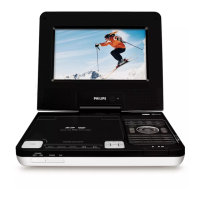
9 SETUP ....................Enter or exit the system menu.
0 3, 4, 1, 2 ...........Navigate in a menu.
...........(1 / 2) search backward/forward in a disc at different
speeds.
! OK ...........................Confirm a selection.
@ J( / § ...................Skip to the previous/next chapter, track or title.
# Numeric Keypad (0-9)...Input numbers.
$ ZOOM.....................Enlarge or reduce a picture or active image on the TFT.
% MONITOR ..............Switch the aspect ratio between 16:9 or 4:3.
^ DISPLAY ................Display information on TFT during playback.
& TITLE/RETURN......Display the disc title or return to the previous level of the
VCD disc menu.
* SUBTITLE ..............Select a subtitle language.
( AUDIO ....................Select an audio language when playing a DVD disc or
select an audio mode (Stereo, Mono-Left or Mono-Right)
when playing a VCD/CD disc.
CAUTION
Use of controls or adjustments or performance of procedures
other than herein may result in hazardous radiation exposure
or other unsafe operation.


 To Next Page