11
This allows you to remotely dial in and access your answerphone via any
telephone with a key and tone dialling.
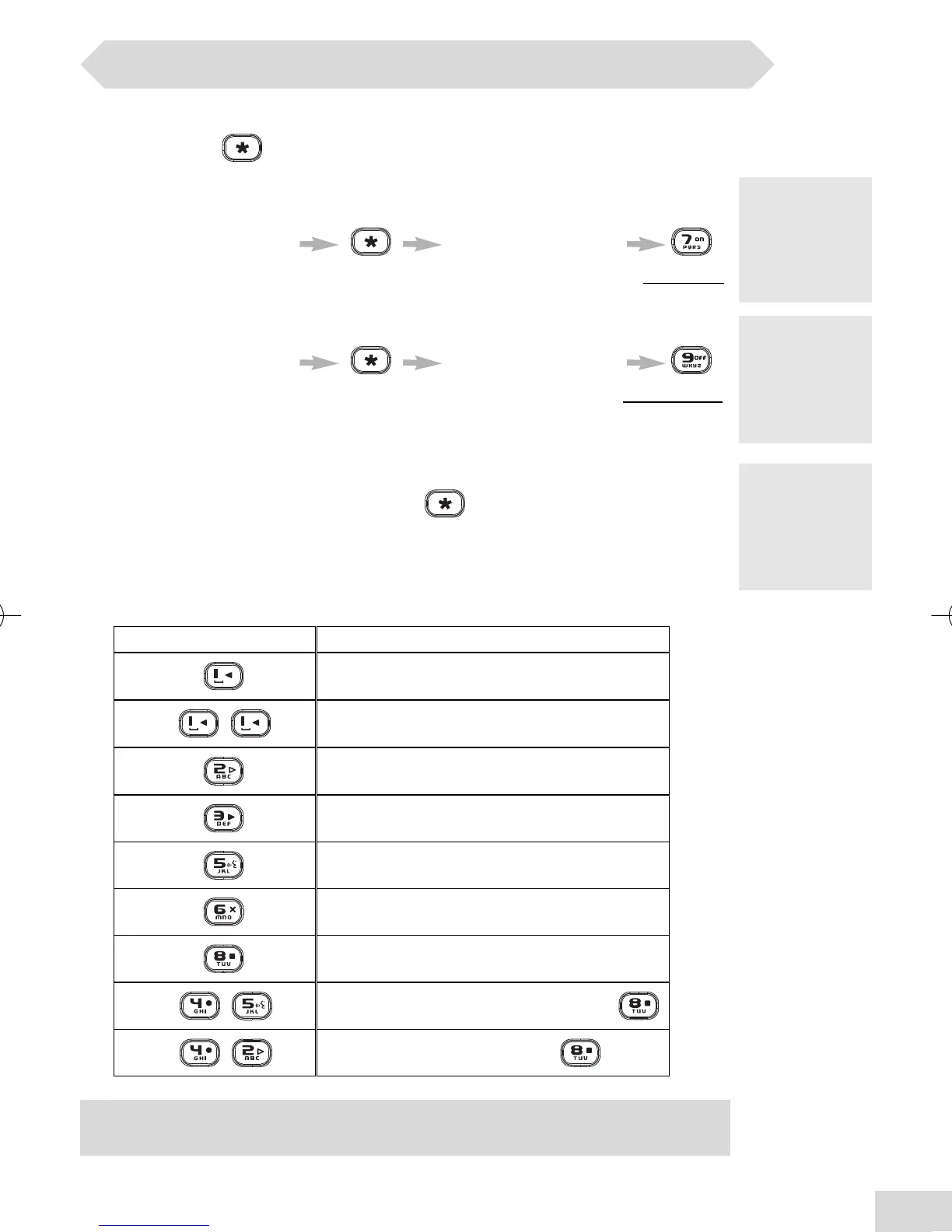
Remotely activating the answerphone
Dial your phone number enter the RC Code*
after 9 rings and a beep to activate
Remotely deactivating the answerphone
Dial your phone number enter the RC Code*
during the outgoing message to deactivate
Remotely accessing the answerphone
1. Dial your phone number**
2. During the outgoing message press and enter your remote
access code
Functions available during remote access
Keys Functions
Replay the message
Play the next message
Delete the current message
To record the outgoing message + press
To record a local memo + press
** You will
hear the
recorded
outgoing
message.
* or enter
your personal
Remote
Access Code
(see p 13).
RC
(Registration
Code) code is
written under
the base.
Remote access
Play the previous message
Play the message
Play the outgoing message
Stop playing message
Note: if you want to deactivate the remote use see note page 13 in “Changing
Remote Access Code”.
www.philips.com/faqs/dect
DECT 215 master UK indice 1.qxd 30/08/2004 15:44 Page 11



 To Next Page