10 FUNCTIONAL OVERVIEW
Functional overview
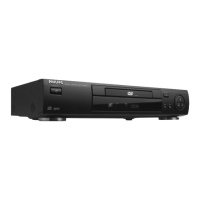
Front panel
9 STOP
- stops video/audio play
; PAUSE
- interrupts video/audio play or advances
to the next picture frame
/ OPEN/CLOSE
- opens/closes the disc tray
Disc tray
PLAY
PREV
STOP
NEXT
SOUND
OPEN
/
CLOSE
PAUSE
POWER ON/OFF
DVD 701
DVD/VIDEO CD/CD PLAYER
TRACKTITLESCANPAUSE
TIMETRACKTOTAL REM
CHAPTER
1 2 3 4 5 6 7 8 9 10 11 12 13 14 15
CD
REPEAT
SHUFFLE
F S
T
CHAPTERTITLE TRACK
V
-BA
. ........ . . . . .
+
SOUND
- selects Stereo, Dolby Surround or 3D-Sound
S
- PREVious title/chapter/track
2 PLAY
- starts video/audio play
T
- NEXT title/chapter/track
Display
- shows the current status of the player
Standby indicator - lights red when the player is in Standby mode
POWER ON/OFF - switches the player to ON or OFF


 To Next Page