5
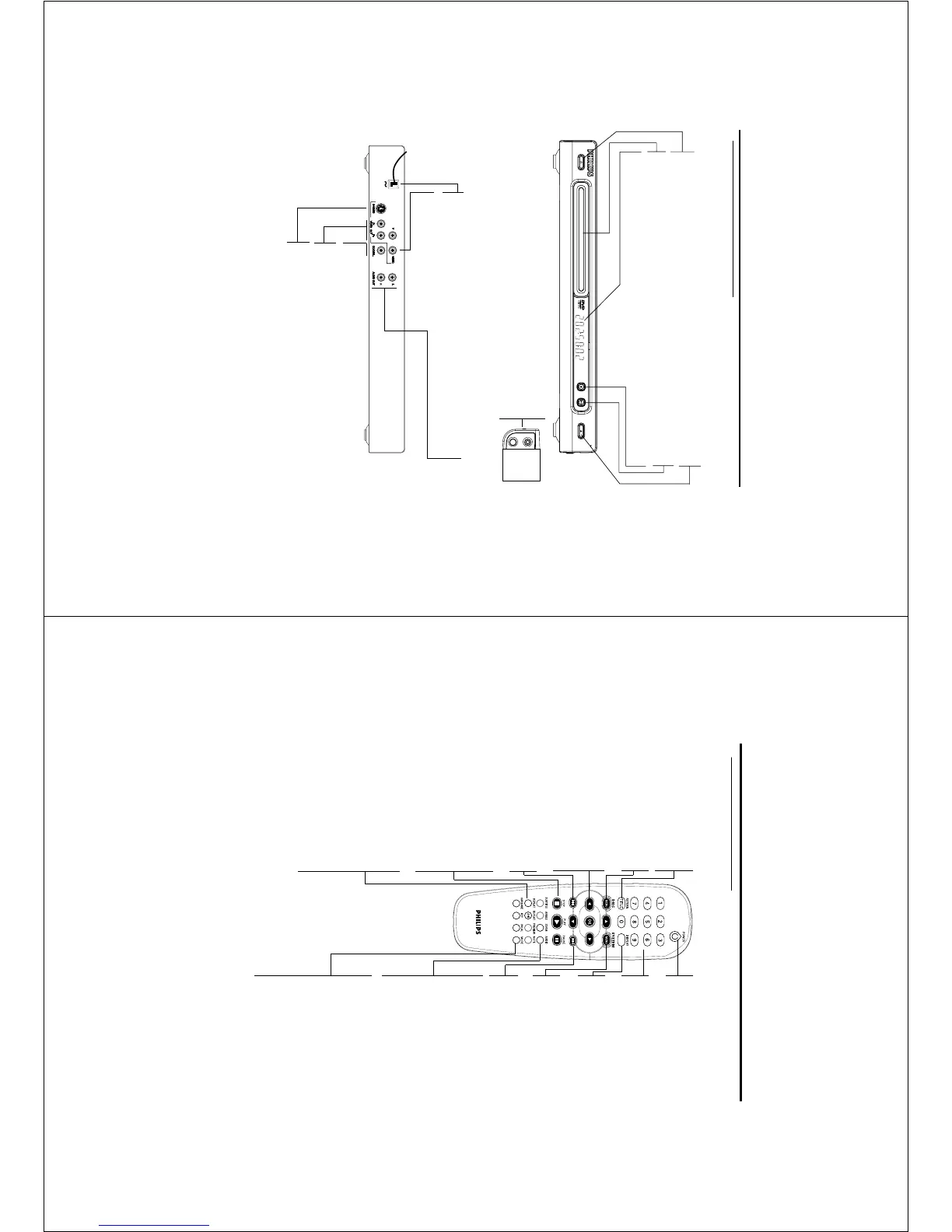
OPEN/CLOSE
STANDBY-ON
DVD625K DVD VIDEO PLAYER
KARAOKE
STOP
MIC
LEVEL
PLAY/PAUSE
Functional Overview
Front and Rear Panels
Mains Cord
– connect to power outlet
Video out (CVBS)
– connect to a TV with CVBS inputs
AUDIO OUT (Left/Right)
– connect to AUDIO inputs of an
amplifier, receiver or stereo system
Video out (S-Video)
– connect to a TV with S-Video inputs
Coaxial output
– connect to a receiver with coaxial inputs
Caution: Do not touch the inner pins of the jacks on the rear panel. Electrostatic
discharge may cause permanent damage to the unit.
STANDBY-ON
– switches DVD ON or to standby-on mode
Disc Tray
DISPLAY
– shows the current status of the player
/ OPEN/CLOSE
– opens/closes the disc tray
B PLAY/PAUSE
– starts/interrupts playback
9 STOP
– stops playback
Video out (Y Pb Pr)
– connect to a TV with component video inputs
MIC
– MIC socket for karaoke
LEVEL
– MIC volume control for karaoke
6
Functional Overview
Remote Control
RETURN / TITLE
– go back to previous menu /
show title menu
DISC MENU
– access menu of a DVD disc
/switch PBC on/off for VCD disc
1 2 3 4
– select an item in the menu/
fast forward/backward, slow
forward/backward
OK
– acknowledge menu selection
S
– go to a previous chapter or
track
STOP ( 9 )
– stops playback
PLAY ( B )
– starts playback
PAUSE ( ; )
– pause playback temporarily /
frame-by-frame playback
REPEAT
– repeat chapter, track, title, disc
REPEAT (A-B)
– repeat a specific segment
PREVIEW
– Preview the content of a track
or whole disc
MUTE
– Disable or enable sound output
POWER B
– switches DVD ON or to
standby-on mode
0-9 numerical key pad
– select numbered items in a
menu
DISPLAY
– display information on TV
screen during playback
SYSTEM MENU
– access or remove player’s
system menu
T
– go to next chapter or track
SUBTITLE
– subtitle language selector
/switch off subtitle
ANGLE
– select DVD camera angle
ZOOM
– change the size of image
AUDIO
– audio language selector
KARAOKE
– display Karaoke menu to set
MIC on or off
KEY
– display Karaoke menu to set
key control
VOCAL
– choose audio channels or
karaoke methods
MODE
– display karaoke menu
Note:
Press “STOP” for about 2 seconds to
OPEN or CLOSE disc tray.



 To Next Page