7
Basic Connections
● Please refer to the instruction books of your TV,
VCR, Stereo System or other devices as
necessary to make the best connections.
● Make one of the following connections,
depending on the capabilities of your existing
equipment.
The following guidelines are options for the best
picture and sound quality available on your DVD
player.
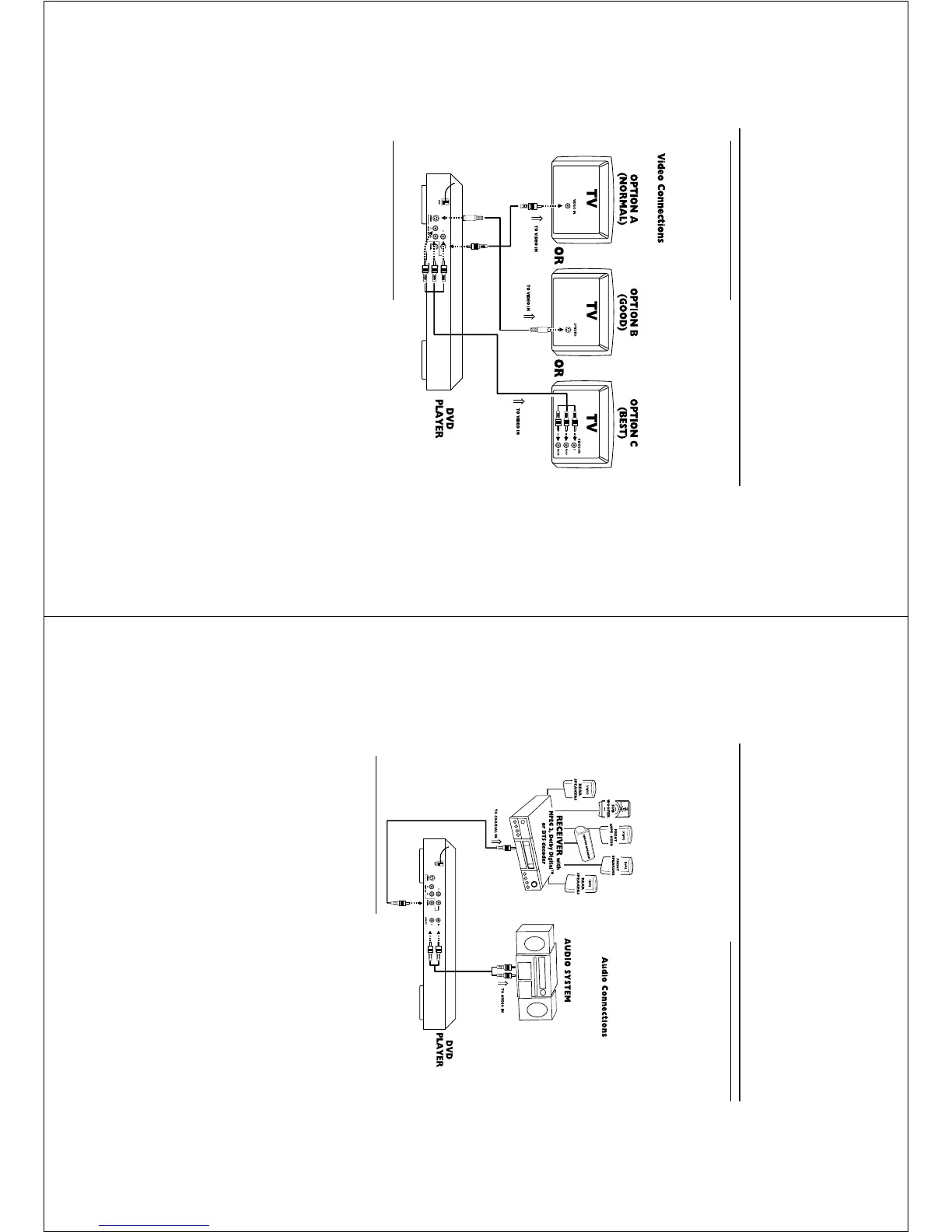
Connecting to a TV
If your TV has a CVBS Video input
connector,
0 Connect the CVBS VIDEO OUT jack on the DVD
player to the corresponding CVBS VIDEO IN jack
on your TV (cable supplied).
If your TV has a S-Video input connector,
0 Connect the S-Video OUT jack on the DVD
player to the corresponding S-Video IN jack on
your TV (not supplied).
If your TV has a Component video
(Y/P
b/Pr)input connector,
0 Connect the Y/Pb/Pr VIDEO OUT on the DVD
player to the corresponding connector on the TV
using the component video cable (not supplied).
Warning!
– Never make or change connections with
the power switched on.
– Connect the DVD player directly to your
TV, instead of eg. a VCR, to avoid
distortion because DVD video discs are
copy protected.
– Do not connect the DVD player AUDIO
OUT to PHONO IN of your player.
Preparation
8
Connecting to a Audio System
1
You can also listen to the sound of audio CDs and
DVD video discs by connecting to an optional
stereo systems.
2 Connect the Left and Right AUDIO OUT on the
DVD player to the Left and Right AUDIO IN on
the stereo systems.
Sound
1 Digital audio connections provide the clearest
sound. Connect one of the DVD player’s
COAXIAL DIGITAL AUDIO OUT to your
amplifier or receiver.
2 If digital connections are not possible, connect
the DVD player’s red and white AUDIO OUT
jacks to the left and right AUDIO IN jacks on
your amplifier, receiver, stereo or TV.
Connecting to Optional
Equipment
● A digital component with a built-in MPEG 2,
Dolby Digital™ or DTS decoder allows you to
enjoy the surround sound while producing the
effect of being in a movie theater or a concert
hall.
If your receiver has a Dolby Digital™,
MPEG 2 or DTS decoder,
Connect to A/V receiver with digital
coaxial cable
● Connect the DIGITAL COAXIAL AUDIO OUT
jack of the DVD player to the corresponding
input jack on the receiver using the normal audio
or video cable supplied.
Notes:
– If the audio format of the digital output does
not match the capabilities of your receiver, the
receiver will produce a strong, distorted sound or no
sound at all.
– To set the audio format of the current DVD in
the Setup Menu, refer to the chapter [ Setup
Menu].
-In this case, do not use the player's audio left and
right output.
Preparation



 To Next Page