English
11
Remote Control (continued)
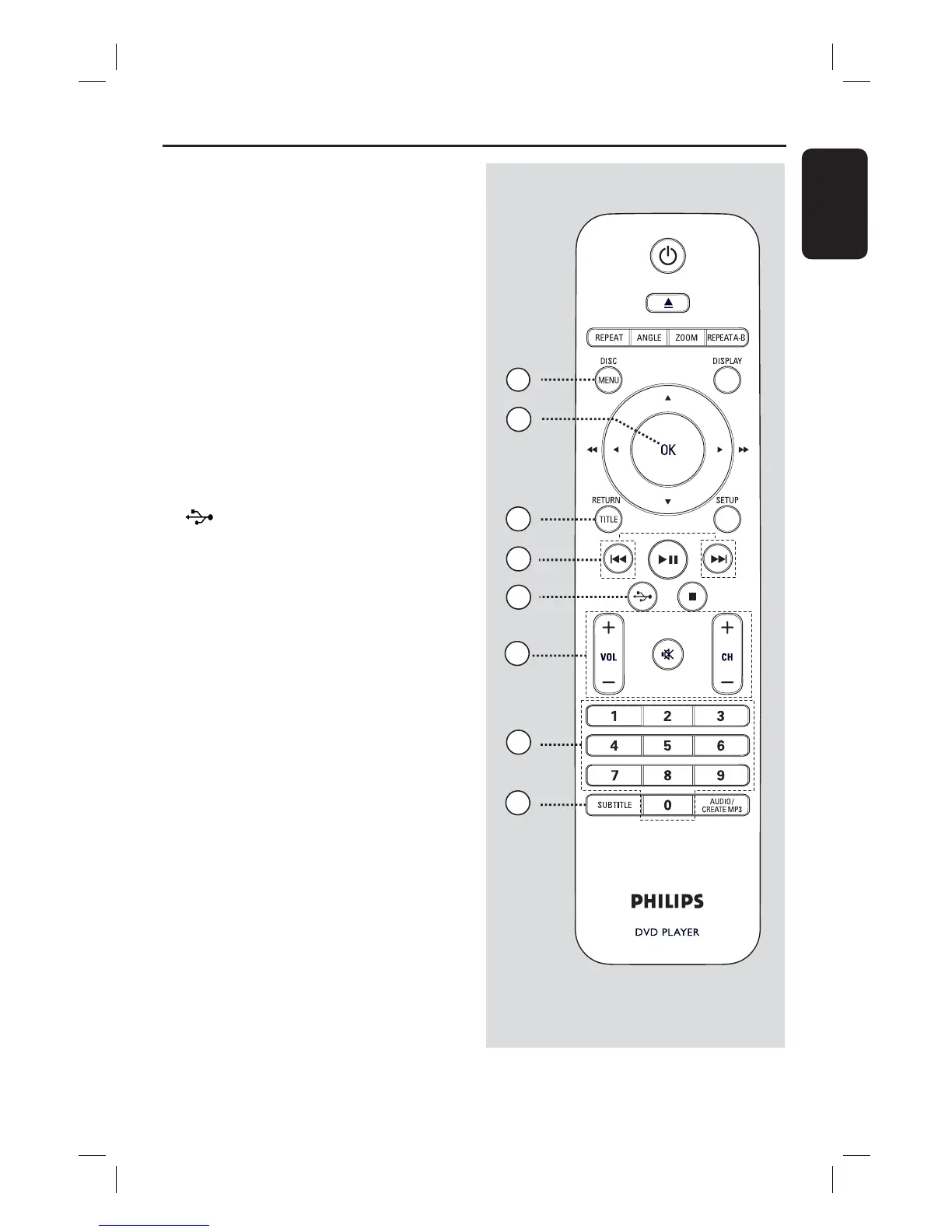
j
DISC MENU
– Enters or exits disc contents menu.
– For VCD 2.0 and SVCD, turns on or off
the playback control mode.
k OK
– Con rms an entry or selection.
l RETURN/TITLE
– Returns to the previous menu or shows
title menu
m ./ > (Previous/Next)
– Skips to the previous or next title/
chapter/track.
– Press and hold this button for fast
backward or forward search.
n (USB)
– Switches to USB mode and shows the
content of the USB device.
o VOL +/-
– Adjusts the TV volume.
% (Mute)
– Mutes or restores the volume.
CH +/-
– Selects the next or previous TV channel
or external input source (Video In
channel, etc)
* These buttons can only be used with
Philips TVs.
p Numeric keypad 0-9
– Selects a track or title number of the
disc.
q SUBTITLE
– Selects a DVD subtitle language.
16
17
11
12
15
13
14
10
dvp5990_5992_37_Eng1.indd 11dvp5990_5992_37_Eng1.indd 11 2008-03-10 10:47:21 AM2008-03-10 10:47:21 AM



 To Next Page