English
10
Remote Control
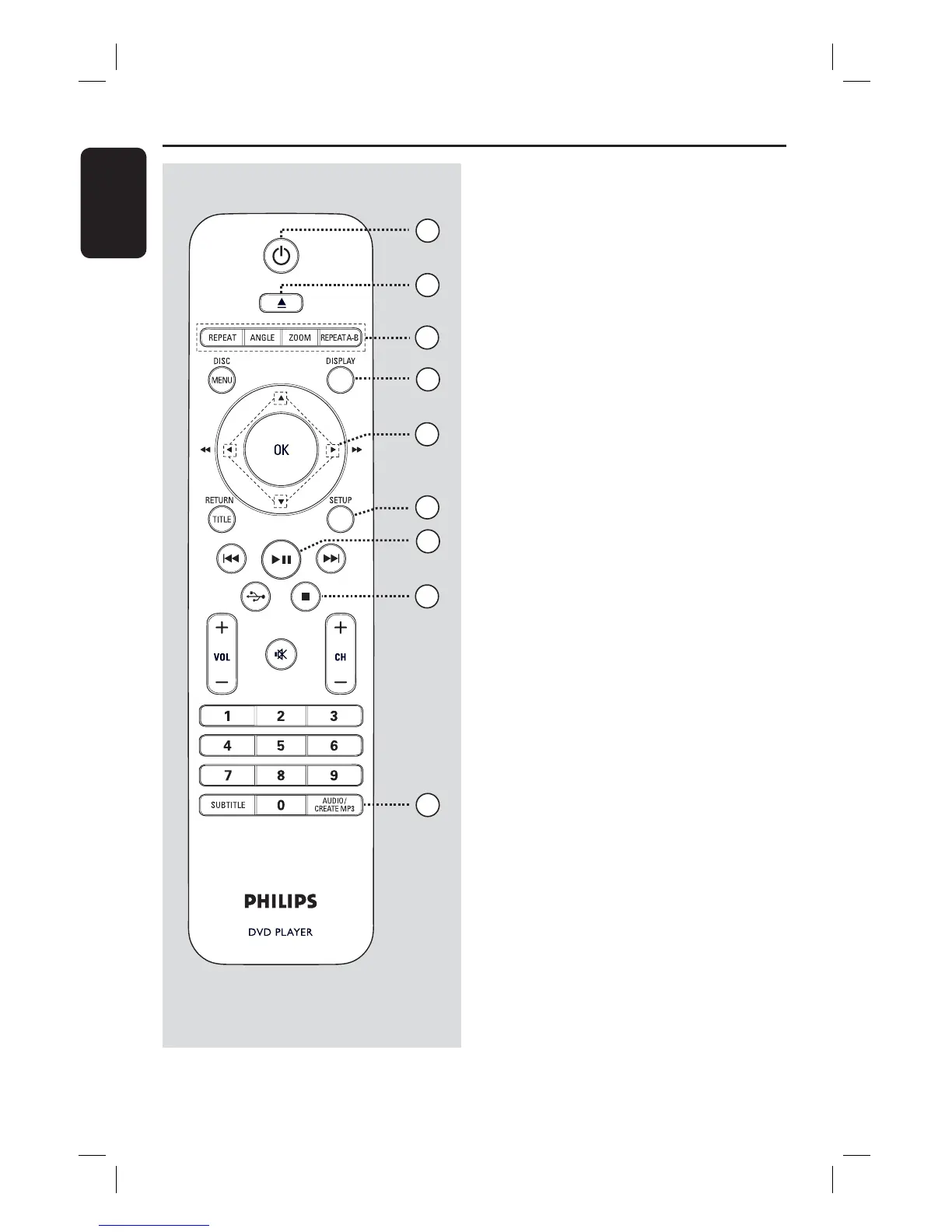
a 1 (Standby-On)
– Turns on this unit or turns off to normal
standby mode.
b ç (Open/Close)
– Opens/closes the disc tray.
c REPEAT
– Selects various repeat modes; turn off
repeat mode.
ANGLE
– Switches between different angles on
DVD.
ZOOM
– Zoom the picture on the TV.
REPEAT A-B
– Repeat a speci c section of a disc.
d DISPLAY
– Displays the current status or disc
information.
e
– Selects movement direction in the menu.
– Press up/down for a slow backward or
forward search.
– Press left/right for fast backward or
forward search.
f SETUP
– Enters or exits the disc setup menu.
g u (Play/Pause)
– Starts or pauses playback.
h
Ç(Stop)
– Stops playback.
i AUDIO/CREATE MP3
– Selects an audio language or channel.
– Access create MP3 menu.
4
3
6
7
9
8
1
5
2
dvp5990_5992_37_Eng1.indd 10dvp5990_5992_37_Eng1.indd 10 2008-03-10 10:47:21 AM2008-03-10 10:47:21 AM



 To Next Page