8239 210 98532
12
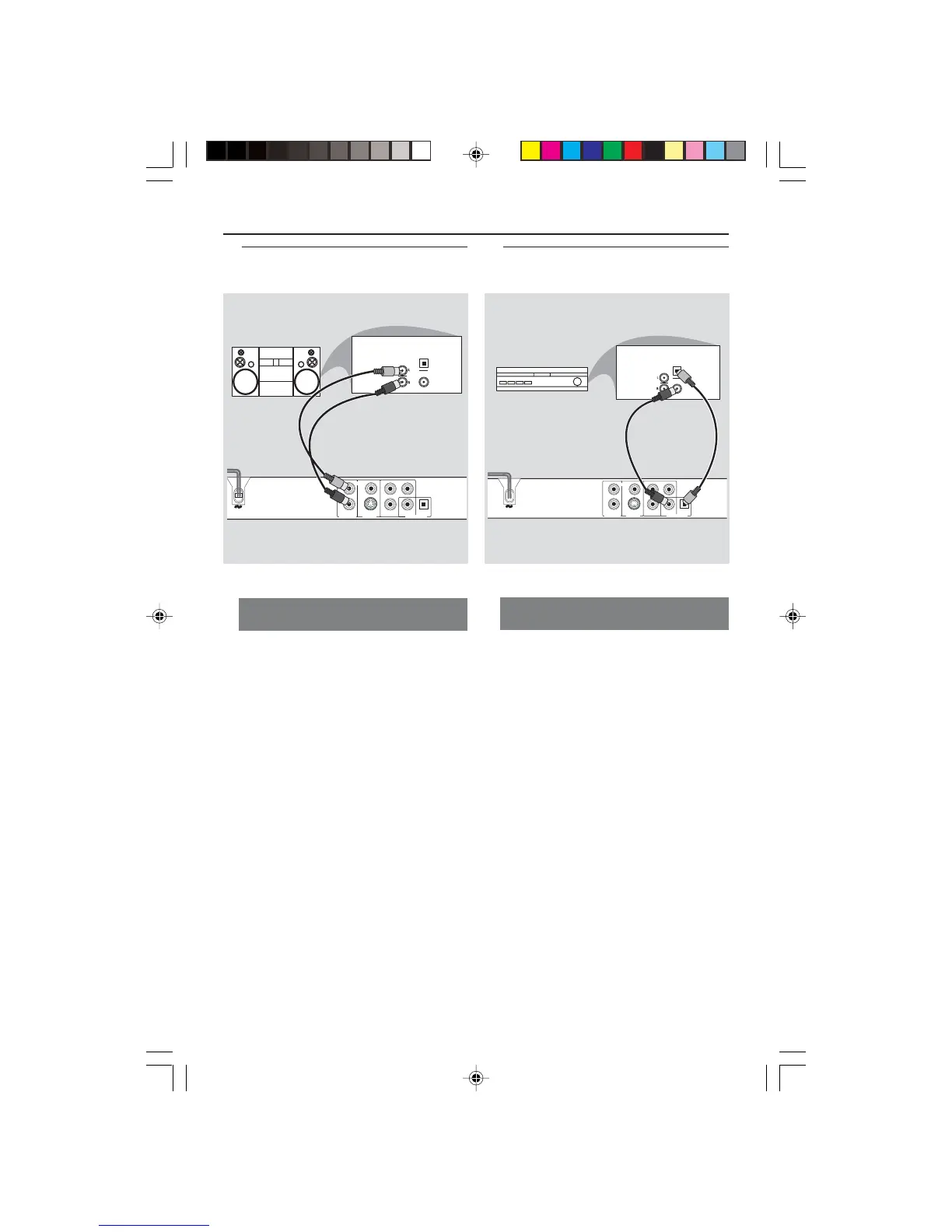
Stereo has Dolby Pro Logic or Right
/ Left Audio In jacks
1 Select one of the video connections to
your TV (CVBS VIDEO IN, S-VIDEO IN,
or COMPONENT VIDEO IN) depending
on the options available on your TV.
2 Use the audio cables (white/red) to
connect AUDIO OUT (L/R) jacks of
the DVD Player to the corresponding
AUDIO IN jacks on the stereo (cable
supplied).
3 Set the DVD Player’s Downmix to ‘Stereo’
for simple Right/Left AUDIO IN jack or
‘LT/RT’ for Dolby Pro Logic decoding. (see
page 27 “Downmix”).
Connections
L
R
AUDIO OUT
VIDEO
OUT
S-VIDEO
OUT
Pr
Pb
Y
DIGITAL OUT
COAXIAL OPTICAL
AUDIO
IN
STEREO
DIGITAL
OPTICAL
Optional: Connecting to an
Audio System
Optional: Connecting to a Digital
Receiver
Receiver has a PCM, Dolby Digital,
or MPEG2 decoder
1 Select one of the video connections to
your TV (CVBS VIDEO IN, S-VIDEO IN,
or COMPONENT VIDEO IN) depending
on the options available on your TV.
2 Connect either the COAXIAL or
OPTICAL jack of the DVD Player to the
corresponding Digital Audio In jack on
your Receiver (cable not supplied).
3 Set the DVD Player’s Digital Output to
PCM-ONLY or ALL depending on the
capabilities of your Receiver (see page 27
“Digital Output”).
Helpful Hint:
– If the audio format of Digital Output
does not match the capabilities of your
receiver, the receiver will produce a strong,
distorted sound or no sound at all.
01-40 DVP640_US5_pt2 (OK) 17/03/2004, 5:23 PM12



 To Next Page