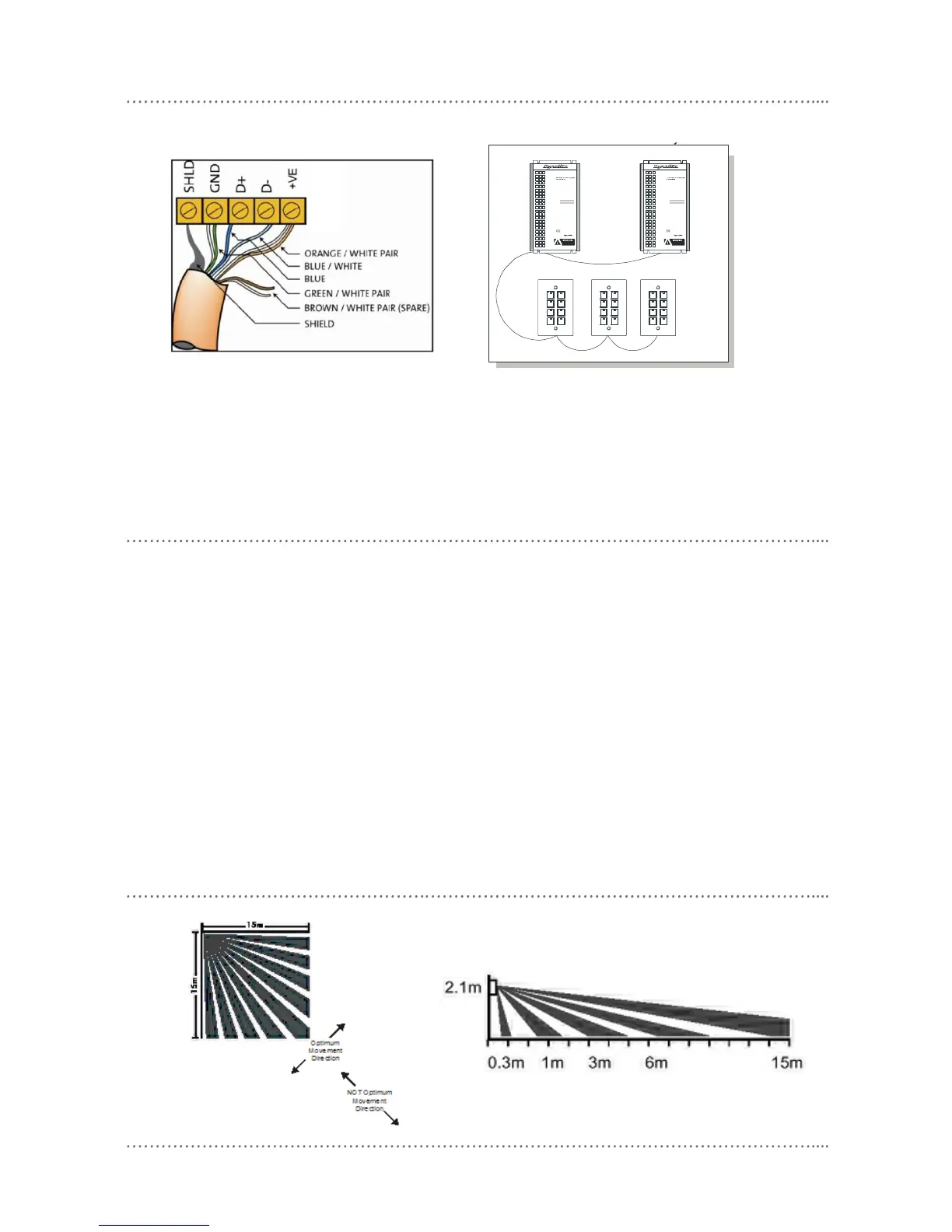
connecting data cable
DUS704W Installation Manual Rev G.doc 3
motion detection mounting location
• Fix the sensor to a firm section of wall
• Position the sensor so it is between 1.1 and 3.1 metres from the floor. Optimum height for the sensor is 2.1
metres.
• Slide the circuit board up or down so the marker on the housing matches up with the installed height on the
scale provided on the right hand side of the circuit board.
• Position the sensor so it is at least 2 metres away from electrical lighting such as neon and fluorescent
lights.
• Position the sensor as to avoid exposing it to direct sunlight and heating / cooling sources.
• Keep data cables away from electrical wiring.
• Select a location where persons are more likely to walk across the detection “fingers” rather than into them
(see diagram below).
• For programming instructions refer to Dynalite Tech Note – Setting up Motion Detection functions.
motion detection lens pattern
INSTALLATI ON DETAILS
DIMTEK 11 0
INPUT: 230 V 5 0-60Hz 10 A
OUTPUT: 1 x 230V 10A
MOUNT VERTIC ALLY
AGAINST WA LL
ENSURE G OOD VENTILATION
FOLLOW INSTAL LATION
INSTRUCTIO NS
Unit 6-119 /133 McE VOY St. Alexandria
NSW 2015 AUSTRALIA
Manufactured by:
ISOLATE FROM
MAINS SUPPLY BEFORE
REMOVING THIS COVER
NO USER SERVICEABLE PARTS INSIDE
SERVICE BY QUALIFIED PE RSONNEL ONLY
INSTALLATI ON DETAILS
DIMTEK 11 0
INPUT: 230 V 5 0-60Hz 10 A
OUTPUT: 1 x 230V 10A
MOUNT VERTIC ALLY
AGAINST WA LL
ENSURE G OOD VENTILATION
FOLLOW INSTAL LATION
INSTRUCTIO NS
Unit 6-119 /133 McE VOY St. Alexandria
NSW 2015 AUSTRALIA
Manufactured by:
ISOLATE FROM
MAINS SUPPLY BEFORE
REMOVING THIS COVER
NO USER SERVICEABLE PARTS INSIDE
SERVICE BY QUALIFIED PE RSONNEL ONLY
Connect Data Cable in a "Daisy Chain"
serial cable permanent connectors
connect data cable in a “daisy chain”
Recommended Cable Colours
Green/White Pair paralleled for GND
Orange/White Pair paralleled for +VE
Blue/White Pair Blue for DATA
White for DATA-
Recommended Cable Types
Belden: 9503
Garland: MCP3S
Hartland: HCK603
M&M Cable: B2003CS
Dynalite: DYNET-STP-CABLE












 To Next Page