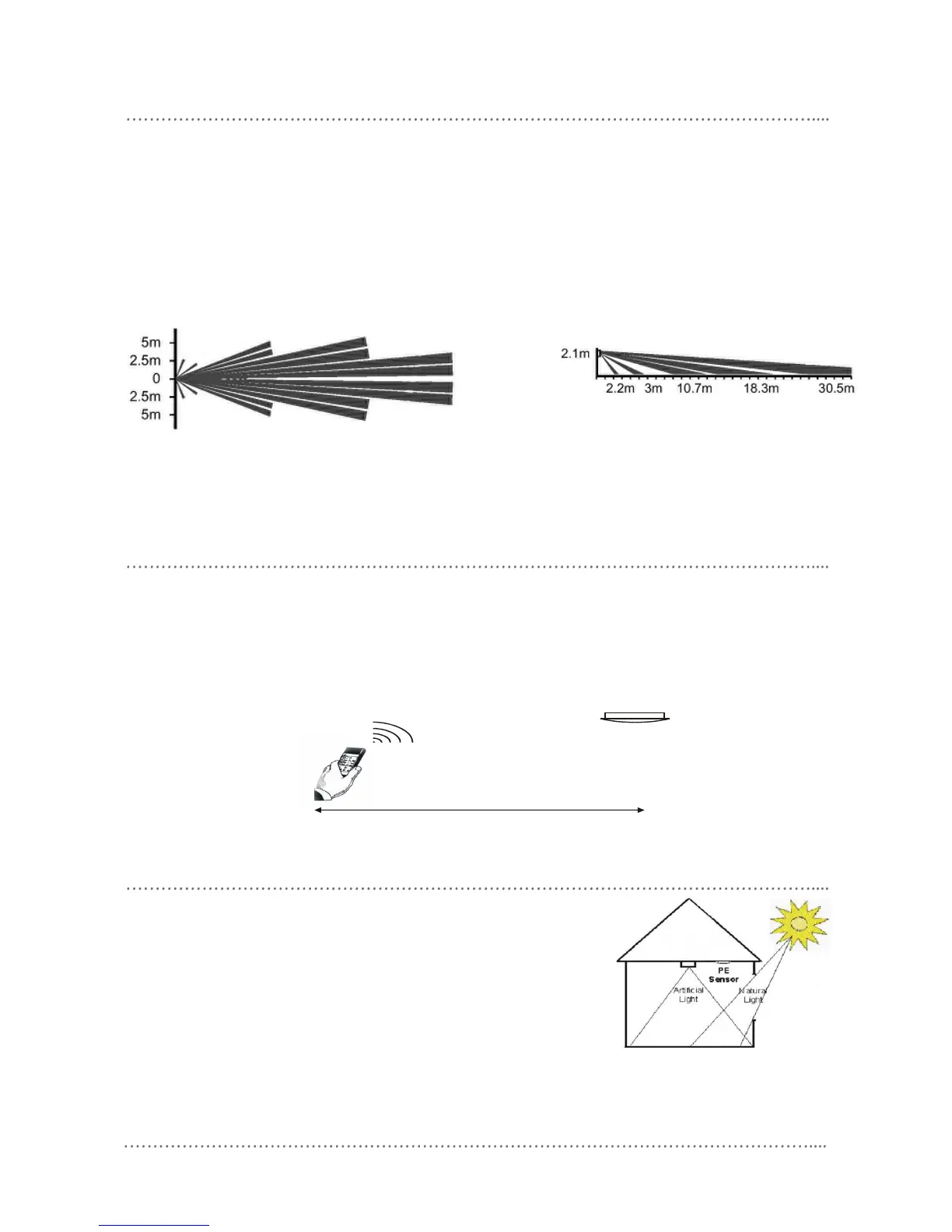
optional motion detector lens
4 DUS704W Installation Manual Rev G.doc
In addition to the supplied Wide Angle lens, An option for a long range lens is available for corridor
applications:
• DUS704W Long Range – Useful for monitoring a long thin space such as a corridor.
Contact your local supplier for more details
infrared receiver mounting location
• Position the sensor so it is within 6 meters of the intended operating positions of the infrared transmitter
• Position the sensor so it is not directly exposed to light, especially incandescent and sunlight, both of which
can substantially reduce IR range
• Keep data cables away from electrical wiring
photo electric cell mounting location
• Position the sensor so it “sees” a combination of artificial light and natural
light
• Position the sensor so it is not directly exposed to artificial light or sunlight
• Keep data cables away from electrical wiring
• For programming instructions refer to Dynalite Tech Note - Setting up PE
functions











 To Next Page