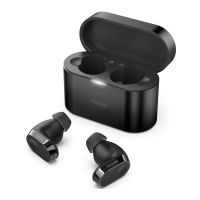
5 Reset the
earpieces
6 Technical data
Note
Specifications are subject to change without
notice.
Music time — ANC enabled: 5 hours
| ANC disabled with Bluetooth: 6
hours
Talk time — ANC enabled: 5 hours |
ANC disabled: 6 hours
Standby time — 200 hours
Charging time: 1.5 hours
Lithium-ion battery 55 mAh on each
earpiece, Lithium-ion battery 560
mAh on charging box
Bluetooth version: 5.0
Compatible Bluetooth profiles:
• HSP (Hands-Free Profile-HFP)
• A2DP (Advanced Audio Distri-
bution Profile)
• AVRCP (Audio Video Remote
Control Profile)
Supported audio codec: SBC, AAC
Frequency range: 2.402-2.480 GHz
Transmitter power: < 10 dBm
Operating range: Up to 10 meters (33
feet)
Auto power off
USB-C port for charging
Wireless charging
Low battery warning: available
T1
Tap & hold multi-function touch for
>25s on each earpiece individually.
To pair the headset with a Blue-
tooth device, Earpiece put back to
charging box to power off. Open
the top cover from charging box,
press and hold the pairing button
from charging box back for approx-
imately 3 seconds. Then, turn on
the Bluetooth function of your
Bluetooth device, select Philips T1.


 To Next Page