EasyManua.ls Logo

Philips FW-P88 - User Manual

Philips FW-P88
31 pages
Print Icon
To Next Page IconTo Next Page
Loading...
3139 116 19611
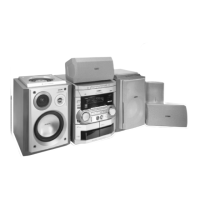
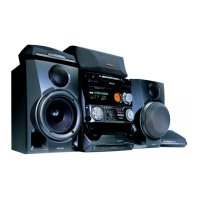
Mini Hi-Fi System
FW-
P88
with 3 CD changer
pg 01-31/P88/22-Eng 3/6/00, 1:26 PM1

Other manuals for Philips FW-P88

Questions and Answers

  • M
    Mary TannerAug 20, 2025
    How to improve radio reception on Philips FW-P88?
    • B
      bryantarthurAug 20, 2025
      To improve radio reception on your Philips Stereo System: * Adjust the antenna. * Connect an external antenna for better reception. * Separate the stereo system from the TV or VCR, as they may interfere with the signal.
  • M
    maria53Aug 22, 2025
    What to do if my Philips Stereo System has no sound?
    • J
      Jessica BryantAug 22, 2025
      If your Philips Stereo System has no sound, there could be several reasons: * The volume might be too low, so adjust the volume. * Headphones might be connected, so disconnect them. * Speakers might not be connected properly, so check the speaker connections. * The stripped speaker wire might not be clamped, so ensure it is.
  • L
    Luis SuttonAug 25, 2025
    Why is my Philips Stereo System remote not working?
    • C
      Carl SilvaAug 25, 2025
      If your Philips Stereo System remote isn't working, consider these possibilities: * The wrong source might be selected. Select the correct source (CD, TUNER, etc.) before using the remote functions. * You might be too far from the system. Reduce the distance. * The batteries might be inserted incorrectly. Check the polarities (+/– signs) and correct if needed. * The batteries might be dead. Replace them with new ones.
  • M
    Michael YoungAug 26, 2025
    What to do if my Philips FW-P88 displays 'NO DISC'?
    • S
      Shannon HallAug 26, 2025
      If your Philips Stereo System displays 'NO DISC', it could be due to several reasons: * The disc might be inserted upside down, so place the CD with the printed side up. * There might be moisture condensation on the lens, so wait until the lens adjusts to normal room temperature. * There might be no disc in the CD tray, so insert a CD. * The CD might be dirty, badly scratched, or warped, so clean or replace the CD. * The CD lens might be dirty or dusty. See section under Maintenance (page 30).
  • C
    Christie SuttonAug 27, 2025
    What to do if Philips Stereo System buttons are not responding?
    • V
      Veronica WrightAug 27, 2025
      If your Philips Stereo System isn't responding to button presses, it might be due to electrostatic discharge. Try switching the system off by pressing STANDBY ON, remove the AC power plug from the wall outlet, then reconnect the power plug and switch the system back on.
  • K
    Krystal AcostaAug 29, 2025
    Why is the timer not working on my Philips FW-P88?
    • N
      nicholas97Aug 29, 2025
      If the timer on your Philips Stereo System isn't working: * The clock might not be set, so set the clock. * The timer might not be switched on, so press TIMER ON/OFF. * Recording might be in progress, so stop recording.
  • D
    David GordonAug 31, 2025
    What does 'DISC NOT FINALIZED' mean on my Philips FW-P88?
    • X
      xthompsonAug 31, 2025
      If your Philips Stereo System displays 'DISC NOT FINALIZED', it means: * The CD-RW or CD-R disc is not properly recorded for use with a standard CD player. Read the instruction booklet of your CD-Rewritable or CD-Recorder on how to finalize a recording. * The CD is badly scratched or dirty. Replace or clean the CD.
  • M
    Melissa BurkeSep 2, 2025
    Why is the left and right sound reversed on my Philips Stereo System?
    • F
      Frederick AlexanderSep 2, 2025
      If the left and right sound is reversed on your Philips Stereo System, the speakers are likely connected wrongly. Check the speaker connections and location.
  • X
    xwilliamsSep 4, 2025
    Why does the clock setting erase on my Philips FW-P88?
    • X
      xgouldSep 4, 2025
      If the clock setting on your Philips Stereo System is erased, it's likely due to a power failure. Reset the clock.
  • J
    Jerry SampsonSep 6, 2025
    Why is there a lack of bass on Philips FW-P88?
    • R
      Robert KingSep 6, 2025
      If you're experiencing a lack of bass sound or imprecise location of musical instruments with your Philips Stereo System, the speakers are likely connected wrongly. Check the speaker connection for proper phasing, colored/black wires to colored/black terminals.

Summary

Important U.K. Usage Notes

Mains Plug Safety and Wiring

Instructions for fuse replacement and proper plug connection.

System Information and Safety

General System Details and Safety Precautions

Includes type plate, energy efficiency, and essential safety guidelines.

Dolby Pro Logic System Setup

Speaker Configuration and Calibration

Connecting and positioning speakers, adjusting levels for optimal surround sound.

System and Remote Controls Overview

Control Functions and Layouts

Detailed explanation of front panel buttons and remote control functions.

Operating the System

Sound Customization and Volume

Adjusting volume, personal settings, DSC, VEC, bass, and treble.

Recording Procedures

Clock and Timer Functions

Philips FW-P88 Specifications

General IconGeneral
TypeMini Hi-Fi System
Disc PlaybackCD
TunerYes
Speakers includedYes
Cassette DeckYes

Related product manuals