Need help?
Do you have a question about the Philips HDTP 8530 and is the answer not in the manual?
Guidance on optimal placement for safe operation and ventilation.
Critical warnings and safety precautions to avoid electric shock and hazards.
Safety guidelines for handling and storing batteries for the remote control.
Advice on preventing electromagnetic interference with the recorder's operation.
Precautions for safe operation and data integrity of the internal hard disk drive.
Guidelines for safely connecting and disconnecting USB storage devices.
Instructions on how to clean the recorder's exterior casing safely.
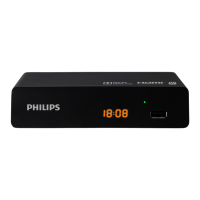
Identification and description of controls and displays on the front panel.
Identification and description of connectors and ports on the rear panel.
Guide for connecting the recorder to a terrestrial antenna for signal reception.
Instructions for connecting the recorder to a television set via HDMI or SCART.
Steps to connect the recorder to a VCR or DVD recorder for signal transfer.
Guide to connect for enhanced audio experience with home cinema systems.
Instructions for connecting to a network for internet access and interactive services.
Explanation of how to navigate the recorder's menu system and use remote control keys.
Visual representation of the recorder's menu structure and options.
Steps to set up parental controls, including creating a parental code.
Process for searching and saving available FREEVIEW TV and radio channels.
Instructions for selecting the correct geographical region for optimal service.
Methods for changing channels using numeric keypad, P+/P- buttons, or the channel list.
How to display and interpret the on-screen program information banner.
Accessing extended information about current and upcoming programmes.
How to display a second program in an inset window simultaneously.
Controls for adjusting volume, mute function, and understanding Scart output audio behavior.
Steps to switch between main and custom favourite channel lists.
How to change audio, subtitle, and AD settings temporarily.
Guide to enable and use the audio description feature for visually impaired users.
Accessing Teletext, news, and interactive services.
How to switch between TV and AUX signals on the SCART output.
Navigating and using the TV Guide for programme information and recording scheduling.
Using the time-shift buffer to pause, rewind, and fast-forward live TV.
How to record live programmes and schedule recordings from the TV Guide.
Accessing and playing recorded programmes from the recording library.
Steps to schedule recordings using the Recording Schedule menu.
How to start recording a live or deferred programme instantly.
Modifying or deleting existing scheduled recordings.
Recording specific programmes or series directly from the TV Guide.
Actions for managing recorded content, including information, locking, and sorting.
How to view recordings locked with a parental code.
Creating and organizing recordings into folders for better management.
Steps to delete selected recordings from the recording list.
How to rename recordings or folders using the on-screen virtual keypad.
Transferring selected recordings into an existing folder.
Steps to access the Media Player via USB or DLNA server.
How to browse folders, files, and use controls within the Media Player.
How to view JPEG photos, including slideshow functionality.
How to play MP3 audio files and use playback controls.
How to play MPEG and MP4 video files with playback controls.
Managing media files by importing to HDD or exporting to USB.
Performing automatic searches for FREEVIEW channels.
Detailed steps for manually searching channels by frequency or modulation.
Options for managing channel lists, creating favourites, and locking channels.
Setting up receiver lock, hiding adult channels, and parental guidance.
Procedure to change the existing parental code for security.
Customizing banner time-out, skip value, network monitoring, and recording type.
Selecting preferred audio and subtitle languages, and activating Audio Description.
Configuring digital audio output, audio/video sync, and volume adjustments.
Adjusting display mode, HD resolution, Scart output, and video standard.
Configuring RF loop-through, aerial power, and sleep timer settings.
Restoring factory defaults and formatting the hard disk drive.
Checking signal level and quality of the antenna.
Displaying network details like IP address when connected to Ethernet.
Accessing software and hardware information about the recorder.
Retrieving information about the recorder's hard disk drive.
Finding information for technical advice and support.
Explanation of recycling and disposal symbols found on the product and packaging.
Guidance on how to recycle and dispose of the product and its components responsibly.
Information on the WEEE directive and product take-back policies.
Compliance with RoHS directive regarding hazardous substances.
Recommendations for reducing electricity consumption.
Frequently asked questions and their solutions for common recorder issues.
Solutions to common problems encountered during recorder operation.
Process for updating recorder software via 'over the air' or USB, and error code explanations.
Technical details of the tuner and demodulator front end.
Specifications for Ethernet and USB ports.
Information on the recorder's CPU, RAM, and flash memory.
Details on the hard disk drive capacity and operational noise.
Supported video formats and decoding capabilities.
Supported audio formats and decoding capabilities.
Supported video output resolutions for HD and SD broadcasts.
SCART configuration options for TV and recorder setups.
Specifications for the HDMI 1.3 output, including video and audio support.
Details on HiFi audio output and Coax S/PDIF connections.
List of components and connectors on the front panel.
List of connectors and ports on the rear panel.
Specifications for the external AC/DC power adapter.
Dimensions, weight, and operating/storage temperature of the recorder.
List of included accessories with the recorder.
Important note regarding applying the guarantee and contacting support.
Conditions under which the guarantee may not apply, such as misuse or external damage.
 General
| Brand | Philips |
|---|---|
| Model | HDTP 8530 |
| Category | TV Receiver |
| Language | English |


 To Next Page