Need help?
Do you have a question about the Philips DTR220 and is the answer not in the manual?
Guide on connecting the set top box to a TV for initial viewing.
Instructions for connecting the set top box to both a TV and a VCR.
Details important safety precautions for operating the device.
Diagrams illustrating connections to TVs, DVD players, and audio equipment.
Steps for the first-time installation and automatic channel search.
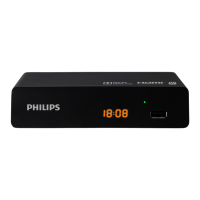
Identifies the components of the set top box and remote control.
Instructions for connecting and using the power supply adaptor.
Guidance on how to operate the set top box using the remote control.
How to view, select, and change channels using the channel list.
Setting timers for recording or switching the device on/off.
Performing a full scan to find all available TV and radio channels.
Setting up PIN codes for device access and menu protection.
A table listing common issues and their remedies.
 Tuner/Reception/Transmission
| DVB | Terrestrial |
|---|---|
| Demodulation type | COFDM 2K/8K, MPEG-2 |
| Input frequency range | 174-862 MHz |
Connectivity| Terrestrial antenna interface | RF in, IEC 169-2, RF out, (bypass) IEC 169-2 |
|---|---|
| TV scart out | CVBS, RGB, Audio L/R |
| Audio Output - Digital | Coaxial (cinch) |
Video Decoding| Compression Format | MPEG-2 MP@ML (std definition) |
|---|---|
| Resolution | up to 720 x 576 interlaced |
| Aspect Ratio | 16:9, 4:3 Letterbox, 4:3 Pan Scan |
Audio Decoding| Compression format | MPEG layer I/II |
|---|---|
| Sound system | Dolby Digital Bitstream out, Stereo, Mono |
System Specifications| Flash memory size | 2 MB |
|---|---|
| Ram size | 8 MB SDRAM |
 Power
Power| Mains power | 230V AC/50Hz to 12V DC |
|---|---|
| Power consumption | 7 W |
| Standby power consumption | 5 W |
 Weight and Dimensions
| Product dimensions (W x H x D) | 199.4 x 33.4 x 95.1 mm |
|---|---|
| Carton dimensions (WxDxH) | 285 x 195 x 58 mm |
| Weight | 0.4 kg |

 To Next Page