16
C Game console 2:
Connect the AV output sockets on
the other game console to the AV2
IN (VIDEO L - AUDIO - R) sockets.
2 Connect the video input socket on the
TV to the VIDEO OUT socket with the
supplied yellow composite cable.
AUDIO VIDEO
AUDIO OUT
L
R
AUDIO VIDEO
AUDIO OUT
L
R
AUDIO VIDEO
AUDIO OUT
L
R
AUDIO VIDEO
AUDIO OUT
L
R
Option 3: Connect devices through
this soundbar to the TV (advanced)
If you want to connect all the devices for use to
this soundbar and the TV has an available digital
output socket, follow these instructions.
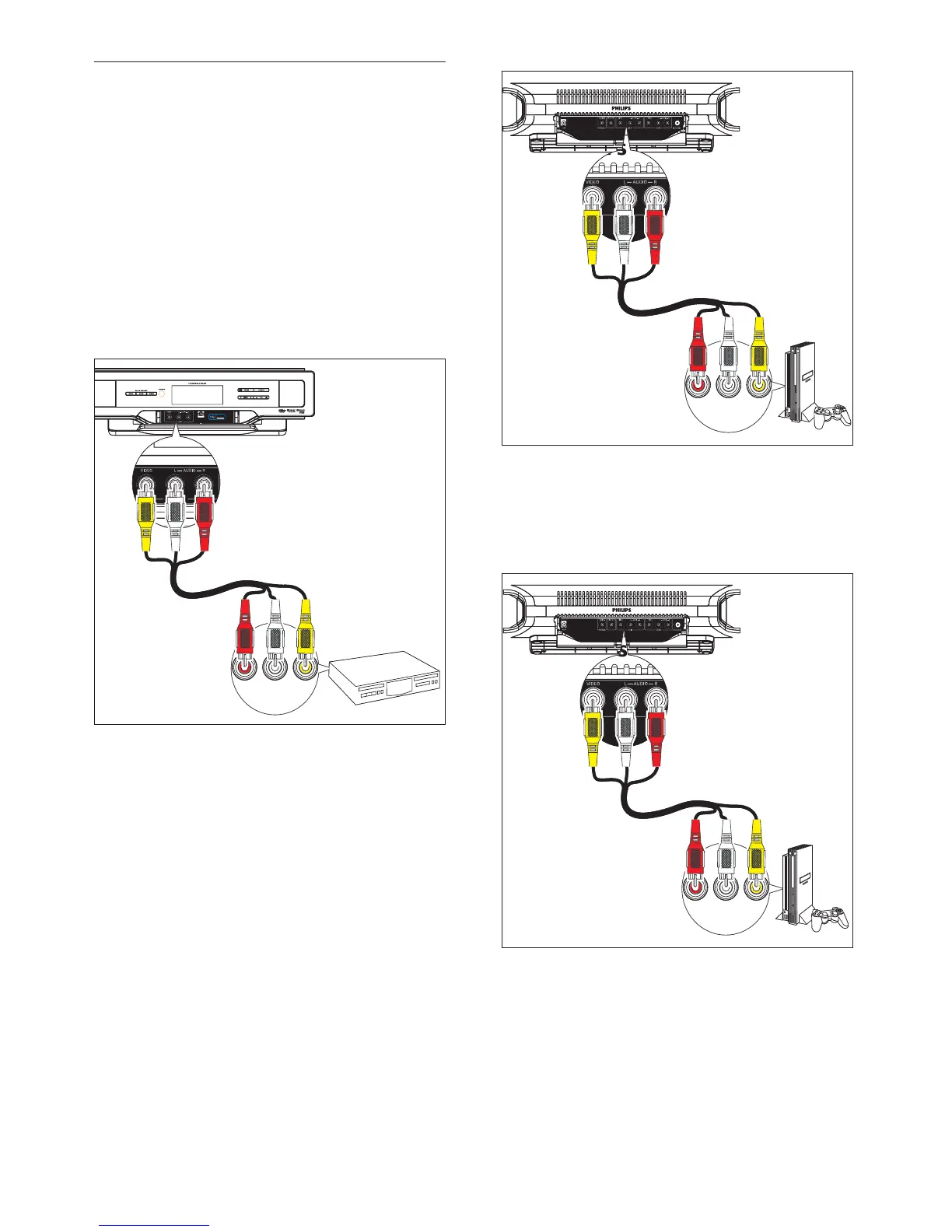
1 Connect the AV devices directly to the
soundbar:
A DVD player:
Connect the AV output sockets on
the DVD player to the AV FRONT
(VIDEO L-AUDIO-R) sockets.
B Game console 1:
Connect the AV output sockets on a
game console to the AV1 IN (VIDEO
L - AUDIO - R) sockets.
AUDIO VIDEO
AUDIO OUT
L
R
AUDIO VIDEO
AUDIO OUT
L
R
EN










 To Next Page