19
EN
2 Your home
theater
Congratulations on your purchase, and
welcome to Philips! To fully benet from the
support that Philips offers(e.g. notication
of product software upgrade), register your
product at www.philips.com/welcome.
Main unit
This section includes an overview of the main
unit.
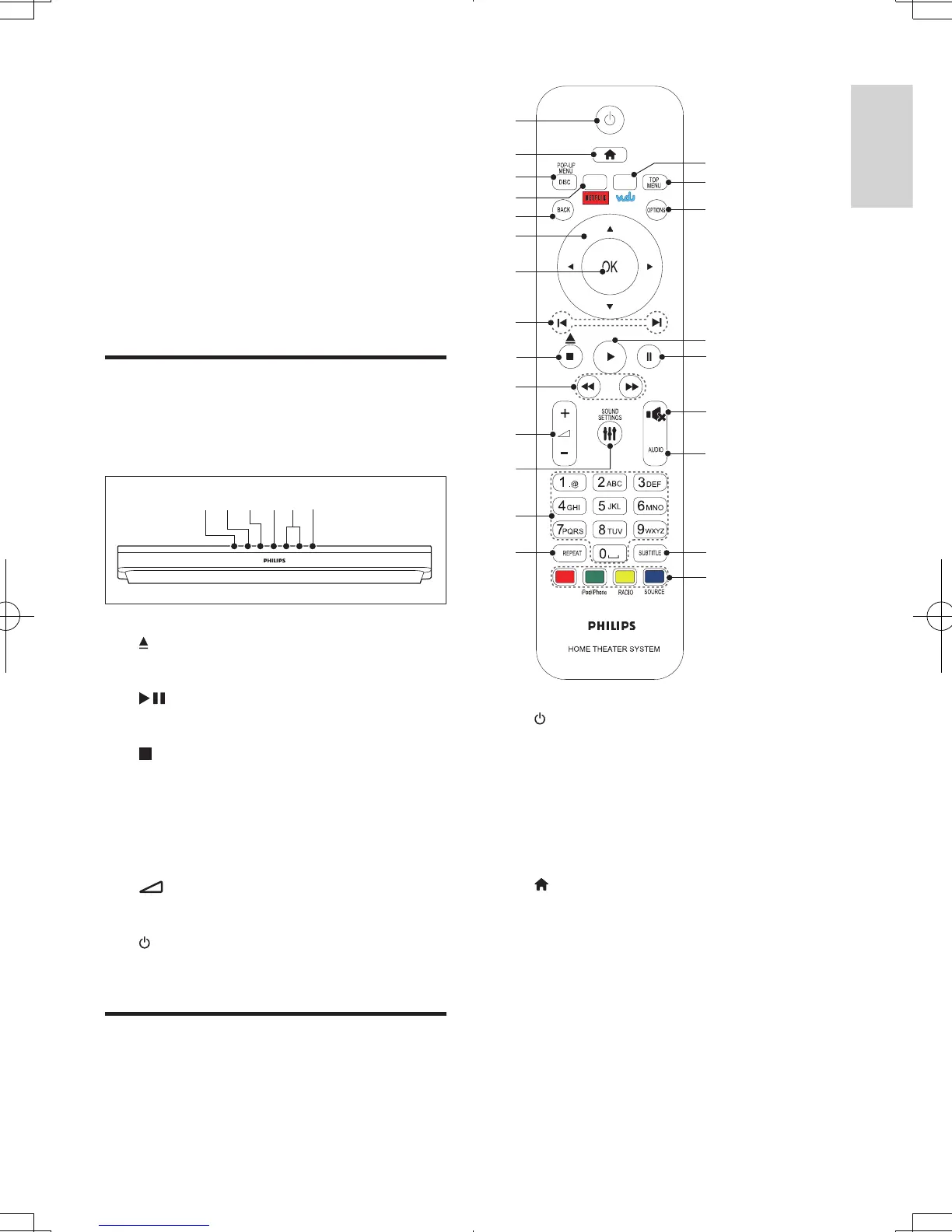
a (Open/Close)
Open or close the disc compartment.
b (Play/Pause)
Start, pause or resume play.
c (Stop)
Stop play.
d SOURCE
Select an audio, video, radio source or
Bluetooth mode for the home theater.
e +/- (Volume)
Increase or decrease volume.
f (Standby-On)
Switch the home theater on or to standby.
Remote control
This section includes an overview of the
remote control.
fa b c de
a (Standby-On)
• Switch the home theater on or to
standby.
• When EasyLink is enabled, press
and hold for at least three seconds
to switch all connected HDMI CEC
compliant devices to standby.
b (Home)
Access the home menu.
c DISC/POP-UP MENU
• Switch to disc source.
• Access or exit the disc menu when
you play a disc.
d NETFLIX
Access online videos and TV episodes from
Netix.
a
b
c
d
e
f
g
i
j
k
l
m
n
w
v
u
t
s
r
q
p
o
h
HTB5544D_F7_UM_V1.0.indb 19 2013/5/24 11:46:38



 To Next Page