6 EN
3 Your home
theater
Congratulations on your purchase, and
welcome to Philips! To fully benet from the
support that Philips offers(e.g. notication
of product software upgrade), register your
product at www.philips.com/welcome.
Remote control
This section includes an overview of the
remote control.
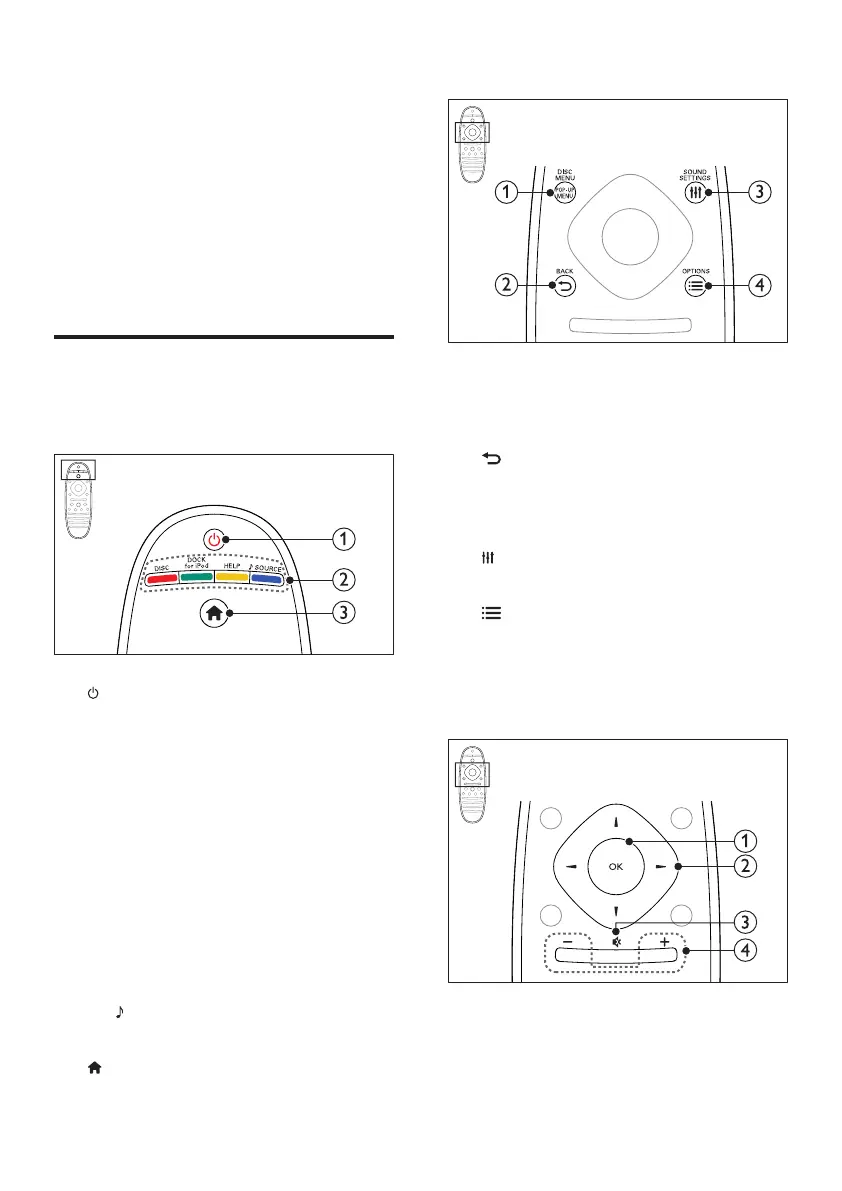
a (Standby-On)
• Switch the home theater on or to
standby.
• When EasyLink is enabled, press
and hold for at least three seconds
to switch all connected HDMI CEC
compliant devices to standby.
b Source buttons / Color buttons
• Color buttons: Select tasks or options
for Blu-ray discs.
• DISC: Switch to disc source.
• DOCK for iPod: Switch to Philips dock
for iPod or iPhone.
• HELP: Access the onscreen help.
•
SOURCE: Select an audio input
source or radio source.
c
(Home)
Access the home menu.
a POP-UP MENU/DISC MENU
Access or exit the disc menu when you
play a disc.
b
BACK
• Return to a previous menu screen.
• In radio mode, press and hold to erase
the current preset radio stations.
c
SOUND SETTINGS
Access or exit sound options.
d
OPTIONS
• Access more play options while playing
a disc or a USB storage device.
• In radio mode, set a radio station.
a OK
Conrm an entry or selection.


 To Next Page