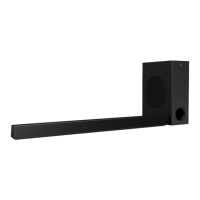
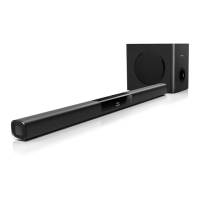
This document describes the Philips HTL3110B Soundbar speaker, a 3000 Series audio device designed to enhance your home entertainment experience. It features wireless connectivity, multiple audio inputs, and various sound modes to optimize your listening.
Function Description
The Philips HTL3110B is a soundbar speaker system that includes a main unit and a wireless subwoofer. It is designed to deliver high-quality audio from your TV and other connected devices, offering an immersive sound experience. The soundbar supports Bluetooth for wireless audio streaming, allowing you to play music from your mobile devices. It also features HDMI ARC connectivity for simplified setup with compatible TVs, and various digital and analog audio inputs for broader device compatibility. The wireless subwoofer automatically pairs with the soundbar, providing enhanced bass without the clutter of cables.
Important Technical Specifications
Amplifier:
- RMS Total output power: 120W RMS (+/- 0.5 dB, 10% THD)
- Frequency response: 20 Hz - 20 kHz / ±3 dB
- Signal-to-noise ratio: > 65 dB (CCIR) / (A-weighted)
- Input sensitivity (AUX): 900 mV
Audio:
- S/PDIF Digital audio input:
- Coaxial: IEC 60958-3
- Optical: TOSLINK
USB:
- Compatibility: Hi-Speed USB (2.0)
- Class support: USB Mass Storage Class (MSC)
- File system: FAT16, FAT32, NTFS
- Supported file formats: MP3 and WMA
- Sampling frequency (MP3): 8 kHz, 11 kHz, 12 kHz, 16 kHz, 22 kHz, 24 kHz, 32 kHz, 44.1 kHz, 48 kHz
- Sampling frequency (WMA): 44.1 kHz, 48 kHz
- Constant bit rate (MP3): 8 kbps - 320 kbps
- Constant bit rate (WMA): 32 kbps - 192 kbps
- WMA Version: V7, V8, V9
- USB port support: 5V ---, 1A
Bluetooth:
- Bluetooth profiles: A2DP, AVRCP
- Bluetooth version: 3.0 + EDR
Main unit:
- Power supply:
- Model (Philips branded AC power adapter): DYS602-210309W; AS650-210-AA309
- Input: 100-240 V~, 50/60 Hz 1.5 A
- Output: 21V ==, 3.09A
- Standby power consumption: ≤ 0.5 W
- Speaker impedance:
- Woofer: 8 ohm
- Tweeter: 16 ohm
- Speaker drivers: 2 x (90mm/3.5" x 34mm/1.3") woofer + 2 x 31mm/1.2" tweeter
- Dimensions (W x H x D): 843 x 52 x 60 mm
- Weight: 1.4 kg
Subwoofer:
- Power supply: 110-240 V~, 50-60 Hz
- Power consumption: 20 W
- Standby power consumption: ≤ 0.5 W
- Impedance: 4 ohm
- Speaker drivers: 1 x 134 mm (5.25") woofer
- Dimensions (W x H x D): 226 x 251 x 306 mm
- Weight: 3.9 kg
Remote control batteries:
Usage Features
Connectivity:
- HDMI OUT (ARC) - TO TV: Connects to the HDMI input on your TV, supporting Audio Return Channel (ARC) for simplified audio routing.
- DIGITAL IN-COAXIAL: Connects to a coaxial audio output on your TV or digital device.
- AUX IN (L/R): Connects to an analog audio output on your TV or analog device.
- DIGITAL IN-OPTICAL: Connects to an optical audio output on your TV or digital device.
- USB: For audio input from USB storage devices, software upgrades, and charging USB devices.
- Bluetooth: Wirelessly stream audio from Bluetooth-enabled devices (e.g., smartphones, tablets, laptops).
Sound Control:
- Volume Adjustment: Increase or decrease the overall volume. Mute function is also available.
- Sound Modes: Select from predefined sound modes to suit your content:
- AUTO: Automatically selects a sound setting based on the audio stream.
- POWERFUL: Ideal for action-packed videos and loud parties.
- BALANCED: Original sound of movies and music without added effects.
- BRIGHT: Adds effects to dull movies and music.
- CLEAR: Enhances detail in music and voices in movies.
- WARM: Provides comfort for spoken words and music vocals.
- PERSONAL: Customize sound based on preferences.
- Surround Sound: Turn surround mode ON for an immersive listening experience or OFF for two-channel stereo sound.
- Equalizer: Adjust high frequency (treble) and low frequency (bass) settings.
- Audio Sync: Synchronize audio with video to correct any delays.
- Night Mode: Decreases the volume of loud sounds for quiet listening (available for Dolby Digital soundtracks only).
Display and Operation:
- Display Panel: Shows current settings and status. Brightness can be adjusted using the DIM button.
- Remote Control: Provides full control over all soundbar functions, including power, source selection, volume, sound modes, and playback controls for USB and Bluetooth.
- Wireless Subwoofer Pairing: The subwoofer automatically pairs with the soundbar. Manual pairing is possible if the connection is lost.
Power Management:
- Auto Standby: The soundbar automatically switches to standby after 29 minutes of button inactivity and no audio/video play from a connected device.
- Standby Power Consumption: Low power consumption in standby or networked standby (≤ 0.5W).
Maintenance Features
Product Care:
- Cleaning: Use only a microfiber cloth to clean the product.
- Safety Precautions:
- Avoid exposure to rain, water, and direct sunlight.
- Do not insert objects into ventilation slots.
- Disconnect from power outlet during lightning storms or when not in use for extended periods.
- Ensure proper ventilation around the product.
- Handle glass parts with care.
Software Update:
- USB Software Update: The soundbar's software can be updated via a USB storage device. This process involves downloading the latest software from the Philips support website, unzipping it, placing the
.BIN file in the root directory of a USB drive, connecting the USB drive to the soundbar, and initiating the update through the remote control while connected to a TV via HDMI ARC.
Troubleshooting:
- The manual provides a comprehensive troubleshooting section to address common issues such as no sound, distorted sound, audio/video synchronization problems, error messages on the display panel, and Bluetooth connectivity issues. It guides users through steps like checking cable connections, resetting to factory settings, selecting correct audio inputs, and re-pairing the subwoofer.
Wall Mounting:
- The soundbar can be wall-mounted using appropriate screws and dowels. Instructions are provided for drilling holes and securing the soundbar to the wall. It is important to ensure the wall can support the soundbar's weight and to use the supplied wall mount bracket (if available).
Compliance:
- The product complies with European Directive 2012/19/EU for waste electrical and electronic equipment (WEEE) and European Directive 2013/56/EU for batteries, indicating that it should not be disposed of with normal household waste. Users are advised to follow local rules for separate collection of electronic products and batteries.


 To Next Page
 General