English
12
8239 300 38591
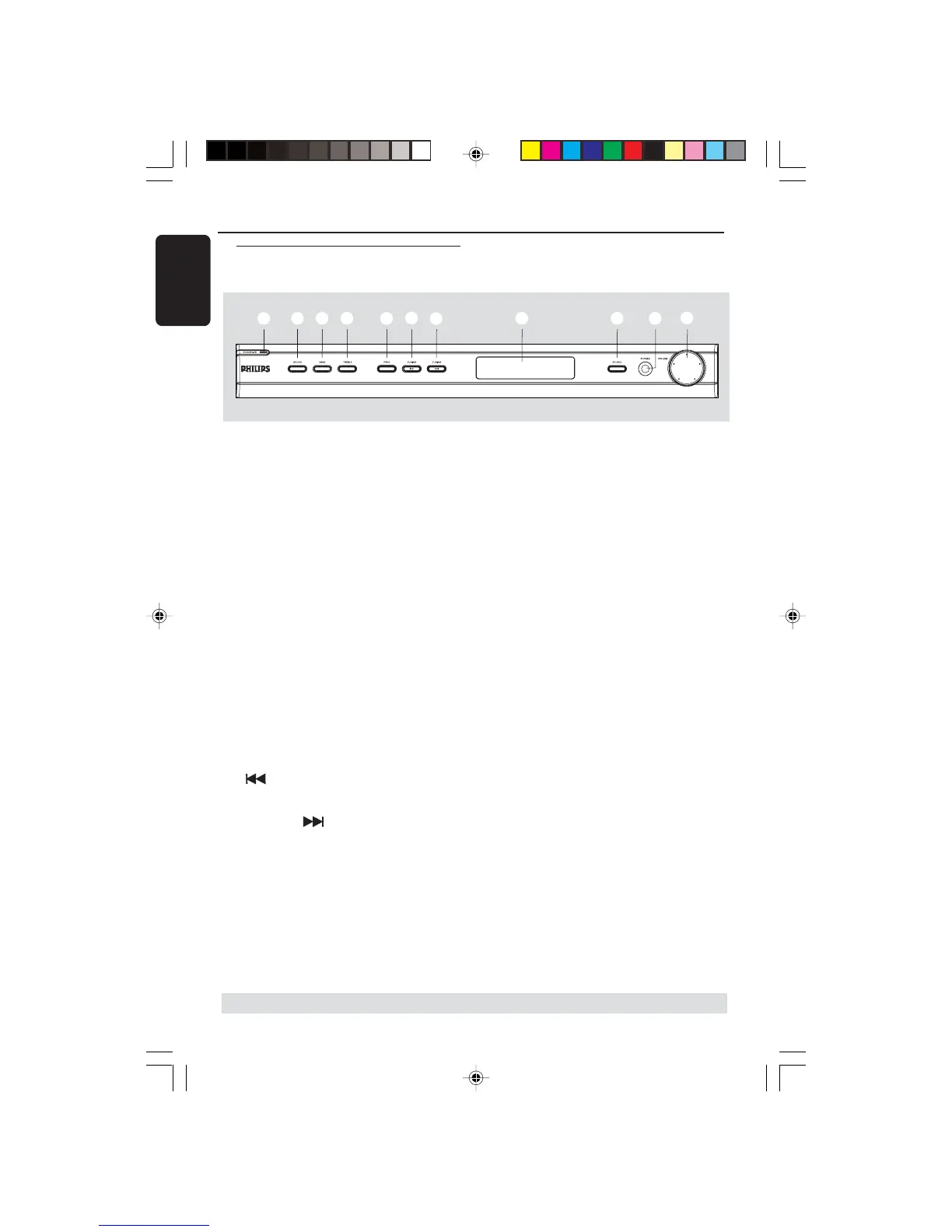
Functional Overview
* = Press and hold the button for more than five seconds.
1 STANDBY ON (B)
– Switches to standby mode or turns on
the system.
2 SOUND
– Selects a sound effect.
3 BASS
– Selects BASS (low tone) sound mode and
use the VOLUME control to change the
tone level.
4 TREBLE
– Selects TREBLE (high tone) sound mode
and use the VOLUME control to change
the tone level.
5 PROG
– *Enters receiver setup menu.
– TUNER: starts automatic/manual preset
programming.
6 TUNING
–Tunes the radio frequency down.
7TUNING
–Tunes the radio frequency up.
Main unit and remote control
8 System display panel
9 SOURCE
– Selects the relevant active source mode:
DISC (6CH/COAX/OPTI),
TUNER (FM/MW), AUX or TV.
(on the remote only)
– TV: switches to TV source mode.
–DISC: toggles between DISC 6CH, DISC
COAX and DISC OPTI source mode.
– TUNER: toggles between FM and MW
band.
–AUX: selects AUX mode.
0 PHONES
–Plug in the headphones jack. The
speakers output will be cancelled.
! VOLUME (VOL +-)
– Adjusts the volume level.
– Selects a setting in receiver setup menu.
4
5
6
7
8
90
!
1
2
3


 To Next Page